Blog
How to Build a Welcome Email Sequence That Converts (5-Step Framework)
Learn how to build a high-converting 5-step welcome email sequence. Includes email templates, timing delays, deliverability tips, and automation workflows.

> TL;DR: A welcome email sequence is an automated series of 3 to 5 emails sent immediately after a new subscriber joins your list. Welcome emails generate average open rates above 50% and 4x higher click-through rates than standard promotional broadcasts. To build a high-converting welcome sequence, deliver lead magnets instantly, share your core brand story, showcase social proof, solve subscriber friction, and introduce a clear soft offer—all while protecting domain reputation with real-time email validation.
Last updated: July 2026
What Is a Welcome Email Sequence? (Mechanisms, Metrics & ROI)
A welcome email sequence (also known as a welcome email series or onboarding sequence) is an automated, multi-step series of emails triggered immediately when a user subscribes to an email list, downloads a lead magnet, or creates a new account.
Unlike broadcast newsletters sent manually to an entire subscriber list, a welcome sequence fires on an individual level based on user behavior. The primary objective is to engage new subscribers during their peak window of intent—typically the first 48 to 72 hours after opt-in—by delivering promised assets, setting content expectations, establishing brand authority, and driving early conversion actions.
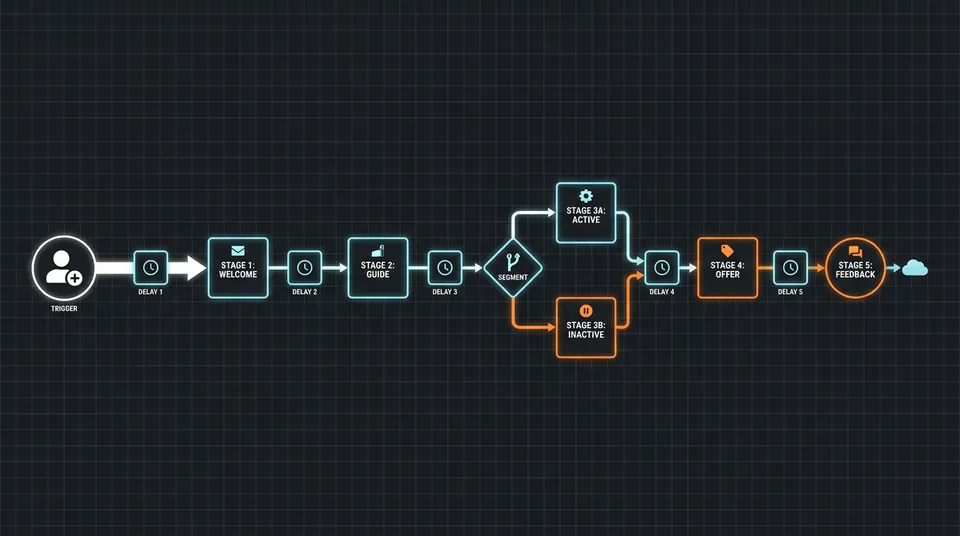
Automated Sequence Execution Flow
- Trigger: Opt-in Form Submission / Lead Magnet Download
- Step 1 (Instant): Email 1 — Asset Delivery & Expectation Setting
- Step 2 (Wait 24 Hours): Email 2 — Origin Story & Unique Value Proposition
- Step 3 (Wait 24 Hours): Email 3 — Social Proof & Customer Case Study
- Step 4 (Wait 24 Hours): Email 4 — Feature Spotlight & Friction Removal
- Step 5 (Wait 24 Hours): Email 5 — Soft Commercial Offer & Interest Segmentation
Key Performance Benchmarks for Welcome Sequences
According to industry deliverability and engagement benchmarks across major email service platforms, welcome emails outperform almost every other campaign type:
- Average Open Rate: 50% to 65% (compared to 20–25% for standard marketing campaigns)
- Average Click-Through Rate (CTR): 10% to 14% (compared to 2–3% for standard broadcasts)
- Conversion Rate: 3x to 5x higher revenue per recipient than one-off promotional blasts
- Unsubscribe Rate Target: Under 0.5% during the first 5 emails
When subscribers first opt in, their attention and curiosity are at their absolute peak. If you wait days to contact them, cold list decay sets in immediately. A structured welcome series capitalizes on this initial momentum while establishing habituation—teaching subscribers to look for, open, and click your emails.
Single Welcome Email vs. 5-Step Welcome Sequence
| Metric / Dimension | Single Welcome Email | 5-Step Welcome Sequence | | :--- | :--- | :--- | | Primary Goal | Asset delivery only | Nurturing, trust-building & conversion | | Average Engagement Window | 5 minutes | 5 to 7 days | | Brand Story Retention | Low (<15%) | High (>60%) | | Segmentation Opportunity | None | High (tracks clicks per email) | | Long-term Customer LTV Impact | Minimal (+5–10%) | Significant (+30–45%) | | Deliverability Warmup Effect | Low | High (consistent positive open signals) |
While a single welcome email fulfills the basic promise of delivering a lead magnet, a multi-step sequence allows you to systematically address objections, showcase social proof, and guide subscribers toward a meaningful relationship.
The 5-Step Welcome Email Sequence Framework (Templates & Copy Breakdown)
To maximize engagement without overwhelming new subscribers, structure your welcome series around a proven 5-email cadence spread over 5 to 7 days. Each email serves a single, distinct psychological purpose in moving the subscriber from cold curiosity to brand affinity.
Email 1: Immediate Asset Delivery & Expectation Setting
- Trigger / Timing: Immediately upon opt-in (Delay: 0 minutes)
- Primary Goal: Fulfill your promise, deliver the lead magnet, and establish sending frequency.
- Subject Line Ideas:
[Download] Your [Lead Magnet Name] is inside!Welcome to [Brand Name]! Here is your free [Asset Name]Your copy of [Guide Name] + a quick note from our founder- Preview Text:
Access your guide immediately inside. Plus, what to expect next.
#### Copy Structure & Best Practices: Do not force a heavy sales pitch in Email 1. Your primary job is friction-free value delivery.
- Warm Greeting: Thank them for joining and confirm their subscription.
- Prominent Asset Link: Place the download button or link high in the email body (above the fold).
- Whitelisting Request: Politely instruct subscribers to move your email to their Primary Inbox (or mark "Not Spam") to ensure future delivery.
- Content Expectations: Briefly state what topics you will cover in upcoming emails (e.g., "Over the next few days, I'll share 3 frameworks we used to reduce bounce rates by 80%").
Email 2: The Origin Story & Unique Value Proposition
- Trigger / Timing: 24 hours after Email 1
- Primary Goal: Humanize your brand, introduce your mission, and explain why you exist.
- Subject Line Ideas:
Why we started [Brand Name] (and why it matters for you)The frustrating problem that led to [Product Name]A 2-minute backstory on how we approach [Industry Topic]- Preview Text:
We were tired of broken tools, so we built something better.
#### Copy Structure & Best Practices: Subscribers buy from people and brands they trust. Share the core "aha moment" or core philosophy behind your business.
- The Core Problem: Describe the industry frustration or pain point your target audience faces daily.
- The Origin Philosophy: Explain why existing status-quo solutions fail (e.g., legacy tools that force complex setups or charge per contact).
- The Value Transformation: Articulate how your product or content helps subscribers overcome that exact obstacle.
- Low-Pressure Engagement Prompt: Ask a simple open-ended question at the end (e.g., "What is your biggest deliverability challenge right now? Reply and let me know—I read every response"). Replies send powerful positive signals to inbox algorithms!
Email 3: Social Proof, Case Studies & Overcoming Objections
- Trigger / Timing: 48 hours after Email 1 (24 hours after Email 2)
- Primary Goal: Build credibility through real customer results and address common hesitation points.
- Subject Line Ideas:
How [Customer/Company] achieved [Specific Result] in [Timeframe]Case Study: From 40% open rates to 68% in 30 daysWhat [Industry Professional] discovered after switching to [Brand Name]- Preview Text:
Real results, exact breakdown, and lessons you can apply today.
#### Copy Structure & Best Practices: Validation from third parties reduces buyer skepticism far faster than self-promotional claims.
- Specific Customer Scenario: Introduce a real or representative user who faced the same challenges as your subscriber.
- The Mechanism / Strategy: Detail the specific steps or feature they used to solve the problem.
- Concrete Quantitative Results: Share clear, non-exaggerated metrics (e.g., "Reduced list bounce rate from 4.2% to 0.4% within 14 days").
- Link to Full Story or Demo: Guide interested subscribers to a detailed case study or video walkthrough.
Email 4: Feature Spotlight & Friction Removal
- Trigger / Timing: 72 hours after Email 1
- Primary Goal: Educate subscribers on key product features or actionable frameworks that eliminate implementation friction.
- Subject Line Ideas:
The 3-minute hack to solve [Common Problem]Are you making this common [Topic] mistake?Inside our [Specific Feature / System]: How it works under the hood- Preview Text:
A quick tutorial to help you get the most out of your setup.
#### Copy Structure & Best Practices: Focus on a single high-impact feature or framework rather than listing every capability at once.
- Actionable Tip / Framework: Provide immediate, standalone utility even if the user hasn't purchased yet.
- Visual Walkthrough / GIF: Show a clean screenshot or concise breakdown of how the feature operates.
- Friction Removal: Address common implementation worries (e.g., "No developer needed," "Takes less than 5 minutes to connect").
Email 5: The Soft Offer & Segmentation Trigger
- Trigger / Timing: 96 hours after Email 1 (or Day 5 to 7)
- Primary Goal: Transition engaged subscribers into trial users, demo bookings, or paying customers while bucketing them into interest segments.
- Subject Line Ideas:
Ready to transform your [Key Outcome]? Here's your next stepAn exclusive invitation for new [Brand Name] subscribersWhere should we go from here? (Choose your path)- Preview Text:
A special starter offer plus options to customize your email preferences.
#### Copy Structure & Best Practices: By Email 5, subscribers who have opened and clicked previous messages are warm candidates for a commercial offer.
- Recap of Value Provided: Remind them of what they have learned across the welcome series.
- Clear Call to Action: Offer a risk-free trial, free account setup, or consultation.
- Interest-Based Links (Segmentation Triggers): Include 2–3 categorized links so subscribers can self-segment based on their role or primary goal (e.g., "I'm an E-Commerce Store", "I'm a B2B SaaS", "I'm an Agency"). Clicking a link automatically updates subscriber tags in your email automation platform.
Technical Setup & List Hygiene: Protecting Deliverability Before the First Send
Even the most persuasive email copy will fail if your welcome messages land in the spam folder or bounce back due to invalid subscriber addresses. Because welcome emails represent the highest volume of automated transactional-style messages for growing lists, they carry significant weight in establishing your sending domain reputation with major mailbox providers like Gmail, Yahoo, and Outlook.

The Hidden Risk of Invalid Opt-Ins on Welcome Sequences
When subscription forms are unprotected, bots, typos, disposable email addresses, and spam traps flood your database. If your automated sequence attempts to deliver Email 1 to an invalid inbox, the message results in an immediate hard bounce.
Many ESPs and inbox providers warn when hard bounce rates climb toward ~1–2%. A high initial bounce rate on automated welcome sends signals to receiving servers that your subscription forms lack proper verification, leading to domain throttling or junk folder placement for all subsequent broadcasts.
To eliminate this vulnerability before launch, implement two essential technical guardrails:
#### 1. Real-Time Front-End Email Validation Integrate API-based verification directly into your signup forms. When a user submits an address with a typo (such as user@gmaill.com or test@tempmail.org), the system detects syntax errors, invalid MX records, and disposable domains instantaneously—prompting the user to correct their entry before the welcome sequence triggers. Using a service with built-in validation like real-time email validation prevents corrupt data from ever polluting your contact database.
#### 2. Double Opt-In (DOI) or Softened Confirmation Workflows While single opt-in offers lower signup friction, double opt-in strongly ensures valid consent and greatly reduces spam trap risks by requiring users to click a confirmation link before entering the main nurture series. Alternatively, you can use automated verification on single opt-in forms to balance high conversion rates with clean deliverability.
Setting Up Automated Sequence Triggers in Sendgrove
Configuring a multi-step welcome workflow requires a platform capable of handling event triggers, precise time delays, and conditional logic. In Sendgrove Email Automation, setting up your welcome sequence involves four simple steps:
- Define the Entrance Trigger: Set the trigger event to
Contact Added to ListorForm Submitted. - Apply Automatic List Filtering: Ensure only contacts verified as
ValidorSafe to Sendenter the active sequence. - Configure Time Delays: Place time delay blocks (e.g.,
Wait 24 Hours) between each email node to establish a natural sending cadence. - Set Up Exit / Goal Conditions: Automatically remove contacts from the welcome series if they convert or trigger a custom goal event (e.g., booked a demo or made a purchase) so they don't receive irrelevant onboarding messages.
Authentication Alignment: SPF, DKIM, and DMARC
Mailbox providers enforce strict domain authentication requirements for automated marketing and transactional sends. Before launching your welcome series, verify that your sending domain has aligned authentication records configured:
- SPF (Sender Policy Framework): Authorizes Sendgrove's mail servers to send emails on behalf of your custom domain.
- DKIM (DomainKeys Identified Mail): Attaches a cryptographic signature to every welcome email, proving the content was not altered in transit.
- DMARC (Domain-based Message Authentication, Reporting, and Conformance): Sets policies for handling unauthorized messages using your domain name.
Proper alignment ensures high inbox placement and protects your brand from domain spoofing. For a complete deep-dive on technical deliverability requirements, review our detailed guide on how to keep emails out of spam folders.
Advanced Welcome Sequence Strategies: Segmentation & Behavioral Triggers
Once your foundational 5-email sequence is active, you can increase conversion performance by introducing behavioral triggers and dynamic personalization. Rather than sending an identical sequence to every subscriber, advanced automation tailors content based on how users interact with your messages.
1. Persona-Based Conditional Branching
Different subscribers join your email list with different intentions, pain points, and technical maturities. By asking a single multi-choice question on your signup form (or capturing job titles), you can split your welcome series into customized branches.
For example, a B2B software company might split its welcome sequence based on subscriber role:
- Branch A (Execs / Founders): Focuses on high-level ROI, business strategy, case studies, and team efficiency gains.
- Branch B (Practitioners / Developers): Focuses on technical documentation, API setup guides, integration speed, and feature workflows.
Applying tailored messaging increases engagement depth across all segments. Explore our complete roadmap on email list segmentation strategies to map out effective audience splits.
2. Behavioral Click Triggers & Dynamic Content Insertion
Every click inside a welcome email reveals explicit subscriber intent. Modern email automation platforms allow you to tag subscribers automatically based on link interactions:
- If Subscriber Clicks "E-Commerce Integration": Apply tag
Interest: E-Commerceand dynamically swap Email 4's feature spotlight to focus on Shopify/WooCommerce syncing. - If Subscriber Clicks "Agency Features": Apply tag
Persona: Agencyand route them into an agency partner sub-sequence. - If Subscriber Does Not Open Email 1 Within 24 Hours: Trigger an automated resend of Email 1 with a modified subject line (e.g.,
Did you miss your download link?) to recapture lost attention without manual intervention.
3. Systematic A/B Testing for Welcome Emails
Because welcome sequences receive consistent ongoing traffic, small optimizations yield compounding returns over time. Focus your initial testing efforts on Email 1 and Email 2 subject lines, as improvements here lift performance across the entire funnel.
When running split tests on welcome sequences:
- Test One Variable at a Time: Compare subject line curiosity vs. direct benefit, or test sender name (
FirstName from Brandvs.Brand Team). - Ensure Statistical Relevance: Allow at least 100 to 200 opens per variant before selecting a winning subject line.
- Optimize Preview Text: Pair action-oriented subject lines with complementary preview text to maximize inbox visibility.
For a step-by-step testing framework, consult our practitioner guide on how to A/B test email subject lines.
4. Smooth Transition into Evergreen Nurturing
A critical operational question for marketers is: What happens when Email 5 finishes?
Subscribers should never drop off into radio silence or receive sudden promotional blasts without context. When the welcome sequence completes:
- Apply a Completion Tag: Mark the subscriber as
Status: Welcome Sequence Completed. - Remove Sequence Suppression: Clear any temporary suppression tags that prevented general promotional sends while the welcome sequence was running.
- Transition to Core Nurture: Automatically enroll subscribers into your ongoing newsletter broadcast schedule or a broader automated lead nurturing sequence tailored to their demonstrated interests.
5 Common Welcome Email Mistakes (And How to Fix Them)
Even experienced marketers frequently make tactical errors when configuring welcome sequences. Avoiding these five common pitfalls will immediately improve your open rates, subscriber retention, and conversion performance.
1. Delaying Email 1 Delivery
- The Mistake: Relying on slow batch processing queues that delay the delivery of Email 1 by 15 to 30 minutes after opt-in.
- The Fix: Ensure your opt-in form connects directly to an instant transactional API or webhooks. Subscriber interest decays exponentially every minute after opt-in; Email 1 must land in the inbox within 60 seconds.
2. Pushing Hard Sales Pitches in Email 1
- The Mistake: Treating Email 1 like a aggressive sales flyer before establishing trust or delivering promised value.
- The Fix: Reserve Email 1 exclusively for asset delivery, gratitude, and setting expectations. Build value in Emails 1 through 4 before introducing a formal commercial offer in Email 5.
3. Neglecting Form Validation and Accepting Corrupt Addresses
- The Mistake: Leaving opt-in forms unprotected, allowing typos and spam traps to trigger automated bounces.
- The Fix: Use real-time email verification on all public signup forms to catch invalid domain syntax and disposable emails at the point of entry.
4. Overloading Emails with Competing Calls to Action
- The Mistake: Including five different links, social media buttons, blog posts, and trial offers inside a single welcome email.
- The Fix: Enforce a "One Primary Goal Per Email" rule. Each email in your sequence should drive toward a single clear action—whether downloading a guide, replying to a question, or viewing a specific case study.
5. Failing to Provide Simple Preference Controls
- The Mistake: Giving subscribers only one harsh option: remaining on the list or unsubscribing completely.
- The Fix: Include a link to a preference center where subscribers can adjust email frequency or select specific topic interests without leaving your list entirely.
Frequently Asked Questions (FAQ)
What is the ideal number of emails in a welcome sequence?
The most effective welcome sequences contain between 3 and 5 emails. A 3-email sequence works well for simple B2C ecommerce brands or newsletter signups, while a 5-email sequence is ideal for B2B SaaS, agency services, and complex products requiring educational nurturing before conversion.
How long should you wait between welcome emails?
A standard delay cadence is 24 hours between emails. Send Email 1 immediately at 0 minutes, Email 2 at 24 hours, Email 3 at 48 hours, Email 4 at 72 hours, and Email 5 at 96 hours (or Day 5 to 7). Spacing messages daily keeps your brand top of mind without causing inbox fatigue.
What open rate should I expect from a welcome email series?
Welcome Email 1 typically achieves open rates between 50% and 65%. Subsequent emails in the series generally average open rates between 35% and 50%. If your initial welcome email open rate drops below 40%, inspect your form validation, subject lines, and domain deliverability alignment.
Should I send welcome emails on weekends?
Yes. Automated welcome emails fire based on subscriber behavior, not calendar schedules. When a user opts in on a Saturday, their interest is active at that exact moment. Delaying Email 1 until Monday morning reduces open rates and causes subscribers to forget why they signed up.
Can I include promotional offers or discounts in a welcome sequence?
Yes, but timing is critical. In e-commerce, offering a welcome discount code inside Email 1 is standard practice. For B2B and SaaS brands, it is better to provide educational value in Emails 1 through 4 first, introducing promotional trials or consultation offers in Email 5 after establishing authority.
How do I prevent welcome emails from landing in Gmail's Promotions tab?
To maximize Primary Inbox placement, minimize heavy HTML layouts, avoid excessive image files, limit total outbound links to 2–3 per email, use a recognized personal sender name, and politely ask subscribers in Email 1 to add your address to their contacts or drag the message to their Primary tab.
Final Takeaways & Getting Started with Sendgrove
A well-crafted welcome email sequence turns passive signups into engaged, long-term customers by delivering value when interest is highest. By combining compelling story copy with technical deliverability safeguards, you ensure that every new subscriber receives a polished, professional brand introduction.
To build and scale your welcome automation with built-in deliverability protection:
- Clean Your Entrance Funnel: Protect registration forms with built-in validation to stop invalid addresses from entering your sequence.
- Implement the 5-Step Framework: Map out asset delivery, brand story, case study social proof, feature walkthroughs, and targeted soft offers.
- Automate with Confidence: Launch your workflows on a platform that combines campaign building, list verification, and deliverability monitoring in a single credit-based system.
Ready to automate your email onboarding while protecting your sender reputation? Explore flexible Sendgrove pricing plans or launch your next sequence with Sendgrove Email Marketing today.