Blog
Email Re-Engagement Campaigns: Strategy, Templates & Sequence Examples (2026 Guide)
Master email re-engagement campaigns: step-by-step strategy, 4 win-back templates, automated list validation, and sunset policies to protect deliverability.

> TL;DR: An email re-engagement campaign is an automated sequence designed to identify, win back, or safely sunset inactive subscribers. By combining list validation, tailored incentives, and automated multi-step sequences, email marketers can restore engagement rates, protect inbox placement, and reduce domain reputation risks.
What Is an Email Re-Engagement Campaign?
An email re-engagement campaign (also known as a win-back sequence or reactivation flow) is a targeted series of automated emails sent to subscribers who have stopped opening, clicking, or interacting with your messages over a specific timeframe. Rather than continuing to broadcast regular marketing campaigns to disengaged addresses, a re-engagement flow isolates inactive contacts to determine whether they want to remain on your list or be permanently removed.
Over time, every email list experiences natural decay. Industry benchmarks indicate that mailing lists naturally degrade over time as subscribers change job roles, abandon personal mailboxes, adjust their content preferences, or filter promotional messages into secondary folders or promotional tabs. When disengaged contacts accumulate on your main sending list, they create a compounding deliverability hazard. Internet Service Providers (ISPs) like Google, Yahoo, and Microsoft monitor subscriber engagement metrics—specifically open rates, click-through rates, spam complaints, and unread deletes—to determine sender reputation. Continuing to send high volumes of mail to inactive addresses signals to inbox providers that your content is low quality or unwanted, increasing the risk that your messages will be routed to the spam folder for active subscribers as well.
A structured re-engagement campaign addresses this challenge directly. It serves three primary operational purposes:
- Re-activating high-value contacts: Bringing dormant customers back into the buying lifecycle with tailored offers, product updates, or preference options.
- Protecting sender reputation: Identifying unengaged contacts so you can suppress or sunset them before ISP algorithms downgrade your inbox placement.
- Optimizing marketing spend: Reducing contact-tier costs on credit-based platforms or contact-limited plans by removing ghost addresses that generate zero revenue.
By establishing clear criteria for inactivity—typically between 60 to 180 days depending on your sending frequency and sales cycle—you can automate reactivation workflows that run continuously in the background.
Why Subscriber Re-Engagement Matters for Deliverability and ROI
Continuing to send emails to subscribers who ignore your messages may seem harmless, but in modern email engineering, list size is secondary to subscriber quality. Unengaged contacts actively erode both your inbox placement and your marketing budget.
| Performance Factor | Active List Management | Unmanaged Inactive Accumulation | | :--- | :--- | :--- | | ISP Reputation Impact | High open and click rates signal high relevance, protecting primary inbox placement. | Low engagement triggers ISP filtering algorithms, pushing messages to spam. | | Spam Trap Exposure | Regular validation and sunsetting purge abandoned addresses before they convert to traps. | Recycled spam traps accumulate on old lists, causing domain blocklists and throttling. | | Sending Economics | Credits and platform tiers are spent exclusively on active, revenue-generating leads. | Monthly subscription or credit costs are wasted on abandoned mailboxes. | | Analytics Accuracy | Metric baselines reflect genuine subscriber intent and actionable campaign data. | Skewed open and click metrics obscure real campaign performance and offer resonance. |
The Deliverability Feedback Loop
Major inbox providers rely heavily on automated engagement scoring. When an ISP observes that 40% of your incoming mail volume sits unread or is deleted without opening, its spam filter lowers your domain and IP reputation score. Many major ESPs and deliverability specialists warn that when list-wide open rates drop below baseline thresholds or when hard bounce spikes occur, overall inbox delivery suffers across all major inbox providers.
Furthermore, disengaged mailboxes pose a direct spam trap risk. ISPs frequently take abandoned email accounts and convert them into recycled spam traps. If you continue sending to an address that has been inactive for a year without verifying its status, you risk hitting a trap that can instantly land your domain on major blocklists. Applying pre-campaign list hygiene through Sendgrove's email validation service allows you to verify address validity and filter out toxic or dead mailboxes before launching a re-engagement workflow.
The Cost of Ghost Subscribers
Most modern email platforms charge based on contact list size or sending volume. Carrying thousands of inactive subscribers increases operational overhead without generating revenue. By running automated re-engagement workflows and sunsetting non-responders, you streamline list size, maintain lower pricing tiers, and improve campaign ROI metrics.
Step-by-Step Strategy to Build an Effective Re-Engagement Sequence
A successful re-engagement strategy requires careful planning, segment isolation, personalized messaging, and automated execution. Following a structured six-step workflow ensures maximum reactivation while protecting your sender domain.
Step 1: Define Inactivity for Your Business Model
Inactivity is relative to your sending frequency and buying cycle. A daily e-commerce brand may consider a subscriber disengaged after 45 days of no opens or clicks, whereas a B2B SaaS platform with a 90-day sales cycle might define inactivity as 120 or 180 days.
Common inactivity benchmarks include:
- High-Frequency Senders (Daily / Multiple Weekly): Inactive after 45 to 60 days without engagement.
- Medium-Frequency Senders (Weekly / Bi-Weekly): Inactive after 90 days without engagement.
- Low-Frequency Senders (Monthly / Seasonal): Inactive after 120 to 180 days without engagement.
Step 2: Validate Contact Quality Before Sending
Before launching a reactivation sequence to long-dormant addresses, run your inactive segment through an automated verification check. Inactive addresses frequently contain invalid mailboxes, full inboxes, or temporary accounts that produce hard bounces.
Using an integrated tool like Sendgrove's built-in validation checks address status in real time, identifying hard bounces, disposable emails, and high-risk syntax errors. Removing invalid addresses prior to sending prevents sudden bounce spikes that could disrupt your domain reputation. To understand complete list hygiene practices, review our detailed guide on how to remove spam traps from your email list.
Step 3: Segment by Past Behavior and Preference
Not all inactive subscribers disengaged for the same reason. Segmenting your inactive pool enables targeted messaging:
- Inactive Buyers: Customers who purchased in the past but stopped opening emails. Offer product updates, VIP perks, or restock alerts.
- Non-Purchasing Subscribers: Leads who downloaded a resource or joined a newsletter but never converted. Provide educational content, case studies, or a limited-time incentive.
- Frequency-Fatigued Contacts: Subscribers overwhelmed by email volume. Provide an option to adjust subscription frequency (e.g., weekly digest instead of daily updates).
Step 4: Map Out a 3-to-4 Email Sequence
A single win-back email is rarely sufficient. A structured 3-to-4 email sequence sent over 10 to 14 days achieves significantly higher response rates without harassing recipients.
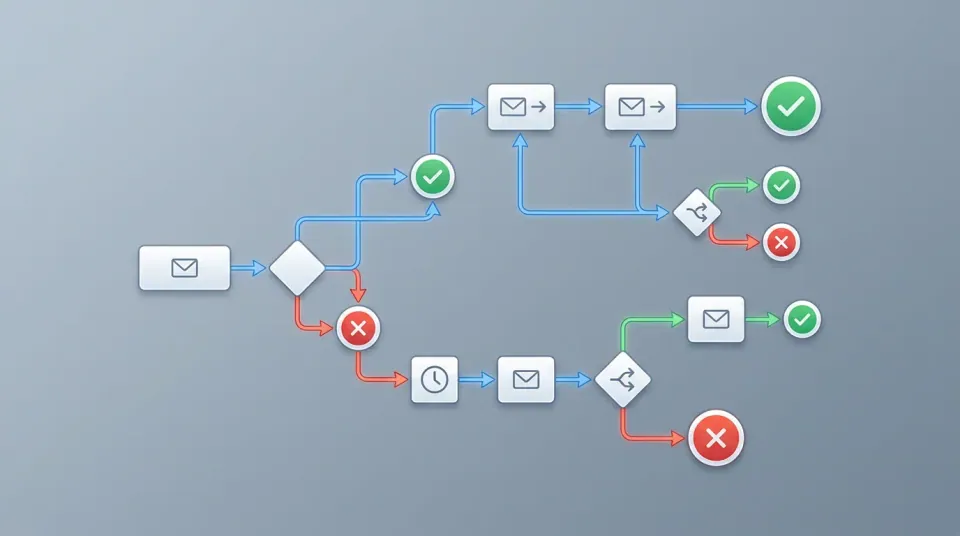
- Email 1 (The Friendly Check-In): Acknowledge the absence, highlight recent top content, or ask if their interests have changed.
- Email 2 (The Incentive / Value Offer): Provide a compelling reason to re-engage, such as a discount, exclusive guide, or product access.
- Email 3 (The Preference / Frequency Request): Ask directly if they prefer fewer emails or specific topic categories using dynamic preference links.
- Email 4 (The Sunset Notice / Last Chance): Inform the subscriber that they will be removed from the list within 48 hours unless they confirm they want to stay.
Step 5: Automate the Sequence and Triggers
Manually tracking inactive contacts is inefficient and error-prone. Modern marketers build dynamic segments that automatically feed inactive addresses into an automated flow. With Sendgrove's marketing automation, you can set automated entry triggers based on inactivity thresholds and configure branch logic that automatically removes contacts who re-engage or suppresses those who fail to respond after Email 4.
Step 6: Enforce Automatic Sunsetting
If a subscriber receives all emails in your re-engagement sequence without opening, clicking, or updating their preferences, they must be unsubscribed or moved to a suppressed suppression list. Continuing to send to unengaged contacts after a full win-back sequence defeats the entire purpose of list hygiene.
B2B vs. B2C Re-Engagement Strategies: Key Differences
While the core mechanics of re-engagement workflows apply across industries, B2B and B2C organizations face distinct customer behavior patterns, buying cycles, and content expectations. Tailoring your reactivation strategy to your business model dramatically improves response rates.
| Campaign Strategic Area | B2C E-Commerce & Retail | B2B SaaS & Professional Services | | :--- | :--- | :--- | | Inactivity Window | Typically 30 to 60 days without open/click or purchase. | Typically 90 to 180 days without product login or email open. | | Primary Incentive | Immediate financial discount, free shipping, or gift. | Educational asset, product roadmap preview, or 1-on-1 review call. | | Messaging Tone | Warm, energetic, visual, and highly brand-focused. | Professional, consultative, outcome-driven, and personal. | | Sender Profile | Brand name or store identity. | Founder, account manager, or customer success representative. | | Key Risk | Promo code hunters who only open during deep discounts. | Role changes or job transitions leaving abandoned work mailboxes. |
E-Commerce (B2C) Tactics
In e-commerce, disengagement often stems from promotional fatigue or browsing without purchasing. Effective B2C win-back flows emphasize visual product showcase blocks, personalized recommendations based on previous order history, and clear urgency (e.g., "Your $15 gift voucher expires in 48 hours").
B2B SaaS & Services Tactics
In B2B environments, inactive subscribers are frequently decision-makers who got busy or end-users whose workflow shifted. Direct, plain-text style emails sent from a personal name (e.g., "Alex from Sendgrove") yield significantly higher engagement than polished promotional templates. B2B re-engagement should focus on newly added features, platform improvements, case studies showing measurable ROI, or an invitation to adjust communication preferences.
Practitioner Triage Workflow: How to Handle Inactive Lists Safely
When dealing with a dormant subscriber segment that has not received mail in 6 months or longer, launching a re-engagement flow without pre-send preparation can trigger domain throttling or temporary blocklisting. Follow this structured practitioner triage workflow to safely process inactive segments.
| Workflow Phase | Action Items | Key Success Indicator | | :--- | :--- | :--- | | 1. Audit & Segmentation | Extract contacts inactive > 90 days. Filter out known hard bounces and prior opt-outs. | Clean initial inactive segment baseline. | | 2. List Validation Pass | Process segment through Sendgrove Built-In Validation. Purge invalid and trap addresses. | Zero syntax errors, disposable, or hard bounce records. | | 3. Throttled Re-Engagement | Broadcast Email 1 to small daily cohorts (500–1,000/day). Monitor bounce/complaint metrics. | Hard bounce rate under 1%, complaints under 0.05%. | | 4. Automated Sunsetting | Route re-engaged leads to active segments. Move non-responders to global suppression. | 100% automated cleanup without manual list editing. |
1. Pre-Campaign Segment Audit
Extract all contacts who have not opened or clicked an email in the past 90 to 180 days. Cross-reference this list against recent transaction records or account login data to avoid emailing active app users who simply have image loading disabled in their email client.
2. Automated Validation Filtering
Before queueing any messages, run the inactive segment through automated validation. This filters out hard bounces, invalid domain records, and syntax errors that accrued while the list sat dormant. To maintain sender domain health alongside cleaning, verify that your domain authentication records are fully aligned; consult our guide on how to set up SPF, DKIM, and DMARC.
3. Throttled Sending Schedule
Do not release 50,000 inactive emails at once. Split the re-engagement flow into daily cohorts of 500 to 1,000 contacts. Monitor real-time bounce and complaint metrics after each batch. If hard bounces approach 1% or spam complaints exceed 0.05%, pause sending and inspect the list segment.
4. Automated Sunset Execution
Contacts who navigate the full 4-email sequence without engaging should automatically be added to your global suppression list. Do not retain unengaged addresses in active status hoping for future engagement.
Real-World Scenario Walkthroughs
To illustrate how re-engagement strategies operate in practice, review these three real-world scenario walkthroughs covering common list management challenges.
Scenario A: Seasonal E-Commerce Win-Back Flow
- The Challenge: An online apparel brand notices that 35% of its holiday customer list becomes completely inactive by late spring.
- The Strategy: The team builds a 3-email sequence starting 90 days post-holiday purchase. Email 1 showcases popular spring arrivals; Email 2 offers a personalized 15% discount; Email 3 serves as a final preference update.
- The Result: 14% of dormant subscribers make a second purchase within 10 days, while 81% of unengaged contacts are automatically sunsetted, reducing email list overhead by 25% and boosting list-wide open rates from 21% to 34%.
Scenario B: B2B SaaS Inactive Lead Reactivation
- The Challenge: A project management software company accumulated 12,000 trial signups over two years who never converted to paid plans or opened newsletter updates.
- The Strategy: Before emailing, the company runs the list through Sendgrove's email validation, identifying and removing 1,850 invalid business email addresses from changed domain roles. They then send a plain-text email from the Head of Product highlighting three major feature releases added since their trial ended.
- The Result: 1,200 leads open the feature announcement, 310 request a platform demo, and the remaining 8,900 invalid/unresponsive leads are suppressed, preserving domain reputation.
Scenario C: Navigating Apple MPP Noise
- The Challenge: A digital publisher observes high "open rates" among Apple Mail users, but click engagement continues to drop, making it difficult to identify genuinely inactive subscribers.
- The Strategy: The publisher updates their engagement definition from opens only to a composite engagement score: link clicks, preference center visits, or reply actions within 90 days.
- The Result: The updated criteria successfully isolate 4,500 non-clicking subscribers who were incorrectly marked as "active" due to Apple MPP proxy pre-loading. The publisher safely runs a win-back sequence and sunsets true non-responders.
4 Proven Re-Engagement Email Templates and Copy Examples
To help you draft effective re-engagement messaging, here are four copy frameworks tailored for different stages of the win-back sequence.
Template 1: The Casual Check-In (Email 1)
Subject Line Options:
- Are we still on your radar?
- Long time no see, {{First_Name}}
- We noticed you’ve been quiet lately
Body Copy: > Hi {{First_Name}}, > > We noticed it’s been a while since you opened our emails, and we want to make sure we’re still delivering value to your inbox. > > Over the last few weeks, we’ve published several new guides and resources designed to help you improve your email marketing results: > > - [Resource 1 Title]: Quick walkthrough on improving inbox placement. > - [Resource 2 Title]: Step-by-step framework for list segmentation. > > If you’re still interested in receiving updates, simply click the link below to stay connected. > > [Yes, Keep Me Subscribed →] > > Thanks for being part of our community, > The Sendgrove Team
Template 2: The Value Incentive (Email 2)
Subject Line Options:
- Here’s 20% off your next order (We missed you!)
- An exclusive gift for {{First_Name}}
- Want to see what’s new? Take $15 off
Body Copy: > Hi {{First_Name}}, > > We know how crowded inboxes get, but we’d love to welcome you back. > > For the next 72 hours, we’re giving you 20% off your next purchase or account upgrade. Use code WELCOMEBACK20 at checkout. > > [Claim Your 20% Discount Now →] > > Whether you’re looking for new templates, automated workflows, or built-in list validation, we’ve added several features recently to streamline your campaigns. > > Need help finding the right setup? Reply directly to this email—our team is here to assist.
Template 3: The Preference Center Update (Email 3)
Subject Line Options:
- Too many emails? Let’s fix that
- Adjust your email preferences
- Is your inbox feeling overcrowded?
Body Copy: > Hi {{First_Name}}, > > We want to respect your inbox. If you’re receiving too many messages from us, you don't have to unsubscribe completely. > > You can easily customize what you receive and how often we write to you: > > - Weekly Summary: Get our top articles once a week. > - Monthly Digest: Receive product updates and major announcements only. > - Product Announcements: Only hear from us when we release major new features. > > [Update My Preferences Here →] > > If you're happy with your current settings, no action is needed!
Template 4: The Final Goodbye / Sunset Notice (Email 4)
Subject Line Options:
- Final notice: We’re removing you from our list
- Should we say goodbye?
- Last chance to stay on our list, {{First_Name}}
Body Copy: > Hi {{First_Name}}, > > This is our final email to you. Since we haven't seen you around in a while, we’re going to clean up our mailing list and remove your address in 48 hours. > > We do this to ensure we only send mail to people who genuinely want it—and to keep our inbox placement rates strong. > > If you want to remain on our list and keep receiving our emails, click below: > > [Keep Me on the List →] > > If you do nothing, you’ll be automatically unsubscribed. No hard feelings! You can always re-subscribe in the future at sendgrove.com whenever you’re ready. > > Thanks again for reading, > The Sendgrove Team
List Validation and Sunset Policies: Handling Inactive Contacts
A re-engagement campaign is incomplete without an explicit, automated sunset policy. A sunset policy is a set of rules that automatically suppresses or deletes contacts who fail to respond to your reactivation sequence.

Why You Must Suppress (Not Delete) Unengaged Contacts
When subscribers reach the end of your sunset workflow without re-engaging, the best practice is to add them to a global suppression list rather than deleting their record entirely.
Suppressing contacts ensures:
- Historical Compliance Tracking: You retain proof of consent, opt-in dates, and unsubscribe events for compliance frameworks such as GDPR and CAN-SPAM.
- Re-Import Prevention: Suppressed addresses cannot be accidentally uploaded in future CSV list imports, protecting you from re-contacting opted-out or sunset contacts.
- Suppression Accuracy: Platform filters automatically block sending to suppressed records across all future broadcast campaigns.
Integrating Pre-Campaign List Hygiene
List hygiene is not a one-time event; it is an ongoing operational requirement. Incorporating pre-campaign list hygiene into your regular workflow ensures that your re-engagement sequences run cleanly and efficiently.
When managing high-volume lists, combining list segmentation with real-time verification prevents spam traps and invalid accounts from diluting engagement metrics. Using Sendgrove's audience segmentation tools alongside automated verification allows you to build dynamic filters that continuously identify disengaged contacts, test their validity, and route them into appropriate reactivation sequences.
For complete authentication practices that support deliverability alongside list cleaning, consult our guide on how to set up SPF, DKIM, and DMARC.
Common Re-Engagement Mistakes to Avoid
Executing a re-engagement flow without proper safeguards can inadvertently harm your deliverability. Avoid these four common pitfalls when building your win-back strategy.
1. Blasting Inactive Contacts All at Once
Sending a sudden spike of emails to thousands of dormant addresses simultaneously triggers ISP rate-limiting and domain throttling. Always warm up or throttle re-engagement broadcasts, sending small daily batches (e.g., 500 to 1,000 per day) rather than a single massive list blast.
2. Relying Solely on Open Rates for Triggering
Due to privacy changes like Apple’s Mail Privacy Protection (MPP), open tracking metrics can produce false positives. Apple MPP pre-loads images via proxy servers, marking emails as "opened" even if the user never viewed them. To ensure accuracy, combine open tracking with explicit click activity, web site visits, or preference center interactions when defining engagement.
3. Using Clickbait or Misleading Subject Lines
Subject lines like "Re: Your order status" or "Urgent security update" may temporarily boost open rates, but they generate high spam complaint rates and destroy recipient trust. Be direct, transparent, and honest about the email's purpose.
4. Failing to Remove Non-Responders
The most critical mistake is continuing to mail subscribers who ignored all four emails in your win-back flow. If a subscriber fails to respond to your final sunset notice, keep your promise and suppress them immediately. Keeping unengaged contacts on your active list hurts deliverability for everyone else.
Frequently Asked Questions (FAQ)
What is a good open rate for a re-engagement email campaign?
Re-engagement open rates are naturally lower than standard newsletter open rates because you are emailing disengaged contacts. A typical win-back campaign achieves open rates between 10% and 25%, with click-through rates between 2% and 5%. Even a 5% to 10% overall list reactivation rate represents significant revenue recovery.
How often should you run an email re-engagement campaign?
Rather than running manual periodic blasts, establish an automated re-engagement workflow that triggers continuously. When a subscriber reaches your specified inactivity threshold (e.g., 90 days without opening or clicking), the automation should automatically enrol them in your win-back sequence.
Should I offer a discount in every re-engagement email?
No. Lead with educational content, helpful updates, or a casual check-in first (Email 1). Reserve financial incentives or special offers for Email 2 or 3 to avoid discounting products unnecessarily for subscribers who simply needed a quick reminder.
What is the difference between an unengaged subscriber and an invalid email?
An unengaged subscriber has a valid, active mailbox but chooses not to open your emails. An invalid email address is broken, non-existent, or abandoned, resulting in a hard bounce when sent to. Unengaged subscribers require re-engagement campaigns or sunsetting, whereas invalid emails should be identified and purged immediately via list validation tools.
What should I do if a subscriber re-engages during the sequence?
When a subscriber opens, clicks, or updates their preferences at any point in the re-engagement flow, an automated branching rule should immediately pull them out of the sequence, mark their contact status as active, and return them to your standard marketing segments.
How does Apple Mail Privacy Protection (MPP) impact win-back criteria?
Apple MPP automatically downloads email images, generating automatic open signals for Apple Mail users. Because of this, open rates alone are no longer 100% reliable for identifying inactive subscribers. Deliverability experts recommend using link clicks, purchase activity, website logins, or preference center updates as primary engagement indicators alongside open data.
Can sending to inactive contacts cause domain blocklisting?
Yes. When you send emails to accounts that have been dormant for a year or longer, there is a high probability that some of those mailboxes have been turned into recycled spam traps by ISPs. Spam traps exist specifically to identify senders with poor list hygiene. Hitting multiple spam traps can cause major security filters to blocklist your domain or IP address.
Should I send re-engagement campaigns from a different email address?
In general, use your main recognizable sending domain so subscribers easily identify your brand. However, ensure that your authentication infrastructure (SPF, DKIM, and DMARC) is properly configured before sending to dormant segments to prevent authentication failures or domain spoofing flags.
Build High-Delivering Re-Engagement Workflows with Sendgrove
Maintaining a clean, highly engaged email list is the foundation of successful email marketing. With Sendgrove, you don't need separate third-party integrations to clean lists, build automated flows, and send broadcast campaigns.
Sendgrove provides an integrated, credit-based platform featuring:
- Built-In Email Validation: Test addresses on import or before campaign sends to eliminate hard bounces and spam traps.
- Visual Marketing Automation: Build flexible, multi-step win-back flows with dynamic branching and automatic suppression rules.
- Smart Audience Segmentation: Easily isolate disengaged subscribers based on custom engagement rules and activity windows.
- Transparent Credit-Based Pricing: Pay only for what you send and validate—no expensive contact-tier penalties for unengaged records.
Ready to protect your sender reputation and turn ghost subscribers into active customers? Explore Sendgrove's pricing plans or start validating your list today.