Blog
10 Email Lead Capture Strategies for High-Quality List Growth
Scale your email list with 10 high-converting lead capture strategies. Learn how exit-intent popups, quizzes, and real-time verification protect deliverability.

> TL;DR: Successful email lead capture balances high conversion rates with strict subscriber quality. Capturing thousands of invalid, disposable, or mistyped email addresses degrades deliverability, inflates list management costs, and damages domain reputation. Implementing a hybrid lead capture framework—combining exit-intent popups, interactive quizzes, content upgrades, and inline real-time verification—ensures your subscriber list remains clean, engaged, and highly deliverable from day one.
Last updated: July 2026
Introduction: Why Lead Capture Quality Matters More Than Quantity
Email lead capture is the structured process of collecting contact information—primarily email addresses—from website visitors in exchange for immediate value, such as guides, discounts, or exclusive content. An effective lead capture strategy acts as the primary acquisition engine for email marketing, turning casual traffic into owned brand audience relationships.
In modern email marketing, capturing a large volume of email addresses is meaningless if those addresses fail to convert into active, inboxable subscribers. Marketers frequently focus solely on boosting opt-in conversion percentages, resorting to aggressive popups and unvetted lead magnet giveaways. While these tactics increase raw subscriber counts, they often flood contact databases with mistyped addresses, temporary disposable inboxes, bot submissions, and spam traps.
When emails bounce or land in spam folders, major inbox service providers like Gmail, Yahoo, and Microsoft track the negative engagement signals. High hard bounce rates above 1–2% and low open rates signal poor list acquisition standards, causing inbox providers to downgrade your domain reputation and route subsequent campaigns directly to spam.
To build a sustainable email marketing engine, your lead capture architecture must prioritize both conversion psychology and list hygiene. Modern platforms like an email marketing platform integrate lead capture mechanisms directly with verification engines, allowing brands to acquire high-intent leads without sacrificing inbox deliverability.
Strategy 1: Exit-Intent Popups with Dynamic Offer Personalization

Exit-intent popups are automated lead capture overlays that trigger when a visitor's cursor moves toward the top of the browser window, signaling an intention to navigate away or close the tab. On mobile devices, exit-intent is typically triggered by rapid upward scrolling, back-button gestures, or extended periods of inactivity followed by movement.
The Mechanics of Non-Intrusive Exit Capture
Unlike aggressive entry popups that interrupt visitors the second they land on a page, exit-intent technology respects the user journey. The visitor has already consumed your content or evaluated your products, making them far more receptive to a targeted offer before departure.
To maximize conversion without frustrating users, exit-intent forms must deploy dynamic offer personalization:
- Contextual Relevance: Match the popup offer directly to the page content. A visitor reading a blog post about email deliverability should see a downloadable SPF/DKIM checklist, whereas a visitor viewing a pricing page should receive an invitation to schedule a live strategy demo or unlock an extended trial.
- Value-First Headline: State the exact benefit within 3 seconds. Replace generic headlines like "Join Our Newsletter" with actionable value propositions such as "Download the 2026 Email Deliverability Playbook (PDF)".
- Frictionless Form Fields: Limit inputs to a single field (Email Address) or two fields (First Name + Email). Every additional field decreases form completion rates by approximately 10–15%.
By reserving popups for exit moments and customizing the messaging based on browsing behavior, businesses consistently achieve opt-in conversion rates between 3% and 7% without increasing bounce rates.
Strategy 2: Inline Real-Time Email Validation at Form Submission
Inline real-time email validation is the technical process of verifying an email address's syntax, domain validity, MX records, and inbox existence at the exact moment a user types it into a submission form, before the form is submitted to your database.
Preventing Bad Data at the Point of Entry
Traditional email marketing workflows capture whatever text a user enters, passing the data into a CRM or mailing list. If the user mistypes gmail.con instead of gmail.com, or uses a temporary 10-minute mail address, the system accepts it. When your welcome sequence triggers, the message bounces hard, immediately penalizing your sender reputation.
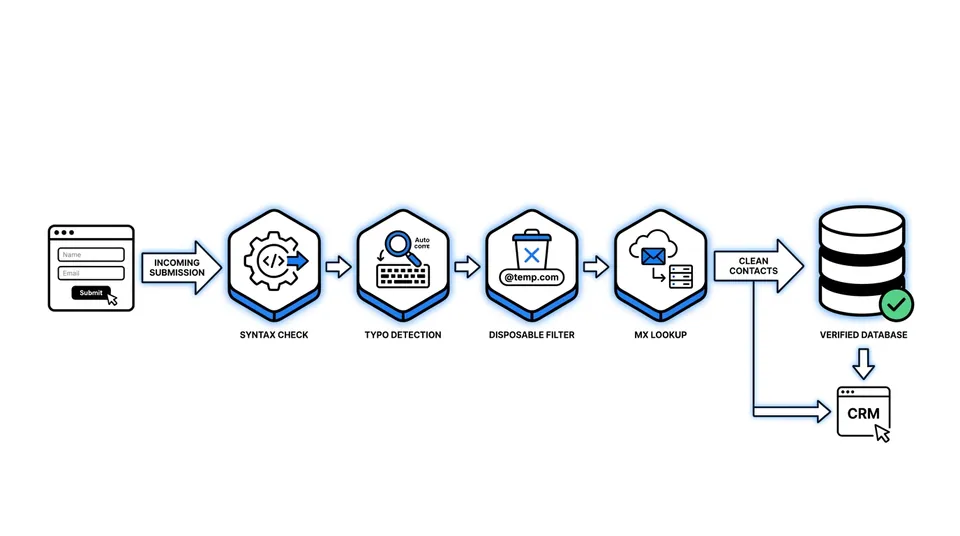
Integrating real-time email validation directly into your lead capture forms creates an intelligent front-line defense. The verification engine executes four sequential checks within milliseconds:
- Syntax and Format Verification: Ensures the string conforms to standard RFC email specifications (detecting missing
@symbols, invalid characters, or double dots). - Typo Detection and Auto-Correction: Identifies common domain misspellings (e.g., suggesting "Did you mean @gmail.com?" when a user types
@gmial.com). - Disposable Domain and Bot Filtering: Cross-references the domain against updated databases of temporary email services and known spam bot networks.
- MX Record and Mailbox Verification: Performs a non-intrusive DNS and SMTP lookup to confirm that the receiving mail server is active and capable of accepting incoming messages.
By blocking invalid entries at the form level and prompting users to correct typos instantly, brands eliminate up to 98% of hard bounces originating from new signups. This ensures that every subscriber entering your welcome workflow is genuine and deliverable.
Strategy 3: Interactive Lead Capture (Quizzes, Assessments, and Calculators)
Interactive lead capture uses engaging, multi-step digital tools—such as product recommendation quizzes, ROI calculators, audit checklists, or diagnostic assessments—to collect contact details in exchange for personalized results.
The Psychology of Interactive Micro-Commitments
Static signup forms ask for personal contact information immediately, offering a generic reward in return. Interactive capture tools reverse this dynamic by using the behavioral principle of micro-commitments. When a user answers 3 to 5 low-friction questions, they invest time and cognitive effort into the process. By the time they reach the final step, providing an email address to unlock their customized report feels like a natural, high-value transaction.
Key elements of high-converting interactive capture tools include:
- Gamified Progress Indicators: Display a clear progress bar (e.g., "Question 3 of 5") to reduce drop-off rates and encourage completion.
- Zero-Party Data Collection: Collect explicit preference data directly from the user (such as industry, primary goal, team size, or budget). This zero-party data allows you to hyper-segment subscribers immediately upon acquisition.
- Gated Tailored Results: Provide instant on-screen summary insights while sending the complete, detailed PDF report or diagnostic breakdown to the user's email inbox.
Interactive quizzes and calculators achieve completion rates of 30% to 50%, making them one of the highest-performing lead capture channels for SaaS, B2B services, and e-commerce brands.
Strategy 4: Content Upgrades and Gated High-Value Assets
A content upgrade is a specialized lead magnet created explicitly for a single, high-traffic blog post or content topic. Unlike site-wide newsletter forms, a content upgrade offers an immediate extension of the specific article the visitor is currently reading.
Elevating Opt-In Rates with Contextual Relevance
If a visitor is reading an in-depth guide on email deliverability, offering a general 10% store discount yields low conversion rates. However, offering a downloadable, printable "Email Deliverability Audit Template (XLSX)" as an embedded content upgrade directly aligns with their active search intent.
To build an effective content upgrade engine:
- Audit Top-Traffic Blog Pages: Identify your top 10 most-visited blog posts using web analytics.
- Develop Targeted Companion Assets: Create concise, actionable companions for each post—such as cheat sheets, decision trees, swipe files, or raw template scripts. For inspiration on structuring compelling resources, explore our comprehensive collection of high-converting lead magnet ideas.
- Embed Native Inline Callouts: Place styled callout boxes every 800 to 1,000 words within the post text, featuring clear visual mockups and single-click download forms.
Because content upgrades match exact user intent, they consistently generate opt-in rates between 10% and 20%, vastly outperforming generic site-wide sidebar forms.
Strategy 5: Multi-Step Slide-In Widgets and Scroll-Triggered Banners
Multi-step slide-in widgets are dynamic lead capture panels that slide smoothly into the lower corner of the viewport when a reader reaches a predetermined scroll depth or time threshold.
Balancing Attention and Reading Experience
Full-screen popups can occasionally disrupt the mobile reading experience if deployed aggressively. Slide-in widgets offer a non-intrusive alternative that preserves page readability while maintaining high visibility.
To optimize scroll-triggered slide-in panels:
- Set Strategic Scroll Thresholds: Configure the widget to appear only after the visitor has scrolled through at least 50% to 65% of the page content, ensuring they are engaged before presenting an offer.
- Implement a Two-Step Micro-Form: The first step presents a simple binary choice (e.g., "Want to double your email open rates?" with buttons for "Yes, Show Me" and "No Thanks"). Clicking "Yes" triggers the email input field in step two, leveraging momentum to maximize form completions.
- Ensure Mobile Responsiveness: Design slide-ins to occupy less than 20% of mobile screen real estate, ensuring easy dismissal buttons to maintain compliance with search engine mobile usability guidelines.
Strategy 6: High-Converting Sticky Floating Bars and Top Banners
Sticky floating bars (also known as hello bars or notification header banners) are thin, persistent horizontal strips anchored to the top or bottom edge of the browser window that remain visible as the user scrolls.
Continuous Low-Friction Visibility
Floating bars provide constant visual presence across your entire website without obscuring main content. They are particularly effective for time-sensitive promotions, sitewide announcements, or high-level lead magnet offers.
Best practices for high-performing header bars include:
- Ultra-Concise Copywriting: Limit header copy to 10–12 words total. Focus on a clear benefit and an urgent call-to-action (e.g., "Free Guide: 10 Email Capture Hacks for 2026. Get Free Copy →").
- Single Field Inline Inputs: Embed a minimal inline email input field and submit button directly within the banner strip on desktop views.
- Smart Dismissal Rules: Store a cookie when a user closes the floating bar, suppressing re-display for 14 to 30 days to prevent banner fatigue.
Strategy 7: Social Proof and Micro-Community Access Forms
Social proof lead capture relies on trust signals—such as live subscriber counters, customer logos, rating badges, and testimonial snippets—to alleviate security concerns and motivate signups.
Leveraging Bandwagon Effect and FOMO
When prospective subscribers see that thousands of peers in their exact role or industry have already joined, perceived signup risk plummets. Framing your newsletter as an exclusive micro-community taps into the fundamental human fear of missing out (FOMO).
Effective social proof tactics include:
- Specific Subscriber Counts: Replace generic calls like "Subscribe to our newsletter" with quantitative proof: "Join 42,500+ Email Marketers receiving weekly deliverability insights."
- Authority Endorsements: Feature a 1-sentence quote and headshot from a recognized industry leader or satisfied subscriber directly above or below the email submit button.
- Real-Time Notification Popups: Display non-intrusive social proof toasts in the corner showing recent signups (e.g., "Sarah from Austin just downloaded the Deliverability Playbook 4 minutes ago").
Integrating dynamic social proof signals typically boosts lead capture conversion rates by 15% to 25%.
Strategy 8: Behavioral Triggered Landing Pages and Embedded Inline Forms
Behavioral triggered landing pages and embedded inline forms position lead capture fields directly inside high-intent user workflows, such as dedicated feature landing pages, resource libraries, or contextual blog sections.
Designing High-Intent Capture Touchpoints
While overlay popups rely on interruption, embedded inline forms act as natural components of your site architecture. Visitors encountering embedded forms are actively looking for solutions, making them exceptionally high-value leads.
Key implementation principles include:
- Strategic Form Placement: Position embedded forms immediately after high-value insights in long-form blog posts (around the 50% mark and conclusion).
- Dedicated Uncluttered Landing Pages: For ad campaigns, social media bios, and guest posts, direct traffic to minimalist lead capture landing pages that feature zero navigation links, a prominent headline, 3 bulleted benefits, and a single email input field.
- Contextual Form Styling: Use contrasting background colors and clear border radius styling so embedded forms stand out visually from surrounding body copy without looking like advertisements.
Strategy 9: Double Opt-In Confirmation Workarounds and Hybrid Verification
The debate between single opt-in (SOI) and double opt-in (DOI) represents a classic tradeoff between acquisition volume and list quality:
- Single Opt-In (SOI): Users are added to your subscriber list immediately upon submitting the form. Yields 20% to 30% higher subscriber volume, but carries elevated risk of invalid emails, bounces, and spam traps.
- Double Opt-In (DOI): Users must open a confirmation email and click a verification link before joining the active list. Ensures pristine list quality, but loses 20% to 40% of legitimate signups who forget or fail to click the confirmation link.
The Hybrid Verification Model
To capture the conversion volume of SOI while maintaining the pristine deliverability of DOI, modern marketers deploy a hybrid verification model:
- Instant Form Validation: Validate the email address in real time during form submission to block typos, disposable domains, and syntax errors instantly.
- Immediate Lead Delivery: Deliver the requested lead magnet on the thank-you confirmation page immediately, removing the frustration of waiting for an email.
- Background Automated Verification: Pass new signups through background verification before triggering the primary promotional nurture sequence. If an address exhibits suspicious domain or bounce signals, flag it for automated re-verification or removal.
This hybrid approach ensures high subscriber growth while safeguarding sender reputation and inbox placement.
Strategy 10: Automated Welcome Sequences and Immediate Value Delivery
Capturing an email address is only the first step; the speed and quality of your immediate post-capture interaction determines whether that subscriber becomes a loyal customer or an unsubscribe statistic.
Optimizing the First-Send Touchpoint
An automated welcome sequence is a triggered series of emails dispatched immediately after a new lead enters your database. The initial welcome email routinely achieves open rates of 50% to 60%—the highest engagement rate any email will ever receive.
To maximize initial engagement and establish strong inbox placement:
- Instant Trigger Dispatch: Send the initial welcome email within 10 seconds of submission using automated email automation workflows. Delays of even 5 minutes result in sharp drop-offs in open rates.
- Clear Sender Identity and Frictionless Delivery: Use a recognizable sender name (e.g., "Alex at Sendgrove") and deliver the promised lead magnet via a direct, prominent download button.
- Initial Engagement Prompt: Ask new subscribers a simple, open-ended question in email #1 (e.g., "What is your biggest email deliverability challenge right now? Hit reply and let me know!"). When subscribers reply, major inbox providers like Gmail record positive sender reputation signals, guaranteeing future campaign inboxing.
Pairing robust lead capture forms with an integrated email marketing platform ensures a seamless transition from initial capture to automated long-term audience cultivation.
Comparative Analysis: Email Lead Capture Strategies Compared
Selecting the ideal lead capture mix depends on your business model, target audience intent, and primary growth objectives. The table below compares all 10 strategies across key performance metrics:
| Lead Capture Strategy | Conversion Rate | Lead Quality | Technical Effort | Best Use Case | Sendgrove Feature Integration | | :--- | :--- | :--- | :--- | :--- | :--- | | Exit-Intent Popups | 3% – 7% | Medium | Low | Abandoning visitors, cart pages | Form builder, Real-time validation | | Real-Time Form Validation | N/A (Quality Gate) | High (99% Deliverable) | Low (API/Script) | All signup forms sitewide | Sendgrove Verification API | | Interactive Quizzes | 30% – 50% | Very High | Medium to High | E-commerce, SaaS qualification | Form tags, Automated segmentation | | Content Upgrades | 10% – 20% | Very High | Medium | High-traffic blog posts | Automation workflows, Lead delivery | | Slide-In Widgets | 2% – 5% | Medium to High | Low | Long-form editorial content | Slide-in forms, Custom triggers | | Sticky Header Bars | 1% – 3% | Medium | Low | Sitewide announcements, sales | Fixed banner forms | | Social Proof Popups | 4% – 8% | High | Low | High-consideration landing pages | Subscriber count widgets | | Embedded Inline Forms | 5% – 12% | High | Low | Dedicated landing pages | Embedded HTML and JS forms | | Hybrid Verification | 15% – 25% | Very High | Medium | High-volume acquisition | Background validation, Automation | | Automated Welcome Series | 50%+ Open Rate | N/A (Nurture) | Medium | Post-capture onboarding | Sendgrove Automated Sequences |
List Quality and Spam Trap Defense Workflow
Acquiring email leads through high-converting forms is only half the battle. Without active list hygiene and spam trap defense, incoming bad addresses will slowly compromise your domain reputation.
Step-by-Step Lead Hygiene Protocol
To maintain pristine inbox placement while scaling lead capture:
- Enforce Point-of-Entry Verification: Block typos, disposable domains, and syntax errors at form submission.
- Monitor Initial Send Bounces: Automatically suppress any address that generates a hard bounce during the welcome sequence.
- Implement Sunset Protocols: If a newly captured lead fails to open or click any email within 60 to 90 days, move them to an unengaged segment.
- Conduct Periodic Spam Trap Sweeps: Periodically run your active database through a bulk validation service to catch pristine and recycled spam traps before sending major broadcasts. For detailed step-by-step instructions, review our complete guide on spam trap removal strategies.
Behavioral Segmentation at Capture
Capturing an email address without contextual metadata limits your ability to send relevant, high-converting campaigns. Modern lead capture architectures record behavioral tags at the moment of signup.
Capturing Contextual Subscriber Tags
When a user submits a lead capture form, automatically append hidden fields or tags based on:
- Capture Source: Identify whether the lead originated from a blog post, product pricing page, exit popup, or ad campaign.
- Content Interest: Tag subscribers based on the specific lead magnet requested (e.g., Tag:
interest-deliverabilityvs Tag:interest-e-commerce). - Interactive Quiz Answers: Store quiz selections as custom contact attributes (e.g.,
role: founder,team_size: 10-50).
Leveraging custom attributes enables granular email list segmentation tactics, driving up to 3x higher click-through rates on future email campaigns.
Frequently Asked Questions (FAQ)
What is email lead capture?
Email lead capture is the process of collecting contact information—specifically email addresses—from website visitors in exchange for immediate value, such as downloadable guides, discount codes, or access to exclusive content.
What is a good conversion rate for email lead capture popups?
Average email lead capture popup conversion rates typically range between 3% and 5%. However, targeted exit-intent popups and context-specific content upgrades routinely achieve conversion rates between 8% and 20%.
How do I prevent fake email signups on my lead capture forms?
Prevent fake email signups by implementing inline real-time email validation at form submission. Real-time verification checks syntax, detects typos, blocks temporary disposable email domains, and verifies MX records before the form is submitted.
Should I use single opt-in or double opt-in for lead capture?
Single opt-in (SOI) maximizes subscriber volume but increases the risk of invalid addresses and hard bounces. Double opt-in (DOI) guarantees address validity but loses 20% to 40% of signups. A hybrid model—combining real-time form validation with automated welcome delivery—provides the conversion benefits of SOI with the security of DOI.
How often should I clean my email list after acquiring new leads?
You should validate new leads continuously at the point of capture using real-time API verification. In addition, perform bulk list cleaning every 3 to 6 months to prune inactive contacts, unengaged addresses, and potential recycled spam traps.
What is the difference between zero-party data and first-party data in lead capture?
First-party data is observational data collected from user behavior on your website (e.g., pages visited, clicks, scroll depth). Zero-party data is explicit information proactively provided by the user (e.g., quiz answers, preference selections, survey responses).
Can lead capture popups harm my website's SEO or user experience?
Popups can harm SEO if they trigger aggressively upon mobile landing and obscure main page content, violating search engine intrusive interstitial guidelines. To protect SEO and user experience, use scroll-triggered slide-ins, exit-intent triggers, or sticky floating header bars.
How do I capture email leads without offering a discount?
Capture high-value leads without offering discounts by creating utility-based lead magnets—such as interactive quizzes, ROI calculators, downloadable templates, industry benchmark reports, or exclusive email courses.
Conclusion and Next Steps
Building a high-growth email list requires balancing conversion psychology with deliverability protection. By deploying a diversified lead capture stack—combining exit-intent popups, interactive quizzes, content upgrades, and automated welcome sequences—you can turn anonymous website traffic into long-term customer relationships.
Protect your domain reputation from day one by pairing your lead capture forms with an integrated verification engine. Explore Sendgrove's transparent credit-based pricing to unlock built-in real-time verification and scale your email marketing with confidence.
Practitioner Step-by-Step Walkthrough: Building a High-Converting Lead Capture Funnel
To translate strategic concepts into measurable subscriber growth, marketing teams need a repeatable, engineering-grade implementation process. Below is the end-to-end technical workflow for building, testing, and deploying a lead capture funnel integrated with real-time verification.
Phase 1: Define Target Intent and Offer Architecture
Before writing a single line of copy or configuring a popup trigger, align your lead capture offer with the user's stage in the awareness funnel:
- Top of Funnel (Informational Intent): Readers browsing introductory blog posts are seeking quick answers. Offer lightweight, high-utility resources such as cheat sheets, checklists, or 1-page summaries.
- Middle of Funnel (Evaluation Intent): Prospects reading comparison articles or feature breakdowns are evaluating solutions. Offer interactive calculators, benchmark reports, or video teardowns.
- Bottom of Funnel (Commercial Intent): Visitors viewing pricing pages or feature documentation are ready to buy. Offer instant trial access, strategy consultations, or sample workspace access.
Phase 2: Form Design and Micro-Copy Optimization
Friction is the single largest killer of lead capture conversion rates. Every field, button color, and micro-copy label impacts final conversion:
- Headline Hierarchy: Use a bold 24px+ primary headline focusing on the outcome, paired with a 16px subheadline addressing the primary objection (e.g., Headline: "Get the 2026 Email Deliverability Playbook", Subheadline: "10-minute read. No credit card required.").
- Input Field Styling: Set field height to at least 48px on desktop and 52px on mobile to ensure easy tapping. Use HTML5 field types (
type="email",autocomplete="email") to enable native browser autofill. - Button Copy Psychology: Avoid passive CTA copy like "Submit" or "Register". Use high-intent, action-oriented verbs such as "Download Free PDF Now", "Unlock My Custom Report", or "Get Instant Access".
Phase 3: Setting Up Real-Time API Validation Webhooks
To prevent bad data from polluting your database, attach a lightweight JavaScript listener to the form's submit event or input blur event:
- Input Blur Validation: When the user clicks or taps out of the email input field, trigger an asynchronous background API request to the verification endpoint.
- Instant Visual Feedback: If the API returns a typo suggestion (e.g.,
did_you_mean: "user@gmail.com"), display a helpful inline prompt directly below the field ("Did you mean user@gmail.com? Click to fix."). - Hard Error Blocking: If the API flags the address as invalid or disposable, disable form submission and highlight the input in soft red with a clear message ("Please enter a valid business or personal email address.").
Phase 4: Automated Post-Capture Onboarding Trigger
Once the validated address is accepted, trigger an immediate web-hook event to your email service provider:
- Pass Custom Attributes: Send the email address along with captured metadata (
source_page,offer_id,device_type,quiz_score). - Instant Delivery Email: Dispatch Email #1 within 10 seconds, containing a direct download link or access key.
- Set Suppression Filters: Exclude the new lead from general newsletter broadcasts until they complete the 3-day welcome sequence, ensuring focused onboarding.
5 Real-World Lead Capture Case Scenarios
Examining real-world implementation across diverse industries illustrates how strategy adaptations drive conversion lifts:
Scenario 1: B2B SaaS Platform Reduces Bounce Rates by 94%
A project management SaaS company experienced a 6% hard bounce rate on new trial signups due to mistyped emails and disposable addresses. By integrating inline real-time validation directly onto their signup form and replacing static sidebars with contextual exit-intent popups on pricing pages, they reduced hard bounces to 0.3% while increasing qualified lead volume by 28%.
Scenario 2: E-Commerce Apparel Brand Replaces Discount Popups with a Style Quiz
An online clothing retailer relied on aggressive 15% sitewide discount popups, which eroded profit margins and attracted low-intent bargain hunters. They replaced the popup with an interactive 4-question "Find Your Perfect Style Match" quiz. The quiz achieved a 42% completion rate, generated 3.5x more email signups per 1,000 visitors, and provided zero-party preference data used to personalize future product recommendations.
Scenario 3: B2B Agency Uses Content Upgrades to Double Client Inquiries
A digital marketing agency added custom downloadable RFP templates and budget spreadsheets as content upgrades inside their top 5 highest-traffic blog posts. These targeted inline callouts generated a 14% opt-in rate, yielding over 350 high-intent inbound client leads per month without increasing paid ad spend.
Scenario 4: Financial Services Firm Leverages Slide-In Widgets for Compliance-Safe Leads
A wealth management firm needed a non-intrusive way to collect leads while maintaining strict financial regulatory compliance. They deployed a bottom-right slide-in widget that triggered only after visitors read 60% of an article on retirement planning. The subtle widget generated a steady 4.2% opt-in rate while maintaining full interstitial compliance on mobile devices.
Scenario 5: Media Publisher Boosts Welcome Open Rates to 68% with Social Proof
An online industry newsletter added a live subscriber counter and executive quotes to their header bar and landing pages ("Join 50,000+ senior ops executives"). The added trust signals increased conversion rates from 2.1% to 5.4%, while an instant welcome email asking subscribers to reply boosted initial open rates to 68%.
Advanced Mobile Lead Capture UX and Interstitial Compliance
Mobile traffic accounts for over 60% of global web browsing, yet mobile lead capture forms often suffer from poor conversion rates due to clumsy responsive design and intrusive popups.
Search Engine Interstitial Rules for Mobile
Search engines enforce strict page layout policies regarding intrusive interstitials on mobile devices:
- Forbidden Interstitials: Popups that cover the main content immediately after a user navigates to a page from search results, or popups that force the user to dismiss them before accessing content.
- Allowed Interstitials: Age verification overlays, cookie consent banners, and small banners that use a reasonable amount of screen space (less than 20–25% of the viewport).
Mobile Optimization Best Practices
To maximize mobile lead capture without risking search engine ranking penalties:
- Use Scroll or Touch Triggers: Never trigger mobile popups immediately upon page load. Wait until the user has scrolled through at least two full screen lengths or tapped a clear CTA button.
- Optimize Tap Target Size: Ensure all close buttons (
X) are at least 44px by 44px to prevent accidental misclicks on small screens. - Simplify Mobile Inputs: Disable auto-capitalization on email fields (
autocapitalize="none") and ensure the virtual keyboard defaults to the email layout (inputmode="email").
Lead Capture Analytics and Key Performance Indicators (KPIs)
To continuously optimize your lead capture architecture, establish a data-driven testing framework centered on four core performance metrics:
1. Form Impression-to-Submit Rate (Opt-In Rate)
Calculated as (Total Submissions / Total Form Impressions) * 100. This metric measures how effectively your headline, offer, and form design persuade visitors to submit their email address.
- Industry Benchmarks: 1% to 3% for site-wide floating bars; 3% to 7% for exit-intent popups; 10% to 20% for contextual content upgrades; 30% to 50% for interactive quizzes.
- Optimization Lever: Test high-value offer positioning, clearer CTA copy, and reducing input fields from two to one.
2. Point-of-Capture Deliverability Rate (Quality Gate Rate)
Calculated as (Verified Deliverable Emails / Total Form Submissions) * 100. This metric evaluates list hygiene at entry, measuring what percentage of captured signups represent valid, active inboxes.
- Benchmark Target: Maintain a verified deliverability rate above 98%. Rates below 95% indicate bot attacks, widespread typos, or heavy use of disposable email services.
- Optimization Lever: Implement inline real-time API verification on all submission forms to reject typos and invalid domains instantly.
3. Welcome Sequence First-Send Open Rate
Calculated as (Unique Welcome Email Opens / Delivered Welcome Emails) * 100. The first-send open rate reflects immediate brand affinity, sender name clarity, and offer delivery speed.
- Benchmark Target: Aim for a 50% to 65% open rate on Email #1 of your automated welcome workflow.
- Optimization Lever: Ensure welcome emails trigger within 10 seconds of form submission, and test clear, recognizable sender name formats.
4. 30-Day Subscriber Retention and Engagement Rate
Calculated as (Subscribers Active After 30 Days / Total Initial Signups) * 100. This long-term metric measures subscriber quality, ensuring that captured leads translate into ongoing audience engagement rather than instant unsubscribes.
- Benchmark Target: Maintain a 30-day active engagement retention rate above 80%.
- Optimization Lever: Align lead capture offer expectations strictly with ongoing email content, avoiding clickbait promises.
A/B Testing Lead Capture Popups: 6 Variables That Drive Big Lifts
Continuous conversion rate optimization (CRO) relies on systematic split-testing rather than guesswork. When running A/B tests on lead capture forms, test one variable at a time:
- Offer Type (Discount vs. Content Asset): Test whether your audience responds better to monetary savings (e.g., "10% Off Your First Order") or educational utility (e.g., "Download the 2026 Buying Guide").
- Trigger Timing (5-Second Dwell vs. 60% Scroll Depth): Compare fixed time-delay triggers against behavioral scroll-depth triggers to identify the sweet spot where visitors are sufficiently engaged.
- Form Field Count (1 Field vs. 3 Fields): Measure the exact conversion penalty of asking for First Name, Company Name, or Industry versus collecting Email Address alone.
- Headline Value Proposition: Split-test feature-focused headlines ("Subscribe to Our Weekly Email Newsletter") against benefit-focused headlines ("Get 5 Deliverability Hacks in Your Inbox Every Tuesday").
- CTA Button Design and Copy: Compare high-contrast accent button colors and test first-person CTA phrasing ("Send Me My Free Playbook") against third-person phrasing ("Download Your Playbook").
- Social Proof Integration: Test adding a live subscriber counter badge or client logo strip directly inside the popup container against a plain, minimal layout.
4 Critical Lead Capture Pitfalls to Avoid
Even experienced growth teams occasionally fall into common lead capture traps that degrade deliverability and alienate visitors:
1. Relying on Purchased, Scraped, or Co-Registration Lists
Never purchase, rent, or scrape email lists from third-party vendors. Scraped and co-registration lists are heavily contaminated with dormant spam traps, invalid mailboxes, and spam complaint bots. Sending campaigns to unconsented contacts triggers immediate IP/domain blacklisting by major inbox providers and violates international privacy regulations such as GDPR and CAN-SPAM.
2. Delayed Welcome Email Delivery
If a visitor submits a lead capture form and waits more than 2 minutes to receive their promised lead magnet, their interest rapidly decays. Delayed welcome sends lead to frustration, duplicate form submissions, and high spam complaint rates when the email eventually arrives. Ensure your lead capture forms are connected to real-time, high-speed automated workflows.
3. Over-Frequented Intrusive Popups
Displaying popups every time a user visits a new page creates intense user frustration, driving up site bounce rates and damaging brand trust. Always configure smart suppression cookies that prevent popups from displaying to existing subscribers or visitors who recently dismissed the form.
4. Ignoring Mobile Keyboard Usability
Failing to test forms on real mobile devices frequently results in broken user experience—such as submission CTA buttons getting buried behind virtual keyboards, or text fields auto-capitalizing the first letter of email addresses. Always optimize mobile form fields with proper HTML input types.