Blog
Email List Decay: How to Calculate, Prevent, and Reverse Attrition
Discover how fast email lists decay annually, how to calculate subscriber attrition, and 6 strategies to prevent bounce spikes and protect deliverability.

> TL;DR: Email list decay is the natural annual loss of valid, engaged email addresses from your marketing database—typically occurring at a rate of 20% to 30% per year due to B2B job changes, abandoned mailboxes, spam complaints, and opt-outs. Left unmanaged, email list decay degrades deliverability, inflates sending costs, and triggers ISP spam filters. To prevent decay, email marketers must combine real-time point-of-entry verification, automated re-engagement workflows, dynamic preference centers, and continuous subscriber acquisition.
Email marketing remains one of the highest-return revenue channels in digital business, generating an average return of $36 for every dollar invested. However, that ROI depends heavily on one fragile asset: the quality and deliverability of your subscriber database. Many organizations assume that once a contact enters their database, that record remains a permanent asset. In reality, email subscriber lists are perishable assets that degrade over time through a continuous, predictable process known as email list decay.
Every year, millions of email addresses become inactive, unreachable, or dangerous to mail. Employees change companies, consumers abandon secondary mailboxes, internet service providers (ISPs) deactivate dormant accounts, and users opt out or mark messages as spam. For email marketers, ignoring this invisible drain leads directly to rising bounce rates, damaged sender scores, and falling inbox placement.
Last updated: August 2026
What Is Email List Decay and Why Does It Happen?
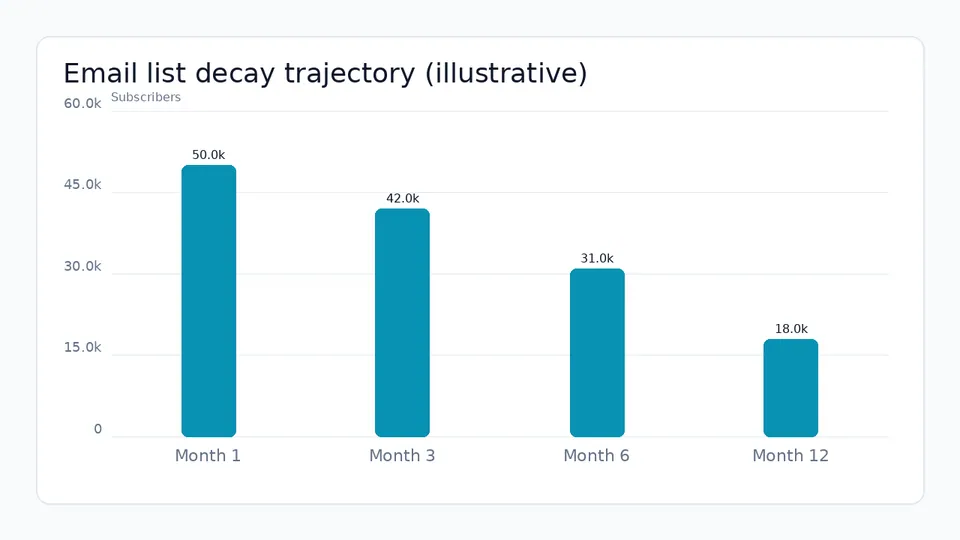
Email list decay—also referred to as email list degradation or email list attrition—is the steady rate at which a marketing email database loses valid, reachable, and active subscribers over time. Even if you never purchase third-party lists and adhere strictly to permission-based opt-in practices, your email database naturally shrinks and degrades every month.
List decay manifests in two distinct operational forms:
- Active Decay: Visible loss triggered directly by subscriber actions, including manual unsubscribes, spam complaints, and explicit preference center downgrades.
- Passive Decay: Invisible degradation caused by external changes, such as career transitions, closed corporate domains, full mailboxes, abandoned free webmail accounts (e.g., Yahoo or Gmail accounts created for single-use downloads), and converting dormant addresses into spam traps.
Primary Drivers of Subscriber Attrition
Understanding why email addresses go bad is the first step toward building a resilient retention and deliverability strategy. The primary drivers of email list decay include:
- B2B Career Mobility: In the corporate sector, annual employee turnover averages 15% to 25% across tech, sales, and professional services. When a prospect changes employers, their corporate address (
firstname.lastname@company.com) is deactivated, immediately turning into a hard bounce or an unmonitored catch-all. - Consumer Account Abandonment: Consumers frequently abandon old personal mailboxes when switching providers, migrating from legacy ISPs (e.g., Comcast or AOL) to modern webmail, or abandoning secondary addresses created solely for e-commerce discounts.
- Domain Re-Architecting and Corporate Mergers: B2B company rebrands, domain name changes, and acquisitions frequently render old email address structures obsolete, causing sudden spikes in invalid recipient errors.
- ISP Recycling and Spam Trap Conversion: Major mailbox providers like Yahoo, Microsoft, and Gmail regularly deactivate accounts that have been dormant for 12 to 24 months. In many cases, ISPs turn recycled dormant addresses into recycled spam traps to identify senders who mail unhygienic databases without consent or hygiene protocols.
- Evolving Spam Filtering Regulations: Stricter authentication policies enforced by Google, Yahoo, and Apple mean that sending messages to inactive or unengaged addresses rapidly lowers your domain sender reputation, pushing your emails out of the primary inbox and into the spam folder.
How Fast Does an Email List Decay? Key Benchmarks & Data
According to deliverability benchmarks and CRM data analysis, the average email marketing database decays at a rate of 22.5% to 30% per year. This means that if you start the year with a database of 50,000 subscribers and capture zero new leads, you will end the year with fewer than 37,000 deliverable, engaged contacts.
- ANNUAL EMAIL LIST DECAY TRAJECTORY
- Initial List Size: 50,000 Contacts
- Average Annual Decay Rate: 22.5% - 25.0%
| Period | List size | |---|---| | Month 1 | 50,000 Contacts | — | | Month 3 | 47,100 Contacts | — | | Month 6 | 44,250 Contacts | — | | Month 9 | 41,500 Contacts | — | | Month 12 | 38,750 Contacts | — |
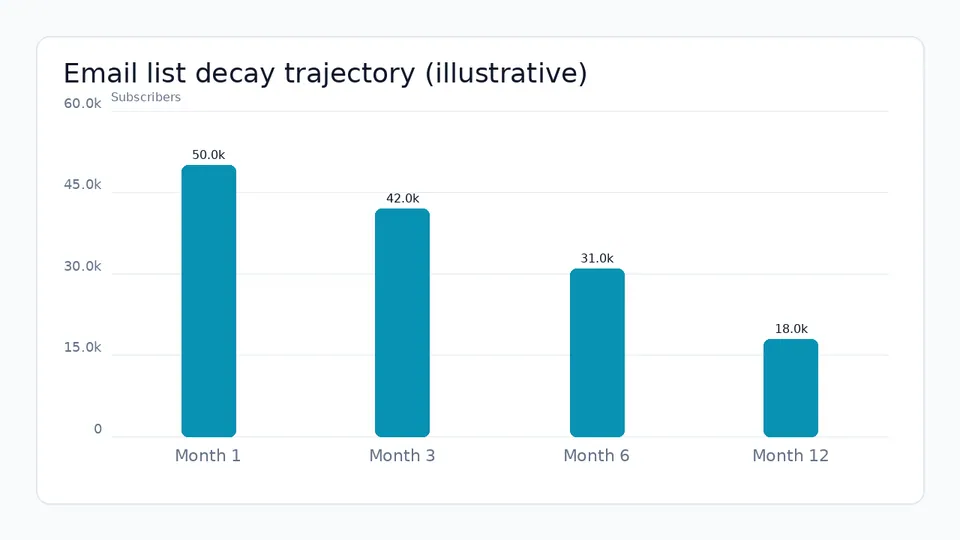
Illustrative subscriber attrition over 12 months without hygiene and re-engagement.
- Net Annual Contact Loss: ~11,250 Inactive / Invalid Records
B2B Email List Decay vs B2C Email List Decay
The velocity and characteristics of list attrition vary significantly depending on your business model, target audience, and sending frequency:
- B2B Email List Decay (25% to 35% Annually): B2B email lists experience higher decay rates due to rapid labor market shifts, corporate layoffs, and role changes. In fast-growing industries like software, SaaS, and digital marketing, annual B2B list decay can approach or exceed 30%.
- B2C Email List Decay (18% to 25% Annually): B2C retail and e-commerce lists tend to decay somewhat slower in terms of address invalidation, but they experience significantly higher passive engagement decay, where subscribers remain deliverable but completely ignore marketing messages after completing an initial purchase.
How to Calculate Email List Decay Rate (The Math & Formula)
To build an effective lead acquisition and deliverability maintenance budget, email operations teams must accurately measure their specific list attrition rate. Calculating list decay requires tracking both explicit losses (unsubscribes and hard bounces) and implicit losses (unengaged or abandoned addresses).
The Standard Email List Decay Formula
Use the following formula to calculate your annual or monthly list decay rate:
List Decay Rate (%) = [(Hard Bounces + Unsubscribes + Spam Complaints + Inactive Contacts) / Total Starting Contacts] * 100Where:
- Hard Bounces: The number of permanent delivery failures caused by invalid addresses, deleted domains, or non-existent mailboxes over the measurement period.
- Unsubscribes: The total number of contacts who clicked your unsubscribe link or adjusted their preferences to opt out of all broadcasts.
- Spam Complaints: The total number of subscribers who flagged your messages as spam or junk.
- Inactive Contacts: Contacts who have received campaigns but registered zero opens, clicks, or site visits over a defined period (typically 90 to 180 days).
Calculation Example Walkthrough
Suppose your organization enters Q1 with a total subscriber list of 20,000 contacts. Over the course of twelve months, your CRM records the following events:
- Hard bounces: 800 contacts
- Unsubscribes: 1,200 contacts
- Spam complaints: 100 contacts
- Contacts entering 180-day dormant status: 2,400 contacts
Calculating total contact attrition over 12 months:
Total Lost Contacts = 800 + 1,200 + 100 + 2,400 = 4,500 contacts
Annual List Decay Rate = ((4,500 ÷ 20,000)) × 100 = 22.5%
This calculation demonstrates that your marketing list lost 22.5% of its value over the year. To maintain a flat database size, your lead generation campaigns would need to acquire 4,500 new verified subscribers annually just to break even.
The True Cost of List Attrition: Revenue, Deliverability & Reputation
The damages caused by email list decay extend far beyond vanity subscriber counts. Continuing to send campaigns to an uncleaned, decaying database inflicts severe financial and technical costs on your marketing operations.
1. Deliverability Collapse and ISP Filtering
Mailbox providers like Google, Yahoo, Microsoft Outlook, and Apple Mail evaluate sender reputation based heavily on subscriber engagement signals (positive signals: opens, clicks, replies, moves to primary inbox; negative signals: hard bounces, spam reports, unread deletions, zero engagement).
When you mail a database plagued by list decay:
- Hard Bounce Rates Surge: Sending to invalid addresses causes your hard bounce rate to exceed the safe industry threshold of 1.0% to 2.0%. Many ESPs warn when hard bounces climb toward ~1-2%, as high bounce rates signal to ISPs that your list is unhygienic, leading to slower sending speeds, increased scrutiny, and potential blacklisting.
- Spam Trap Hits Increase: Dormant accounts converted into recycled spam traps catch your campaigns, signaling to ISPs that you do not maintain hygiene protocols. Hitting spam traps frequently can instantly damage your sender reputation and lead to messages being routed directly to the spam folder for all recipients.
- Reputation Scores Plummet: High bounce rates and low engagement score ratios cause ISPs to route your future messages directly to the junk or spam folder, even for your most active, valuable subscribers. This directly impacts your primary inbox placement, reducing visibility and campaign effectiveness.
2. Inflated ESP Infrastructure Costs
Traditional email service providers charge fees based on contact volume tiers or stored subscriber records. Keeping dead addresses, abandoned mailboxes, and unengaged contacts in your database means paying monthly storage fees for records that generate zero revenue. For example, a database of 100,000 contacts with a 25% decay rate means you are paying to store 25,000 useless records.
By contrast, modern credit-based platforms like Sendgrove Pricing allow marketers to validate contacts on upload and pay purely for active sending usage and verification credits, eliminating artificial storage inflation. This ensures that every dollar spent on your email platform is invested in reaching actual, engaged subscribers.
3. Skewed Campaign Analytics and ROI Metrics
When 25% of your database consists of dead addresses or ghost accounts, your reporting data becomes unreliable and misleading:
- Artificially Depressed Metrics: Click-through rates (CTR) and open rates appear artificially suppressed because a significant portion of your sends are not reaching valid inboxes.
- Flawed Conversion Rate Calculations: Conversion rate calculations fail to reflect true performance among real human buyers, as many emails never reach their intended target.
- Statistically Skewed A/B Testing: A/B testing results become statistically skewed due to non-deliverable impressions, making it difficult to confidently identify winning subject lines, calls to action, or email designs.
- Misallocated Marketing Budget: Inaccurate analytics can lead marketing teams to misallocate budget, reducing investment in a high-performing email channel based on faulty data, and shifting resources to less efficient channels.
Active vs. Passive List Decay: Identifying Silent Attrition Signals
To effectively combat database degradation, marketing teams must distinguish between active decay and passive decay. Each type of attrition requires different detection mechanisms, operational responses, and prevention tools.
- ACTIVE DECAY VS. PASSIVE DECAY
- ACTIVE DECAY | PASSIVE DECAY
- • Explicit Subscriber Opt-Outs | • Abandoned Free Mailboxes (Gmail/Yahoo)
- • Spam/Junk Complaints Registered | • Corporate B2B Role Changes & Turnover
- • Unsubscribe Link Clicks | • Closed Domains & MX Record Failures
- • Preference Center Downgrades | • Secondary Inboxes Created for Discounts
- • Instant Operational Feedback | • Silent Inactivity (Zero Opens/Clicks)
- • Immediate List Removal Required | • High Risk of Spam Trap Conversion
The Mechanics of Active Churn (Unsubscribes, Spam Complaints, Opt-Outs)
Active decay is visible and immediate. When a contact clicks your unsubscribe link or marks your campaign as spam in Gmail or Yahoo, the event is immediately logged by your email service provider.
- Unsubscribes: While losing a subscriber feels negative, clean unsubscribes are actually healthy for list deliverability. An unsubscribe explicitly signals that the contact no longer wishes to receive your content, preventing future spam complaints and unread campaign volume.
- Spam Complaints: Spam complaints represent the most dangerous form of active decay. Major ISPs like Google and Yahoo enforce strict spam rate thresholds, requiring senders to maintain complaint rates below 0.10% (fewer than 1 complaint per 1,000 delivered messages) and never exceed 0.30%. Exceeding these limits leads to immediate spam folder placement or domain throttling.
The Silent Risk of Passive Decay (Role Abandonment, Unread Deletions, Dormant Mailboxes)
Passive decay is far more dangerous because it occurs silently without immediate CRM error flags. Contacts simply stop opening, clicking, or reading your emails while their inbox continues to return 250 OK delivery status codes to your sending server.
- Abandoned Mailboxes: Consumers frequently create secondary email addresses on free webmail services specifically to access lead magnets, whitepapers, or initial e-commerce discount codes. Once the offer is consumed, the inbox is abandoned and never logged into again.
- B2B Job Transitions: When a B2B contact leaves their employer, their IT department may set their mailbox to silently accept incoming mail for several months before eventually deactivating the account or assigning it to a catch-all server. During this window, campaigns are delivered to a ghost mailbox where no human ever sees or opens them.
ISP Engagement Scoring: How Inactive Contacts Hurt Active Deliverability
Modern inbox algorithms employed by Google, Yahoo, and Microsoft prioritize engagement above almost all other deliverability signals. ISPs track the percentage of delivered emails that recipients actively open, read, reply to, forward, or move to primary folders.
When a large portion of your database consists of passively decayed, inactive addresses:
- Your overall engagement ratio drops dramatically.
- ISPs interpret low engagement as a sign that your content is unwanted or unread bulk mail.
- ISPs begin filtering your campaigns into the spam folder for all subscribers, including highly engaged, active buyers.
Industry-Specific Email List Decay Rates & Benchmark Comparison Table
Email list decay rates vary widely across different industry verticals, sales models, and audience demographics. The table below illustrates typical annual list decay metrics, primary attrition drivers, and recommended hygiene audit frequencies across five major business sectors:
| Industry Vertical | Avg. Annual List Decay Rate | Primary Attrition Drivers | Recommended Audit Frequency | Target Hard Bounce Rate | | :--- | :--- | :--- | :--- | :--- | | B2B Tech & SaaS | 25% – 35% | High corporate mobility, acquisition domain shifts, role changes | Quarterly (Every 90 days) | < 0.5% | | E-Commerce & B2C Retail | 18% – 25% | Secondary discount mailboxes, seasonal fatigue, email address switches | Bi-Annually (Every 6 months) | < 1.0% | | Financial Services & Legal | 15% – 22% | Regulatory compliance changes, strict corporate firewall filtering | Quarterly (Every 90 days) | < 0.3% | | Media & Publishing | 22% – 28% | Subscriber content fatigue, competing newsletter noise, domain shifts | Continuous Real-Time | < 0.8% | | Non-Profits & Higher Ed | 20% – 26% | Student graduation address deactivations, donor lifecycle churn | Bi-Annually (Every 6 months) | < 1.0% |
B2B Corporate Mobility & Email Domain Shifts
In the B2B SaaS and professional services sectors, corporate mobility is the single largest contributor to list decay. Tech industry turnover averages roughly 20% annually. Furthermore, M&A activity frequently forces entire organizations to migrate from one email domain handle to another (e.g., migrating from @company.io to @enterprise.com).
Without automated real-time verification and periodic batch hygiene, a B2B marketer's contact database will become 30% invalid within 12 months, severely harming campaign performance and sales pipeline velocity.
B2C Disposable Mailboxes & Seasonal Inactivity
In B2C retail and e-commerce, consumer behavior drives passive list decay. Consumers routinely rely on disposable email services (such as TempMail or Guerrilla Mail) or dedicated "junk mailboxes" to collect coupon codes during major sales events like Black Friday or Cyber Monday.
While these addresses pass initial validation check syntax, they rapidly become dormant or unmonitored once the promotional period ends, degrading sender reputation if kept on broadcast lists indefinitely.
6 Proven Strategies to Prevent and Slow Down Email List Decay
While email list decay cannot be eliminated entirely, strategic marketers can dramatically slow its velocity and neutralize its negative impact on deliverability. Implementing a proactive multi-layer defense preserves sender reputation while maximizing subscriber lifetime value.
Strategy 1: Implement Real-Time API Verification at Point of Sign-Up
The most effective way to slow down email list decay is to stop bad data from entering your CRM in the first place. Up to 15% of initial sign-up form entries contain typos, syntax errors, temporary disposable addresses, or non-existent domain handles.
By integrating a real-time verification API directly into your website forms, landing pages, and checkout flows, you can validate syntax, domain MX records, and inbox existence in milliseconds before the record is saved.
Marketers using Sendgrove Email Validation can intercept invalid addresses, soft typos (such as gmai.com or yaho.com), and role-based addresses (sales@ or info@) at the moment of entry. Prompting users to correct errors instantly prevents hard bounces on campaign launch and ensures that 100% of new list additions represent deliverable inboxes. For lead capture architecture strategies, explore our guide on email lead capture strategies.
Strategy 2: Adopt Double Opt-In (DOI) & Explicit Consent Architecture
Single opt-in (SOI) forms offer minimal friction, but they expose your database to bot attacks, fake address submissions, and accidental mistyping. This can quickly inflate your list with low-quality contacts, accelerating decay.
Implementing Double Opt-In requires new subscribers to click a confirmation link sent to their inbox before receiving marketing broadcasts. Double opt-in:
- Strongly ensures that the submitted address belongs to an active, monitored inbox. This verifies the legitimacy of the subscriber and their intent to receive your communications.
- Protects your forms against malicious spam-bot injections and fake lead submissions.
- Establishes a clear paper trail of consent, helping ensure compliance with CAN-SPAM, GDPR, CASL, and CCPA standards.
Strategy 3: Deploy Dynamic Subscriber Preference Centers
Subscribers frequently unsubscribe not because they dislike your brand, but because they experience inbox fatigue or relevance mismatch. Offering an "all-or-nothing" unsubscribe button forces dissatisfied contacts to opt out entirely, losing a potentially valuable customer.
By deploying a dynamic subscriber preference center, you allow contacts to customize their relationship with your brand, giving them control over their inbox experience:
- Adjust Frequency: Let subscribers switch from daily newsletters to a weekly or monthly digest.
- Select Topics: Allow users to pause promotional offers while keeping educational guides or product updates.
- Snooze Communications: Provide a "Snooze 30 Days" option during busy seasons or vacations.
Reducing unsubscribe churn by giving users granular control over email frequency directly slows active list decay, fostering a healthier, more engaged subscriber base.
Strategy 4: Automated Behavioral Segmentation & Engagement Triggers
Sending identical batch-and-blast marketing broadcasts to your entire contact list guarantees accelerated passive decay. Unengaged subscribers ignore irrelevant broadcasts, training mailbox algorithms that your domain sends unwanted bulk mail.
To prevent passive decay:
- Segment by Recency: Segment subscribers into engagement tiers based on recent activity (e.g., Active 0–30 Days, Moderate 31–90 Days, Inactive 91–180 Days, Dormant 180+ Days).
- Adjust Frequency by Tier: Send daily or weekly broadcasts exclusively to Active and Moderate tiers, while reserving major product announcements or high-value offers for lower-frequency sends to the Inactive tier.
- Deploy Automated Marketing Triggers: Use Sendgrove Automation to trigger tailored messages based on individual subscriber behavior, ensuring that contacts receive timely, highly relevant content.
Strategy 5: Conduct Routine Batch Hygiene & Verification Audits
Even with real-time verification active on your lead capture forms, existing database contacts inevitably age and decay over time. Employees resign, domains expire, and secondary mailboxes are abandoned.
To maintain database hygiene:
- Schedule Regular Audits: Conduct a complete batch verification audit of your stored contact list at least every 90 to 180 days.
- Filter Out Harmful Addresses: Identify and remove hard bounce risks, disposable email handles, spam traps, and unmonitored role accounts before launching major email campaigns.
- Protect Sender Reputation: Regular batch verification ensures your campaigns maintain low bounce rates, protecting your deliverability score and sender reputation. To learn how to safely isolate and clean compromised records, refer to our detailed guide on how to remove spam traps from email list.
Strategy 6: Deploy Automated Re-Engagement & Win-Back Workflows
When a subscriber stops opening or clicking your emails for 60 to 90 days, do not continue sending them standard broadcast newsletters. Instead, automatically route unengaged contacts into an automated win-back sequence designed to re-ignite interest or cleanly sunset the record.
A structured win-back workflow should:
- Identify contacts crossing the 60-day or 90-day inactivity threshold.
- Send a 2 to 3-part automated email series featuring high-value incentives, compelling subject lines, or preference update requests.
- Automatically unsubscribe or archive contacts who remain unengaged after the final message in the sequence. For proven win-back frameworks and message copy, read our complete guide on email re-engagement campaigns.
Step-by-Step Practitioner Guide: Setting Up Automated Decay Prevention in Sendgrove
Implementing a complete defense against email list decay requires combining real-time API verification, automated list hygiene, and behavioral segmentation into a unified workflow. Below is a step-by-step practitioner guide to configuring automated decay prevention using Sendgrove's marketing and verification tools.
- SENDGROVE AUTOMATED LIST DECAY DEFENSE PIPELINE
| Step | Stage | |---|---| | 1 | Lead Capture Form | | 2 | Real-Time Sendgrove API Validation | | 3 | Valid Address | | 4 | Invalid / Typo | | 5 | Added to Main CRM List | | 6 | Form Prompt: "Check Email" | | 7 | Behavioral Recency Routing | | 8 | Active 0-60d | | 9 | Inactive 90d+ | | 10 | Regular Sends | | 11 | Automated Win-Back Series | | 12 | Re-Engaged | | 13 | Still Inactive | | 14 | Return to Active | | 15 | Suppressed / Sunset Record |
Step 1: Connect Real-Time API Verification at Form Capture
To stop invalid records from entering your database at sign-up:
- Generate an API key inside your Sendgrove account dashboard under Settings > API & SMTP Keys.
- Embed the Sendgrove real-time validation endpoint into your sign-up forms, landing page builders, or custom web forms.
- Enable client-side inline feedback so users who mistype their email (e.g., typing
user@gmai.com) receive an immediate suggestion to correct their address before submission. - Using Sendgrove Email Validation at the entry point immediately eliminates up to 95% of syntax errors, temporary mailboxes, and invalid domain entries.
Step 2: Configure Recency-Based Behavioral Segmentation
Next, segment your existing contact database into dynamic engagement cohorts using Sendgrove's contact management tools:
- Create a dynamic segment named Active Subscribers with filter criteria:
Last Open Date < 60 daysORLast Click Date < 60 days. - Create a secondary segment named At-Risk Subscribers with filter criteria:
Last Open Date between 61 and 120 daysANDTotal Delivered Sends > 5. - Create a third segment named Dormant Subscribers with filter criteria:
Last Open Date > 120 daysORLast Open Date IS EMPTY.
Configure your broadcast campaign sending rules inside Sendgrove Email Marketing to target Active and At-Risk segments for primary promotions, completely excluding Dormant records from daily or weekly blasts.
Step 3: Trigger Automated Re-Engagement & Sunset Sequences
Build an automated multi-step win-back workflow using Sendgrove Automation:
- Set the automation trigger to fire whenever a contact joins the At-Risk Subscribers segment.
- Step 1: Send a personalized "We Miss You" check-in email featuring your top-performing blog post or a special offer.
- Wait 7 days. If no open or click is recorded, fire Step 2: Send a preference update email inviting the subscriber to select lower send frequencies or adjust their topic interests.
- Wait 7 days. If the contact still remains inactive, fire Step 3: Send a final courtesy notice stating that they will be unsubscribed to respect their inbox.
- If no engagement occurs within 48 hours of Step 3, automatically apply a
Sunset-Suppressedtag and remove the contact from all promotional broadcast lists.
How to Reverse Email List Decay: Replacing Attrition with High-Intent Growth
Slowing list decay preserves the deliverability of your existing contacts, but achieving net subscriber growth requires building a high-intent acquisition engine that continuously replaces churned contacts with verified, engaged buyers.
Calculating Required Acquisition Volume to Outpace Decay
To ensure your email database expands over time, calculate your required annual new subscriber target using the following formula:
Required New Subscribers = (Starting List Size × Annual Decay Rate) + Desired Net Growth Target
Example Scenario:
- Starting List Size: 25,000 contacts
- Annual Decay Rate: 20% (5,000 lost contacts per year)
- Desired Annual Net Growth: 15% (3,750 net new active contacts)
Required New Subscribers = (25,000 × 0.20) + 3,750 = 5,000 + 3,750 = 8,750 new verified contacts/year
In this scenario, acquiring 5,000 new subscribers per year merely maintains a flat database size. To achieve 15% net growth, the marketing team must acquire 8,750 verified new subscribers annually (approximately 730 new contacts per month).
High-Intent Lead Acquisition Tactics
To attract subscribers who are less prone to fast decay:
- Publish In-Depth Educational Lead Magnets: Offer specialized industry guides, calculators, and benchmark reports rather than generic newsletters. High-intent educational content attracts buyers who actively monitor their professional email inboxes.
- Optimize Co-Marketing & Webinar Partnerships: Partner with complementary brands in your industry to host educational webinars. Co-marketed live events attract verified professional attendees with active corporate addresses.
- Implement Gated Content Verification: Require work email addresses for premium B2B resources while restricting disposable or webmail handles at form submission.
Troubleshooting List Decay Spikes: Root Cause Analysis & Bounce-Log Triage
A sudden spike in list decay or bounce rates rarely happens by accident. When hard bounce rates jump above ~1–2% or deliverability metrics suddenly deteriorate, marketing teams need a structured triage protocol to isolate the root cause before sender reputation suffers lasting damage.
Step 1: Analyze SMTP Bounce Codes and Categories
Start by exporting raw SMTP bounce logs from your email provider or deliverability dashboard. Categorize failures into hard bounces (permanent delivery failures) and soft bounces (temporary delivery disruptions):
- 550 / 554 Permanent Failures: These represent non-existent mailboxes, invalid domain names, or recipient server rejections. A sudden spike in 550 codes indicates stale opt-in lists, poor lead capture validation, or imported legacy contacts.
- 421 / 451 Temporary Throttling: Indicates that mailbox providers (such as Gmail, Yahoo, or Microsoft) are rate-limiting your connection due to sudden volume spikes or poor engagement signals.
- 550 5.7.1 Security / Policy Block: Points to authentication failures (DKIM, SPF, or DMARC misalignment) or IP/domain blocklist placement.
Step 2: Correlate Decay Spikes with Acquisition Sources
Not all lead sources degrade at the same rate. Isolate subscriber cohorts by signup form, landing page, co-marketing partner, or paid ad campaign. If a specific lead magnet or promo offer exhibits a 40%+ 90-day decay rate, your acquisition channel may be attracting temporary "burner" addresses or incentivized bot submissions. Implementing real-time API verification at the point of capture via Sendgrove Email Validation blocks invalid syntax, disposable domains, and toxic spam traps before they enter your active database.
Step 3: Inspect Authentication and Domain Alignment
Mailbox providers continually tighten security requirements. Verify that your SPF records include all sending IP ranges, your DKIM keys are 2048-bit aligned, and your DMARC policy is published with valid reporting URIs. Authentication misalignment frequently causes receiving servers to reject messages outright, misclassifying valid contacts as bounced addresses and artificially inflating list decay metrics.
| Bounce Code Range | Failure Type | Common Root Cause | Primary Remediation Action | | :--- | :--- | :--- | :--- | | 550 5.1.1 – 5.1.3 | Hard Bounce | User unknown / mailbox deleted | Immediate suppression; enable point-of-capture validation. | | 550 5.7.1 | Policy Rejection | DKIM/SPF failure or blocklist entry | Verify DNS alignment; check domain reputation on Google Postmaster. | | 421 4.7.0 | Temporary Throttle | Excessive sending velocity / low engagement | Pause campaign; reduce hourly send rates; isolate engaged segments. | | 552 5.2.2 | Soft Bounce | Mailbox full / temporary over-quota | Retry up to 3 times over 72 hours before converting to inactive status. |
B2B vs. B2C List Decay: Key Differences, Attrition Triggers, and Lifecycle Management
While both B2B and B2C organizations experience list decay, the underlying drivers, decay velocity, and retention strategies differ significantly between commercial models.
B2B List Decay: High Velocity Driven by Workplace Mobility
B2B email databases degrade at an estimated annual rate of 25% to 30%—significantly faster than consumer lists. The primary drivers include:
- Job Changes and Resignations: Average corporate turnover rates mean roughly one in four professionals changes employers or roles every 12 months, invalidating their work email address.
- Corporate Mergers and Domain Acquisitions: Corporate restructuring frequently leads to domain migrations, changing address formats (e.g., from
@company.comto@parentcorp.com). - Role-Based Alias Abandonment: Generic addresses like
sales@,info@, ormarketing@are often reassigned, abandoned, or heavily filtered by corporate security gateways.
To combat B2B decay, organizations should implement automated quarterly list verification, track social/LinkedIn employment updates where permissible, and use Sendgrove Automation to trigger re-engagement workflows whenever a contact stops interacting with routine content.
B2C List Decay: Driven by Inbox Overload and Consumer Behavioral Shifts
B2C lists typically experience an annual decay rate between 15% and 22%. While physical inbox abandonment is less common, passive decay is widespread:
- Secondary and Secondary "Burner" Inboxes: Consumers frequently create secondary free webmail addresses (Gmail, Yahoo, Outlook) specifically for promotions, lead magnets, and ecommerce discounts, rarely checking them post-purchase.
- Inbox Overload and Unsubscribe Fatigue: High send frequencies cause consumers to tune out promotional messages, leading to passive decay where messages land unopened in crowded promotional tabs.
- ISP Inactive Mailbox Recycling: Major consumer webmail providers periodically convert long-unattended mailboxes into active spam traps to catch senders mailing unhygienic lists.
| Metric / Dimension | B2B Email List Decay | B2C Email List Decay | | :--- | :--- | :--- | | Average Annual Decay Rate | 25% – 30%+ per year | 15% – 22% per year | | Primary Decay Driver | Career mobility, company restructuring, domain changes | Burner inboxes, promotional overload, ISP mailbox recycling | | Dominant Attrition Type | Hard decay (550 hard bounces / deleted mailboxes) | Passive decay (unopened emails, promotional tab filtering) | | Recommended Cleaning Frequency | Monthly or real-time API check | Bi-monthly or campaign-based cleaning | | Key Prevention Strategy | Point-of-entry API validation + firmographic enrichments | Preference centers + segmented engagement automation |
Email Decay Audit & Maintenance Checklist: Daily, Monthly, and Quarterly Action Plan
Systematic decay prevention requires embedding health checks into your routine marketing operations. Use this practitioner checklist to establish automated controls and regular maintenance cycles.
Daily Automated Maintenance
- Real-Time API Validation: Ensure all sign-up forms, landing pages, and lead capture widgets route prospective contacts through real-time verification via Sendgrove Email Validation to block invalid addresses, typos, and disposable emails.
- Automated Hard Bounce Suppression: Confirm that your email service provider immediately suppresses 550 hard bounces to prevent repeated sends to invalid mailboxes.
- Double Opt-In (DOI) Verification: Soften signup friction while ensuring high list quality by implementing double opt-in for high-risk acquisition channels, such as co-marketing webinars or paid lead generation. Learn more about effective opt-in mechanics in our guide on email lead capture strategies.
Monthly Health Audits
- Calculate Monthly Decay Rate: Run the list decay formula (
[Unsubscribes + Hard Bounces + Spam Complaints + Inactives] ÷ Starting Subscribers) to track monthly attrition velocity. - Monitor Bounce Category Ratios: Review hard vs. soft bounce ratios. Ensure total bounce rates remain well below ~1–2% across all active campaigns.
- Review Segment Engagement: Identify contacts who have not opened or clicked an email in the past 60 to 90 days and isolate them into a dedicated re-engagement segment.
- Spam Trap Removal Audit: Check deliverability dashboard metrics and run periodic hygiene scans to eliminate potential pristine or recycled spam traps. See our detailed workflow on how to remove spam traps from an email list.
Quarterly Sunsetting & Infrastructure Reviews
- Execute Automated Win-Back Sequences: Trigger a 2-step or 3-step automated re-engagement campaign offering preference updates or exclusive incentives. Read our deep-dive on designing email re-engagement campaigns.
- Suppress Unresponsive Inactives: Permanently suppress contacts who fail to engage after a 90-to-180-day win-back sequence to protect domain reputation and save database credit costs.
- Review Authentication DNS Records: Audit SPF, DKIM, and DMARC record alignments across all domain senders.
- Database Cost & Credit Review: Audit total contact storage and validation usage against your subscription plan on Sendgrove Pricing to optimize list hygiene ROI.
FAQ
What is email list decay?
Email list decay is the gradual, natural loss of usable email addresses from a marketing database over time, driven by job changes, abandoned inboxes, unsubscribes, spam complaints, and invalid addresses.
How fast does an email list decay per year?
Marketing databases decay at an average annual rate of 20% to 30%. B2B lists decay faster (25–30%+) due to employment mobility, while B2C lists average 15–22% annual attrition.
How do you calculate email list decay rate?
Divide the total number of lost contacts (unsubscribes + hard bounces + spam complaints + unengaged inactives) over a given period by the starting total subscriber count, then multiply by 100 to get the percentage.
What is the difference between hard decay and passive decay?
Hard decay occurs when an email address permanently fails (550 hard bounce) because the mailbox or domain no longer exists. Passive decay occurs when a contact stops opening or clicking emails while their mailbox remains valid.
Does real-time email validation prevent list decay?
Real-time validation prevents invalid addresses, typos, and disposable emails from entering your database at capture, slowing down future hard decay, though it cannot prevent natural career changes or voluntary unsubscribes.
How often should marketers clean their email lists?
High-volume senders and B2B marketers should validate lists monthly or use continuous point-of-capture API validation. Lower-volume or B2C senders should perform deep list hygiene audits at least quarterly.
What is an acceptable bounce rate for email campaigns?
Many email service providers warn senders when hard bounce rates climb toward ~1–2%. Keeping total bounce rates consistently under ~2% protects inbox placement and sender reputation.
Should inactive subscribers be deleted or suppressed?
Unresponsive subscribers should be placed on a suppression list rather than deleted outright. Suppression prevents accidentally re-importing or re-mailing invalid addresses in future campaigns.