Blog
Compare Top Email Marketing Software Options Now?
Discover the best email marketing software options for your business. Compare platforms like Sendgrove, Mailchimp, Brevo, and Klaviyo on features, pricing, and

> TL;DR: Choosing the right email marketing software options in 2026 requires looking beyond basic campaign templates to examine deliverability, list hygiene, automation flexibility, and total cost of ownership. While legacy platforms often charge high recurring subscriber taxes and force users to buy external list verification tools, modern platforms like Sendgrove combine email marketing, real-time list validation, and automated workflows under a transparent credit-based model. This guide compares the top 8 email marketing tools to help you select the ideal option for your business goals.
Selecting the right email marketing software is one of the most critical infrastructure decisions an online business, ecommerce brand, or B2B marketing team can make. Email remains the single highest-ROI digital marketing channel, generating predictable engagement, recurring revenue, and direct customer relationships that aren't subject to third-party algorithm shifts. However, as inbox providers like Google, Yahoo, and Microsoft enforce stricter sender requirements around authentication, bounce management, and list hygiene, the software platform you choose directly impacts whether your messages land in the inbox or the spam folder.
The email marketing ecosystem has evolved significantly. Historically, platforms focused purely on broadcast newsletter delivery and basic drag-and-drop template builders. Today's competitive landscape demands advanced segmentation, event-triggered automations, built-in audience validation, and precise deliverability controls. Marketers face a dizzying array of options ranging from heavyweight enterprise suites to lightweight newsletter apps. Making the wrong choice can result in inflated software expenses, high bounce rates that destroy domain reputation, or restrictive feature gates that stall campaign growth.
Last updated: March 2026
Why Selecting the Right Email Marketing Software Options Matters in 2026
The landscape of digital communication has changed dramatically over the past few years. Inbox providers have implemented sophisticated machine learning algorithms and strict bulk-sender guidelines that actively filter out messages sent from unverified domains, stale contact lists, or low-engagement accounts. In 2026, delivering an email campaign successfully requires more than compelling copywriting; it demands robust technical infrastructure and continuous list maintenance.
When evaluating email marketing software options, marketers must understand that software choice directly dictates three core operational pillars: deliverability health, campaign scalability, and cost efficiency.
Deliverability Health and Domain Reputation
Your sender reputation is tied to your sending domain and dedicated IP addresses. If you choose an email platform that allows bad data to linger in your account—such as invalid email addresses, spam traps, or inactive subscribers—your hard bounce rate increases. High hard bounce rates signal to mailbox providers that you are practicing poor list hygiene, which quickly leads to throttling, domain blocklisting, or automatic routing to the spam folder. Modern platforms that integrate real-time email verification directly into the send workflow protect your reputation before campaigns leave the outbox. For more insights on how to improve your email delivery, read our guide on how to keep emails out of spam folders.
Campaign Scalability and Automation Depth
As your audience grows from hundreds to hundreds of thousands of subscribers, manual campaign execution becomes unsustainable. High-performing marketing teams rely on behavioral triggers, automated drip sequences, cart abandonment recoveries, and dynamic list segmentation. The email marketing software you select must support complex branching logic, webhooks, custom fields, and real-time event tracking without lagging or failing during high-volume send windows. For a deeper dive into effective automation, explore our article on email marketing automation workflows.
Total Cost of Ownership and Pricing Transparency
Traditional email marketing tools charge based on subscriber list size. Under a contacts-based pricing model, you pay for every single address stored in your database—even if a large percentage of those addresses are inactive, invalid, or receiving emails only once a quarter. This model creates a perverse financial penalty for building a large audience. Furthermore, because legacy platforms lack built-in list validation, marketers are forced to pay third-party verification vendors separate fees just to clean their lists before uploading them back into their email tool. Evaluating modern alternatives with unified credit models or flexible send-based tiers can dramatically reduce software overhead while improving campaign performance.
In the sections below, we break down the key evaluation criteria you should use when comparing platforms, followed by an in-depth analysis of the top 8 email marketing software options available today.
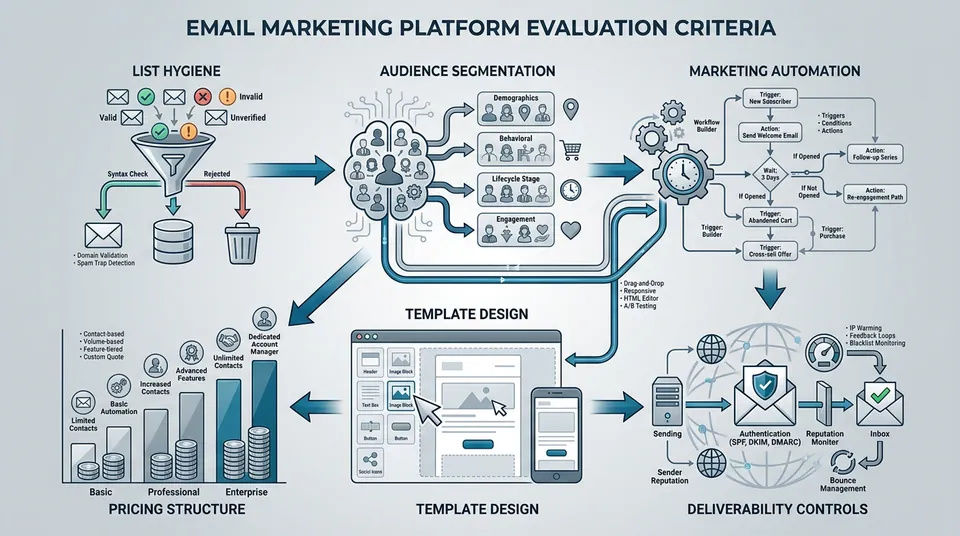
Key Evaluation Criteria for Comparing Email Marketing Platforms

To choose the best email marketing software options for your specific tech stack and growth stage, it is helpful to evaluate candidate tools across six primary dimensions. Comparing software against these standardized benchmarks ensures you don't overpay for enterprise bloat or underinvest in essential deliverability infrastructure.
1. List Hygiene and Built-In Email Validation
A major hidden cost of email marketing is list decay. On average, email lists decay by 20–30% annually as users change job roles, abandon old webmail accounts, or enter syntax typos during signup forms. Most traditional platforms require you to export your subscriber list, upload it to an external third-party email verification tool, pay a separate fee per lookup, and then re-import the cleaned data. Modern platforms solve this friction by offering native, real-time list validation directly within the email interface. Evaluating whether a platform includes native verification features is critical for maintaining low bounce rates without adding operational friction. Without integrated validation, marketers face increased hard bounces, which can lead to mailbox providers flagging their domain as untrustworthy, resulting in emails landing in spam folders or being rejected entirely. This not only wastes marketing spend but also severely damages sender reputation over time.
2. Marketing Automation and Workflow Flexibility
Basic autoresponders are no longer sufficient for competitive email marketing. A robust software platform must provide visual drag-and-drop workflow builders that support multi-branch conditional logic, behavioral delays, custom event triggers, tagging, and segment movements. Whether you are building an onboarding drip sequence for SaaS trialists or a multi-stage cart recovery flow for ecommerce shoppers, the automation builder should be intuitive, reliable, and capable of executing complex marketing plays seamlessly. The ability to create highly personalized, context-aware journeys is paramount for maximizing engagement and conversion rates. Platforms with limited automation can constrain growth and force manual interventions, negating the benefits of scale.
3. Deliverability Controls and Domain Authentication
Inbox placement is governed by technical authentication protocols including SPF (Sender Policy Framework), DKIM (DomainKeys Identified Mail), and DMARC (Domain-based Message Authentication, Reporting, and Conformance). The best email marketing software tools streamline custom domain setup, providing clear DNS records and automated validation checks. Furthermore, top-tier platforms actively monitor sending IP pools, isolate high-risk senders, and provide granular bounce diagnostic logs so you can pinpoint specific delivery errors instantly. Platforms that neglect these technical aspects leave marketers vulnerable to delivery failures and can lead to a rapid degradation of sender reputation, directly impacting campaign effectiveness.
4. Audience Segmentation and Personalization Depth
Generic blast emails produce declining open and click-through rates. Effective software platforms enable dynamic segmentation based on contact attributes, purchase history, engagement frequency, custom property values, and real-time user activity. Look for tools that allow multi-condition filtering (e.g., "opened email in past 30 days AND located in US AND purchased category X") and support dynamic tag replacement for personalized subject lines and email body content. Deep segmentation capabilities unlock the power of hyper-personalization, delivering messages that resonate directly with individual subscriber needs and preferences, thereby significantly boosting engagement metrics.
5. Template Design and Content Builder
Creating responsive, professional email templates should not require coding expertise or dedicated HTML developers. Modern platforms feature mobile-optimized visual block editors, customizable design systems, pre-built template libraries, and clean HTML export options. The email builder must produce clean, light code that renders correctly across all major email clients, including Gmail, Apple Mail, Outlook, and mobile webmail apps. A well-designed email is critical for first impressions and user experience; a poor builder can lead to broken layouts, frustrating recipients and diminishing brand perception.
6. Pricing Structure and Billing Predictability
Pricing models vary widely across the email marketing ecosystem. The three main models include:
- Contact-Based Pricing: You pay a monthly fee based on total contacts stored, regardless of send frequency. This can become expensive as your list grows, especially if many contacts are inactive or invalid.
- Send-Based Volume Pricing: You pay based on the total number of emails sent per month. This offers more flexibility if you have a large list but send infrequently.
- Credit-Based Hybrid Pricing: A flexible model where credits are consumed for sends or list validations, offering ultimate control over resource allocation. This model, often seen in modern platforms like Sendgrove, can be highly cost-effective by aligning spending directly with usage and value.
Understanding your monthly send volume and list cleaning requirements will help you identify which billing model delivers the highest value without unexpected overage fees. Hidden costs, particularly from needing separate validation services, can inflate the true total cost of ownership significantly if not considered upfront.
Summary Comparison: Top 8 Email Marketing Software Options
The comparison table below highlights how the leading email marketing platforms stack up across core capabilities, pricing structures, list validation integration, and target user profiles.
| Platform | Core Strength | Native Email Validation | Pricing Model | Ideal User Profile | | :--- | :--- | :--- | :--- | :--- | | Sendgrove | Integrated email marketing, automations, & real-time list validation | Built-in (Native) | Flexible credit-based model (Free plan available) | SMBs, ecommerce brands, SaaS teams, deliverability-focused marketers | | Mailchimp | All-in-one brand & campaign suite for beginners | None (Requires 3rd-party integration) | Tiered contact-based monthly plans | Small business owners wanting simple marketing tools | | Brevo | Cost-effective multi-channel messaging & SMS | None (Requires 3rd-party integration) | Daily/monthly send volume pricing | High-volume senders needing predictable send costs | | Klaviyo | Deep ecommerce data integrations & predictive analytics | None (Requires 3rd-party integration) | Contact-based tiered pricing | Shopify & WooCommerce ecommerce brands | | ActiveCampaign | Advanced CRM workflows & visual automation building | None (Requires 3rd-party integration) | Contact-based multi-tier subscriptions | B2B sales teams & complex marketing agencies | | MailerLite | Clean interface & budget-friendly builder | None (Requires 3rd-party integration) | Contact-based tiered pricing with free tier | Content creators, bloggers, & indie newsletter writers | | HubSpot | Enterprise inbound marketing & unified CRM ecosystem | None (Requires 3rd-party integration) | High-tier contact & marketing hub seats | Mid-market & enterprise B2B companies | | Constant Contact | Robust event marketing & customer relationship tools | None (Requires 3rd-party integration) | Contact-based tiered pricing | Event organizers, non-profits, small service businesses |
1. Sendgrove: Best Integrated Email Marketing and Real-Time Validation Platform
Sendgrove is a modern, unified email platform designed specifically to solve the deliverability and workflow fragmentation challenges that plague email marketers. Unlike legacy platforms that focus solely on broadcasting messages while ignoring list hygiene, Sendgrove combines powerful email marketing automation, visual campaign building, custom-domain email hosting, and native, real-time list validation into a single, cohesive dashboard.
Comprehensive Feature Overview
At the heart of Sendgrove is an engineering philosophy that prioritizes inbox placement and operational simplicity. Rather than forcing users to juggle external list cleaning subscriptions or deal with opaque delivery failures, Sendgrove builds email verification directly into the core workflow.
- Native Real-Time Email Validation: Sendgrove's built-in validation engine screens contact lists for invalid syntax, disposable addresses, spam traps, role accounts, and inactive mailboxes. You can run validations prior to campaign broadcasts or enable automated list hygiene on contact intake forms. This proactive approach significantly reduces hard bounces, protecting your sender reputation and improving overall deliverability. By identifying and quarantining problematic addresses before they impact your sending, Sendgrove helps maintain high inbox placement rates and safeguards your domain's authority, which is critical in a landscape with increasingly strict sender policies.
- Visual Marketing Automation Engine: Create sophisticated behavioral drip sequences, welcome series, re-engagement campaigns, and transactional notifications using an intuitive drag-and-drop workflow builder. Trigger automations based on webhooks, tag additions, segment movements, or link interactions. The automation capabilities are designed for both simplicity and power, allowing marketers to build complex customer journeys without extensive coding knowledge. This allows for highly targeted and timely communication, ensuring messages are delivered at the most impactful moment, driving engagement and conversion efficiency.
- Custom-Domain Email Hosting & Webmail: Sendgrove offers custom-domain mailbox hosting accessible via mail.sendgrove.com, allowing teams to manage inbound webmail, outbound team messaging, and automated marketing campaigns under one roof. This unified approach simplifies email management and ensures consistent brand messaging. Consolidating these functions reduces operational complexity and improves brand consistency across all email interactions.
- Dynamic Audience Segmentation: Easily filter contact databases using real-time behavioral data, engagement tiers, custom properties, and validation status flags. This enables highly personalized messaging, leading to increased engagement and conversion rates. The segmentation tools are powerful enough to handle complex criteria, ensuring your messages reach the most relevant audience segments. Precise segmentation means less waste, higher ROI per email sent, and a stronger connection with your audience.
- High-Deliverability Infrastructure: Sendgrove provides streamlined SPF, DKIM, and DMARC wizard setup, robust bounce diagnostic logging, and proactive IP pool management to ensure top-tier sender reputation across all major inbox providers. These technical safeguards are crucial for maintaining consistent inbox placement and avoiding spam filters, giving marketers peace of mind about their email campaigns. This comprehensive approach to deliverability management is a cornerstone of Sendgrove's commitment to helping businesses maximize their email marketing effectiveness.
Pros and Key Advantages
- Eliminates Third-Party Validation Costs and Complexity: By integrating list verification into the core platform, Sendgrove saves users hundreds of dollars per month in external cleaning tools and eliminates the cumbersome process of exporting and re-importing lists. This directly translates to significant cost savings and streamlined operational workflows.
- Transparent Credit-Based Model with Predictable Costs: 1 credit equals 1 email send or 1 list validation check. You only pay for what you actually use, with no hidden penalties for storing inactive contacts. This flexible pricing ensures you're only paying for active engagement and validated contacts, making budgeting straightforward. Unlike contact-based models that punish list growth, Sendgrove's approach rewards efficient usage and provides clear ROI.
- Generous Free Plan Allotment for Risk-Free Exploration: Sendgrove offers a generous free tier that includes contact validation and campaign sending credits to help growing businesses get started risk-free (details available on the Sendgrove Pricing Page). This allows new users to experience the platform's benefits and robust deliverability features without an initial financial commitment.
- Unified Deliverability Management: Proactive Reputation Protection: Real-time feedback loops protect domain reputation before campaigns launch, preventing sudden delivery drops and ensuring consistent inbox placement. This proactive system minimizes deliverability issues, allowing marketers to focus on content and strategy rather than technical problems.
Considerations
- Designed for deliverability-first businesses; large enterprise legacy teams tied to massive legacy CRMs may require initial webhook configuration. While highly flexible, integration with older, more rigid systems might require some initial setup and API work. However, Sendgrove's comprehensive API and developer documentation make such integrations feasible for technical teams.
Pricing Structure
Sendgrove operates on a flexible credit-based pricing model. Every plan grants access to both campaign sending and list validation capabilities. Free plan options allow users to test features immediately, with paid upgrades available on the Sendgrove Pricing Page for scaling send volumes. Explore Sendgrove Email Marketing and Sendgrove Email Validation to streamline your campaigns.
2. Mailchimp: Popular All-in-One Marketing Platform for Beginners
Mailchimp is one of the most widely recognized names in the email marketing industry. Originally built as a simple web-based newsletter tool, Mailchimp has expanded over the past two decades into a broader marketing platform that includes landing page builders, basic CRM features, digital ad management, and social media scheduling tools. Its widespread adoption makes it a familiar choice, especially for those just starting out in email marketing.
Comprehensive Feature Overview
Mailchimp excels at user accessibility. Its drag-and-drop email designer offers a vast selection of modern pre-built templates, making it easy for non-technical users to build visually attractive campaigns quickly. The platform includes standard automation features, such as welcome drip sequences, purchase follow-ups, and date-based triggers. Mailchimp also provides pre-built integrations with major ecommerce platforms like Shopify, WooCommerce, and BigCommerce, enabling basic transaction tracking and automated cart reminders. While its automation is functional, it often lacks the deep branching logic and event-triggered flexibility needed for highly personalized customer journeys at scale, especially when compared to more specialized automation platforms.
Pros and Key Advantages
- Extensive Integration Ecosystem: Mailchimp connects with hundreds of web apps, content management systems, and payment gateways out of the box, making it easy to link with existing marketing tools and streamline data flow from various sources. This broad compatibility is a major draw for businesses already invested in other platforms.
- Intuitive Visual Builder: The template editor is beginner-friendly and requires virtually no HTML knowledge to design clean, responsive emails. This lowers the barrier to entry for new marketers and enables quick campaign creation. Its ease of use is a significant factor in its popularity among small businesses.
- Strong Brand Recognition and Community Support: Widespread usage means that most marketing freelancers and agencies are already familiar with the interface, and extensive online resources are available. This robust community and readily available support can be invaluable for new users.
Limitations and Considerations
- Critical Deliverability Gap: No Native Email Validation: A significant drawback for deliverability. Mailchimp does not offer built-in email verification. Marketers must integrate third-party cleaning services or risk high bounce rates from stale contacts, which can severely damage sender reputation and inbox placement. This adds an additional cost and complexity layer to maintaining list hygiene, and can lead to missed opportunities and wasted ad spend if emails don't reach their intended recipients.
- Aggressive Unsubscribed Contact Billing: Mailchimp counts unsubscribed and non-subscribed addresses toward your monthly contact quota unless you manually archive or delete them. This can inflate costs unnecessarily, as you're paying for contacts you cannot actively market to. This pricing model can disproportionately penalize businesses with large, but potentially aging, lists.
- Escalating Costs at Scale: As subscriber lists cross key thresholds, monthly tier prices increase rapidly, making it expensive for high-volume senders. This can become a significant budget concern for growing businesses, making it less cost-effective in the long run compared to more flexible pricing models.
- Limited Advanced Automation: While it has basic automation, highly complex, multi-path customer journeys or integrations with external systems often require workarounds or are not natively supported, limiting advanced personalization. This can be a bottleneck for businesses looking to implement sophisticated marketing strategies.
Pricing Structure
Mailchimp offers a limited free plan with strict sending caps. Paid tiers (Essentials, Standard, and Premium) are billed monthly based on contact counts, with pricing scaling steeply as subscriber lists grow.
3. Brevo: Cost-Effective Multi-Channel Platform with Flexible Volume Pricing
Formerly known as Sendinblue, Brevo has established itself as a versatile, multi-channel communication platform. Brevo focuses on providing accessible marketing tools that combine email messaging, SMS campaigns, WhatsApp marketing, web chat, and basic CRM capabilities into a unified subscription. Its strength lies in offering a broad range of communication channels from a single dashboard, making it appealing for businesses seeking integrated customer outreach.
Comprehensive Feature Overview
Brevo stands out by structuring its pricing around monthly email send volume rather than stored contacts. This makes Brevo an attractive choice for businesses with large contact lists that send emails infrequently, as they aren't penalized for database size. The platform offers a drag-and-drop email editor, marketing automation workflows, transactional email sending via SMTP, landing page creators, and a centralized sales inbox. Brevo also supports SMS and WhatsApp marketing channels, enabling multi-channel customer journeys within a single dashboard. Its automation capabilities are solid for standard workflows, but may require more custom development for highly niche or complex conditional logic, especially when integrating with external data sources.
Pros and Key Advantages
- Unlimited Stored Contacts: Base plans allow unlimited contact storage, charging only for the number of emails sent each month. This is a significant advantage for businesses with large, but perhaps less frequently engaged, lists, as it avoids penalties for list size alone. This model can lead to considerable cost savings for contact-heavy businesses with moderate sending volumes.
- Multi-Channel Capabilities: Seamlessly combine email, SMS, and messaging apps within unified customer automation flows, offering a holistic communication strategy. This integrated approach allows for richer customer interactions and consistent brand messaging across different touchpoints.
- Robust Transactional Email Engine: Strong developer documentation and reliable API infrastructure for transactional notifications, making it a good choice for critical system-triggered emails like order confirmations, password resets, and shipping updates. Developers will appreciate the flexibility and reliability for integrating automated system messages.
- Predictable Send-Volume Pricing: The volume-based pricing model offers clarity on costs, especially for high-volume senders, avoiding unexpected charges based on contact list size fluctuations. This pricing predictability is valuable for businesses with fluctuating contact lists but consistent sending needs.
Limitations and Considerations
- Critical Deliverability Gap: No Native Email Verification: A key limitation affecting deliverability. Brevo lacks integrated real-time list validation. Users must monitor bounce logs manually or utilize external verification tools to purge bad addresses, adding an extra step and potential cost to list hygiene efforts. This absence can result in higher bounce rates and, consequently, a damaged sender reputation, impacting inbox placement and campaign effectiveness.
- Slower Automation Execution at High Scale: Complex automation workflows can occasionally experience slight execution delays during peak sending periods. This can impact time-sensitive campaigns or critical customer journeys where immediate action is required. Businesses with highly time-sensitive automations should consider this potential latency.
- Basic Reporting Interface: Analytics dashboards provide standard open and click metrics but lack deep predictive insights compared to specialized ecommerce tools. Marketers looking for advanced data analysis and actionable insights might find it insufficient. This can hinder data-driven optimization for more sophisticated marketing teams.
- Learning Curve for Multi-Channel Management: While powerful, mastering the integration and optimization of multiple channels (email, SMS, WhatsApp) can require a steeper learning curve than single-channel platforms. Users need to invest time in understanding how to best leverage each channel in their overall strategy.
Pricing Structure
Brevo offers a free plan with a daily send cap of 300 emails. Paid tiers (Starter and Business) are priced based on monthly email send volume, with custom Enterprise packages available for high-scale senders.
4. Klaviyo: Specialized E-Commerce Marketing Automation for Retail Brands
Klaviyo is an industry-leading marketing automation platform purpose-built for online retail and ecommerce businesses. By providing deep, real-time data integrations with store platforms like Shopify, Magento, Salesforce Commerce Cloud, and WooCommerce, Klaviyo allows merchants to leverage granular customer purchase history to trigger personalized messaging. Its focus on ecommerce makes it a powerhouse for online stores looking to maximize customer lifetime value.
Comprehensive Feature Overview
Klaviyo's primary competitive advantage is its rich data architecture. Every customer action—viewing a product, adding an item to a cart, completing a purchase, or clicking a custom offer—is tracked and mapped to the customer profile in real time. Marketers can build highly targeted segments based on predictive metrics, such as predicted customer lifetime value (CLV), churn risk probability, and next predicted order date. Klaviyo's visual flow builder supports multi-step cart recovery, post-purchase cross-sell, and VIP loyalty sequences, complete with native dynamic coupon code generation. Its automation is highly geared towards revenue generation through deeply personalized customer journeys, making it a favorite for data-driven ecommerce brands seeking to optimize every stage of the customer lifecycle.
Pros and Key Advantages
- Deep Ecommerce Integrations: Synchronizes catalog items, order histories, and cart events seamlessly from leading ecommerce platforms. This provides an unparalleled level of data for personalization, enabling marketers to craft highly relevant messages based on real-time customer behavior. This deep integration is a significant advantage for online retailers.
- Advanced Predictive Analytics: Machine learning models forecast CLV, churn risk, and optimal send times per contact. These insights enable highly optimized and impactful campaigns, allowing businesses to anticipate customer needs and proactively engage. This data-driven approach leads to more effective and profitable email strategies.
- High ROI for Retailers: Precise targeting and dynamic cart recovery workflows drive measurable revenue per email sent, making it a powerful tool for maximizing ecommerce profitability. Many ecommerce businesses report significant revenue increases directly attributable to Klaviyo's sophisticated segmentation and automation.
- Extensive Template Library for Ecommerce: Offers a wide range of mobile-responsive templates specifically designed for various ecommerce scenarios, from product launches to holiday sales. These templates are optimized for conversion and designed to showcase products effectively.
Limitations and Considerations
- High Monthly Cost: Klaviyo is among the most expensive email marketing software options, with prices escalating quickly as list sizes increase. This can be a significant barrier for smaller or growing ecommerce businesses, particularly those with tight marketing budgets. The cost can become prohibitive for businesses with large contact lists but lower profit margins.
- Steep Learning Curve: The depth of data features and segment conditions can overwhelm beginners or non-ecommerce teams. Maximizing its potential requires a dedicated team member with analytical skills and a good understanding of customer data. New users should be prepared to invest time in learning the platform's intricacies.
- Critical Deliverability Gap: Lack of Built-In List Validation: Despite high subscription costs, Klaviyo does not include native real-time email validation, requiring store owners to pay extra for third-party verification app integrations. This oversight means additional steps and costs for maintaining a healthy email list and protecting deliverability. Failing to validate lists can lead to increased bounce rates, impacting sender reputation and ultimately reducing campaign reach.
- Less Suited for Non-Ecommerce Use Cases: While powerful for ecommerce, its features are highly specialized, making it less ideal for B2B or content-focused marketing strategies. Businesses outside the ecommerce sector may find many of its core functionalities less relevant or underutilized.
Pricing Structure
Klaviyo offers a free tier for up to 250 contacts and 500 email sends. Paid email plans scale dynamically based on contact counts, with combined Email + SMS packages available for multi-channel merchants.
5. ActiveCampaign: Advanced Automation and CRM Workflow Builder
ActiveCampaign is a powerful customer experience automation (CXA) platform that combines email marketing, marketing automation, sales CRM, and machine learning into a single system. It is widely regarded as one of the best tools for complex B2B sales funnels and multi-touch lead nurturing. Its robust feature set and flexible automation capabilities make it a strong contender for businesses with intricate customer journeys.
Comprehensive Feature Overview
ActiveCampaign's standout feature is its visual automation workflow engine. Unlike simpler autoresponder tools, ActiveCampaign allows users to construct elaborate, multi-path customer journeys with split branching, goals, site tracking triggers, deal status updates, and automated task assignments for sales reps. The platform includes an integrated deals CRM, predictive content sending, conditional email content blocks, and lead scoring features. This combination enables marketing teams to score leads based on email opens and website visits before automatically handing qualified prospects off to sales pipeline stages. Its automation capabilities are among the industry's best, offering unparalleled flexibility for complex marketing and sales processes, allowing for highly customized and effective outreach across the customer lifecycle.
Pros and Key Advantages
- Industry-Leading Automation Builder: Highly granular workflow controls allow complex logic, multi-path routing, and goal tracking. This enables highly sophisticated customer journeys that adapt in real-time, delivering the right message to the right person at the right time. This level of control is invaluable for businesses with complex sales cycles or multi-stage customer onboarding.
- Built-In Sales Pipeline CRM: Unified deals pipeline connects email engagement directly with sales rep activity and revenue attribution, providing a 360-degree view of customer interactions. This integration bridges the gap between marketing and sales, leading to more aligned efforts and improved conversion rates.
- Granular Site Tracking: Tracks visitor actions on your website to trigger real-time, context-aware email responses, ensuring highly relevant and timely communication. This behavioral tracking allows for dynamic content personalization and highly effective re-engagement campaigns.
- Advanced Lead Scoring: Automatically scores leads based on engagement and behavior, helping sales teams prioritize the most promising prospects. This ensures that sales efforts are focused on high-potential leads, increasing efficiency and close rates.
Limitations and Considerations
- Interface Complexity: The abundance of features, menus, and configuration settings creates a noticeable learning curve for non-technical users. New users might find it overwhelming initially, requiring a significant time investment to master. This complexity can be a barrier for small businesses without dedicated marketing automation specialists.
- Critical Deliverability Gap: No Native Email Validation: A critical deliverability gap. ActiveCampaign does not validate subscriber lists automatically. Users must connect third-party email verification integrations to filter out spam traps and invalid syntax, adding an extra cost and potential delay to maintaining list hygiene. This absence can lead to higher bounce rates, reputational damage, and ultimately lower email campaign ROI if not proactively managed with external tools.
- Strict Account Review Policies: Rapid list imports or spikes in bounce rates can trigger compliance holds on sending privileges. This emphasizes the need for meticulous list management, which is more challenging without native validation, and can disrupt ongoing campaigns. Businesses must be extra vigilant about their list quality to avoid service interruptions.
- Pricing Scales with Features: While offering a free tier, access to advanced CRM and automation features requires higher-tier plans, which can become expensive for growing businesses. Businesses need to carefully evaluate their feature requirements against their budget to ensure cost-effectiveness.
Pricing Structure
ActiveCampaign offers four main pricing tiers (Marketing Lite, Plus, Professional, and Enterprise) billed monthly or annually based on contact volume. Features like CRM pipeline management and predictive sending require higher-tier plans.
6. MailerLite: Simple and Affordable Email Platform for Content Creators
MailerLite is a user-friendly email marketing service focused on simplicity, clean design, and affordable pricing. It is tailored specifically toward small business owners, bloggers, authors, newsletter publishers, and digital product creators who need intuitive campaign tools without complex enterprise bloat. Its straightforward approach makes it an excellent entry point for those new to email marketing or focused on content distribution.
Comprehensive Feature Overview
MailerLite provides a clean, modern drag-and-drop editor alongside a rich text builder and an HTML editor. Users can easily build newsletter campaigns, landing pages, signup popups, embedded forms, and digital product sales pages. Despite its straightforward design, MailerLite includes essential automation features, such as welcome drip sequences, RSS-to-email publishing, order notifications, and A/B split testing. It also supports paid newsletter subscriptions via Stripe integration, allowing creators to monetize digital content directly within the platform. Its simplicity makes it highly accessible, though its automation is less complex and customizable than specialized automation platforms, primarily focusing on common use cases.
Pros and Key Advantages
- Exceptional Ease of Use: Clean, minimalist user interface that requires minimal setup time to launch first campaigns. Ideal for individuals and small teams without dedicated technical support or extensive marketing experience. This low barrier to entry enables rapid campaign deployment.
- Budget-Friendly Pricing: Highly competitive pricing tiers make it one of the most accessible paid email tools on the market. This is a key differentiator for cost-conscious users, including individual creators and small non-profits. Its affordability makes professional email marketing accessible to a broader audience.
- Monetization Features: Built-in digital product sales and paid newsletter support with direct Stripe integration, offering direct revenue generation opportunities for creators and small businesses. This is a valuable feature for content creators looking to directly monetize their audience.
- Good Deliverability for Basic Use Cases: For well-maintained lists and standard campaigns, MailerLite generally performs well in terms of inbox placement, as it focuses on core email sending best practices. While not offering advanced deliverability tools, its fundamental approach helps ensure messages reach their destination.
Limitations and Considerations
- Critical Deliverability Gap: No Built-In List Cleaning: Lacks native email validation tools. List hygiene depends on manual list scrubbing or external third-party software, adding a manual process and potential for deliverability issues if not managed diligently. This means users bear the full responsibility for list quality, which can be time-consuming and costly.
- Basic Automation Triggers: Automation options are straightforward but lack the complex conditional branching and CRM pipeline tracking found in enterprise platforms. This limits advanced personalization and multi-stage customer journeys, making it less suitable for highly intricate marketing funnels. Businesses requiring sophisticated, data-driven automation may find MailerLite's capabilities insufficient.
- Approval Process for New Accounts: MailerLite enforces strict manual domain and account review processes before granting full sending access. This can introduce a delay for new users needing to launch campaigns quickly, as they must wait for manual approval. This can be a point of friction for businesses with urgent marketing needs.
- Limited Advanced Analytics: While providing core metrics like open and click rates, in-depth analytical capabilities for campaign optimization and predictive insights are not as robust as more specialized platforms. Data-driven marketers might find themselves needing external tools for deeper analysis.
Pricing Structure
MailerLite offers a generous free plan for up to 1,000 subscribers and 12,000 monthly email sends. Paid plans (Growing Business and Advanced) scale affordably based on contact counts, offering unlimited monthly sends on base plans. Additional features and higher subscriber limits are available in the paid tiers.
7. HubSpot: Comprehensive Inbound Marketing Ecosystem for Scaling Enterprises
HubSpot is an enterprise-grade customer platform offering an end-to-end suite of tools across marketing, sales, customer service, content management, and operations. Within the HubSpot Marketing Hub, email marketing is deeply interconnected with HubSpot's centralized CRM and inbound lead management tools. Its unparalleled integration across various business functions makes it a powerful choice for organizations seeking a unified customer experience platform.
Comprehensive Feature Overview
HubSpot Email Marketing leverages the full power of the HubSpot CRM. Marketers can build highly customized email campaigns using rich CRM contact properties, tracking every touchpoint from initial web form submission to closed deals and customer support tickets. The platform features an advanced drag-and-drop editor, smart content blocks that change based on viewer properties, automated A/B testing, and multi-touch revenue attribution modeling. HubSpot's workflows module allows sophisticated automation across marketing, sales rep alerts, lead scoring, and pipeline stage changes. Its strength lies in unifying all marketing and sales efforts under one roof, providing a holistic view of the customer journey and ensuring seamless transitions between different customer touchpoints.
Pros and Key Advantages
- Unified All-in-One CRM Platform: Email marketing integrates natively with sales, customer support, and website CMS modules, providing a single source of truth for customer data. This eliminates data silos and ensures that all teams are working with the most current customer information.
- Powerful Revenue Attribution: Directly tie email campaign opens and clicks to closed deal revenue and pipeline growth, offering clear ROI visibility for marketing efforts. This makes it easier to justify marketing spend and optimize strategies for maximum revenue generation.
- Enterprise-Grade Infrastructure: Exceptional reliability, security compliance, and team permission management for scaling organizations, ensuring robust operations for large teams and complex business needs. HubSpot offers peace of mind for businesses with strict compliance or security requirements.
- Extensive Learning Resources: HubSpot offers a vast library of educational content, certifications, and community forums, making it easier for users to master the platform and continuously improve their marketing skills. The wealth of resources helps users maximize their investment in the platform.
Limitations and Considerations
- Prohibitive Pricing for Small Teams: Professional and Enterprise tiers carry high monthly subscription fees plus mandatory onboarding packages. This makes it largely inaccessible for startups and small businesses, requiring a significant budget commitment. The high entry cost can be a major barrier for businesses in early growth stages.
- Contact Quota Overages: Storing contacts in the HubSpot CRM can become very expensive as database size expands, leading to significant unexpected costs if not carefully managed. Businesses need to be vigilant about their contact list management to avoid excessive billing.
- Critical Deliverability Gap: No Native Email Validation: Despite high price points, HubSpot does not offer built-in real-time email verification; users must rely on external App Marketplace integrations to maintain list hygiene. This adds another layer of cost and management for ensuring deliverability. This significant oversight can lead to increased bounce rates, impacting sender reputation and overall campaign performance, despite the platform's other strengths.
- Complexity for Basic Users: The sheer breadth of features can be overwhelming for users who only need simple email marketing functionalities, leading to underutilization of the platform's capabilities. Users may find themselves paying for many features they don't need or use.
Pricing Structure
HubSpot offers basic free tools with limited sending capabilities. Paid Marketing Hub packages (Starter, Professional, and Enterprise) require monthly or annual commitments, with costs scaling significantly based on contact numbers and user seats.
8. Constant Contact: Robust Event Marketing and Customer Relationship Tools
Constant Contact is a long-standing player in the email marketing space, particularly popular among small businesses, non-profits, and event organizers. It specializes in providing user-friendly tools for engaging audiences through email, social media, and event management. Its focus on simplicity and event-driven marketing makes it a reliable choice for businesses with frequent event promotions or community-focused outreach.
Comprehensive Feature Overview
Constant Contact excels at ease of use, offering intuitive drag-and-drop email builders with a wide array of customizable templates. Its core strengths lie in its robust event marketing features, allowing users to create event registration pages, manage RSVPs, and send automated event-related communications. The platform also includes basic CRM functionalities for managing customer relationships, website builder tools, and social media posting. While its automation capabilities are not as advanced as platforms like ActiveCampaign, it provides solid foundational tools for welcome series, birthday emails, and simple drip campaigns, making it a reliable choice for businesses focused on consistent communication and community building. Its straightforward approach ensures that even beginners can launch effective campaigns quickly.
Pros and Key Advantages
- Exceptional Ease of Use: Highly intuitive interface, making it very accessible for beginners and those less tech-savvy. This enables rapid campaign creation and management without extensive training. Its user-friendly design is a major asset for small businesses and non-profits with limited technical resources.
- Strong Event Management Features: Integrated tools for creating event pages, managing registrations, and sending event-specific emails are a significant plus for event-driven organizations. This makes it an all-in-one solution for event promotions and follow-ups.
- Good Customer Support: Offers extensive customer support, including live chat, phone, and online resources, which is valuable for users needing assistance. Reliable support ensures users can quickly resolve issues and optimize their campaigns.
- Social Media Integration: Allows direct social media posting and ad management from within the platform, unifying communication efforts across multiple channels. This streamlines content distribution and ensures consistent messaging.
Limitations and Considerations
- Critical Deliverability Gap: No Native Email Validation: Similar to many competitors, Constant Contact lacks built-in real-time email verification. Users must manually clean lists or integrate third-party services, which can impact deliverability and add to operational costs. This absence can lead to higher bounce rates, reputational damage, and inefficient email campaigns if list hygiene is not meticulously managed externally.
- Limited Advanced Automation: While it offers foundational automation, complex multi-step workflows, behavioral targeting, and highly personalized customer journeys are less developed compared to more advanced platforms. Businesses requiring sophisticated, data-driven automation or intricate sales funnels may find its capabilities restrictive.
- Higher Cost for Basic Features: Compared to some budget-friendly options, Constant Contact's pricing can be higher for a similar set of basic email marketing features, especially for businesses with smaller lists. This can be a consideration for budget-conscious small businesses.
- Less Robust CRM: Its CRM capabilities are basic, suitable for contact management but lacking the depth and integration of dedicated CRM systems or platforms with strong CRM modules like HubSpot or ActiveCampaign. For businesses needing comprehensive customer relationship management beyond basic contact storage, external CRM solutions or more integrated platforms might be necessary.
Pricing Structure
Constant Contact offers tiered pricing based on the number of contacts in your list. Both Email and Email Plus plans are available, with the latter including more advanced features like automation and event marketing tools. Pricing scales with contact volume.
Future Trends in Email Marketing Software
The email marketing landscape is continuously evolving, driven by advancements in AI, stricter privacy regulations, and shifting consumer expectations. Future trends will likely include:
- Hyper-Personalization at Scale: AI and machine learning will enable even more granular segmentation and dynamic content generation, delivering truly individualized experiences without manual effort.
- Enhanced Deliverability Tools: Platforms will integrate more sophisticated real-time deliverability monitoring, predictive analytics for inbox placement, and deeper authentication insights to combat evolving spam tactics.
- Unified Customer Experience Platforms: The lines between email marketing, CRM, and customer service will continue to blur, leading to more cohesive and integrated platforms that manage the entire customer journey from a single interface.
- Increased Focus on Privacy and Consent: With regulations like GDPR and CCPA, platforms will offer more robust tools for managing user consent, data preferences, and privacy-compliant data collection, building greater trust with subscribers.
- Interactive Email Elements: AMP for Email and similar technologies will make emails more dynamic and interactive, allowing users to complete actions (like surveys, purchases, or appointments) directly within the inbox, reducing friction and improving conversion rates.
These trends underscore the importance of choosing an email marketing platform that is not only powerful today but also poised for future innovation and compliance.
Conclusion: Choosing Your Best Email Marketing Software Options for 2026
Navigating the crowded landscape of email marketing software options in 2026 requires a discerning eye. The platforms that will drive the highest ROI are those that balance powerful marketing automation with proactive deliverability management. While legacy tools like Mailchimp and HubSpot offer broad feature sets, they often fall short on built-in list hygiene, forcing marketers to pay for separate third-party validation services and potentially risking their sender reputation.
For businesses prioritizing optimal deliverability, cost efficiency, and seamless workflow integration, modern solutions like Sendgrove stand out. By natively embedding real-time email validation directly into the marketing automation engine, Sendgrove not only streamlines operations but also safeguards your most valuable asset: your sender reputation. Whether you're an SMB, an ecommerce brand, or a SaaS company, choosing a platform that proactively protects your inbox placement ensures your marketing messages consistently reach their intended audience.
Make an informed decision. Evaluate your specific needs, assess the true total cost of ownership (including hidden validation expenses), and choose a partner that's committed to your long-term deliverability success. Explore how Sendgrove can transform your email marketing strategy and ensure maximum email validation effectiveness.
FAQ
What is the primary difference between contact-based and send-based pricing models?
Contact-based pricing charges you monthly based on total unique email addresses, regardless of sends. Send-based pricing bills by email volume sent, often allowing unlimited contacts. Credit-based models, like Sendgrove's, consume credits for each send or validation, offering flexible control and aligning costs with usage. Choose based on list size, send frequency, and need for validation.
Why is native email validation important for deliverability?
Native email validation integrates list cleaning directly into your platform. It proactively identifies and removes invalid or high-risk email addresses (spam traps, disposable emails) before sending. This prevents hard bounces that damage sender reputation, lower inbox placement, and waste marketing spend. Without it, external tools are needed, adding cost and complexity.
How does email marketing automation improve ROI?
Automation improves ROI by triggering emails based on user behavior (e.g., purchases, cart abandonment, sign-ups). This ensures timely, relevant, and personalized communication without manual effort. It leads to higher engagement, conversion rates, and reduced operational costs. Automating nurtures leads, recovers carts, and builds loyalty, directly boosting return on investment.
Can I use multiple email marketing software platforms simultaneously?
Generally, it's not recommended. Using multiple platforms can lead to fragmented data, inconsistent branding, increased administrative overhead, and potential deliverability issues if lists aren't synchronized. An unsubscribe on one platform might not carry over to another, risking compliance. Consolidating to a single, robust platform usually simplifies management and ensures data integrity.
What are SPF, DKIM, and DMARC, and why do they matter?
SPF (Sender Policy Framework), DKIM (DomainKeys Identified Mail), and DMARC (Domain-based Message Authentication, Reporting, and Conformance) are email authentication protocols. They verify emails sent from your domain are legitimate, preventing spoofing and improving deliverability. Properly configured, these signal trustworthiness to inbox providers, reducing the likelihood of emails being flagged as spam. Major providers now enforce these standards for optimal inbox placement.