Blog
How to Reduce Email Spam Complaints Below 0.10% (2026 Guide)
Learn 9 actionable strategies to lower your email spam complaint rate below 0.10% and protect your sender reputation. Follow our expert guide to stay compliant

> TL;DR: Maintaining an email spam complaint rate below 0.10% (less than 1 complaint per 1,000 delivered messages) is mandatory under Google and Yahoo's sender requirements. To lower your spam complaint rate, implement RFC 8058 one-click unsubscribe headers, perform pre-send list validation, set up Google Postmaster Tools feedback loops, and automatically sunset unengaged subscribers. Sendgrove provides built-in list validation and automated list hygiene tools to keep your sender reputation protected.
When a recipient clicks "Report Spam" or "Mark as Spam" in Gmail, Yahoo, Outlook, or Apple Mail, it triggers the single most damaging signal in email deliverability. Unlike unsubscribes or soft bounces—which indicate interest decay or temporary delivery failures—a spam complaint is a direct accusation that your message is unwanted, deceptive, or unauthorized.
In 2026, mailbox providers enforce zero-tolerance thresholds for spam complaint rates. Both Google and Yahoo explicitly mandate that bulk senders maintain a spam complaint rate below 0.10% (1 complaint per 1,000 delivered emails), with an absolute maximum ceiling of 0.30%. Breaching the 0.30% mark results in immediate delivery degradation: your emails will bypass the inbox and land directly in the spam folder, or be blocked at the gateway level altogether.
This guide provides a comprehensive, step-by-step deliverability playbook to keep your spam complaint rate consistently below 0.10%. You will learn how mailbox providers calculate complaint rates, how to configure feedback loops (FBL), how to deploy list-unsubscribe headers, and how pre-send email validation stops risky contacts from damaging your domain reputation.
Last updated: July 2026
Understanding Email Spam Complaint Rates: Benchmarks & Calculations
Before implementing mitigation strategies, you must understand how mailbox providers calculate spam complaints and why dashboard metrics can sometimes be deceiving.
How Mailbox Providers Calculate Spam Complaint Rate
Your spam complaint rate is calculated using a simple formula:
Spam Complaint Rate (%) = (Total Spam Complaints Received / Total Emails Delivered to Inbox/Folders) x 100
However, there is a critical caveat regarding where the data comes from:
- ESP Dashboard Metrics: Your email service provider (ESP) calculates complaint rates based solely on complaints reported back to them through Feedback Loops (FBL). If an ISP does not share FBL data with your ESP (or if the user marks spam without an active FBL), those complaints will not appear in your ESP reporting.
- Google Postmaster Tools (GPT) Metrics: Gmail does not provide traditional FBL reports to ESPs for privacy reasons. Instead, Google calculates your complaint rate inside Google Postmaster Tools based on messages delivered to user inboxes vs. user-initiated "Report Spam" clicks in Gmail webmail and mobile apps.
Because Gmail accounts for 40% to 60% of most consumer and B2B email lists, your Google Postmaster complaint rate is the ultimate source of truth for deliverability health.
2026 Deliverability Benchmark Thresholds
The following table outlines the complaint rate thresholds enforced by major inbox providers:
| Status Band | Spam Complaint Rate Range | Impact on Inbox Placement | Recommended Action | | :--- | :--- | :--- | :--- | | Optimal (Green) | Under 0.05% (< 1 per 2,000) | Maximum inbox placement, high domain reputation | Maintain existing list hygiene and frequency. | | Acceptable (Yellow) | 0.05% – 0.09% (1 per 1,000–2,000) | Normal inbox placement, minor warning territory | Audit recent subscriber acquisition sources. | | Warning (Orange) | 0.10% – 0.29% (1 per 333–1,000) | Increased spam folder placement, domain throttling | Pause unengaged segments, run list validation. | | Critical (Red) | 0.30%+ (≥ 3 per 1,000) | Widespread spam placement, potential account suspension | Emergency campaign freeze, full list audit & cleanup. |
Unsubscribe vs. Spam Complaint: The Critical Difference
Many marketers confuse unsubscribes with spam complaints. While both represent a lost subscriber, their impact on your sender reputation is completely opposite:
- Unsubscribes: A clean, neutral action. The recipient uses your provided link to opt out. Mailbox providers view unsubscribes as positive list management because it proves you respect recipient preference. Unsubscribes do not harm domain reputation.
- Spam Complaints: A negative penalty. The recipient clicks the inbox provider's native "Report Spam" button. This informs Gmail or Yahoo that your mail is unsolicited or deceptive. High complaint rates ruin domain reputation and hurt deliverability for all subscribers on your list.
Your primary goal is to make opting out so effortless that no recipient ever feels compelled to click "Report Spam."
Why Recipients Hit "Report Spam": The 5 Primary Root Causes
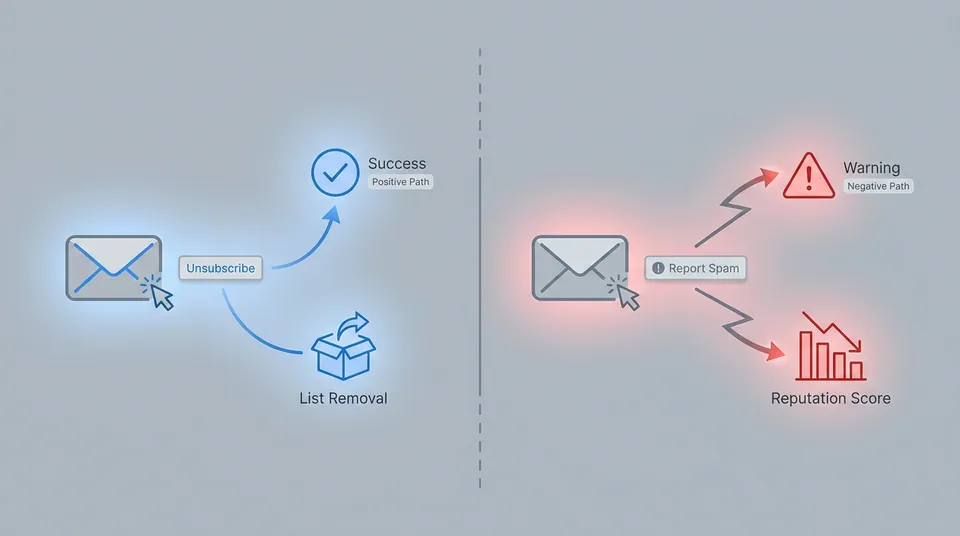
To prevent spam complaints, you must understand the psychological and technical triggers that lead recipients to mark messages as spam:
- Inability to Find the Unsubscribe Link: If your unsubscribe link is hidden in tiny 8pt gray text at the bottom of the email, frustrated recipients will take the easiest path available: clicking the prominent "Report Spam" button in their email client header.
- Unrecognized Sender Name or Unexpected Frequency: If a subscriber signed up for a monthly newsletter but starts receiving daily promotional blasts from an unfamiliar sender name, they will treat the message as unsolicited.
- Purchased, Scraped, or Third-Party Lists: Sending emails to contacts who never explicitly opted in to receive messages from your specific brand guarantees immediate complaint spikes exceeding 1.0%.
- Irrelevant Content or Altered Consent: Sending content that strays far from what the subscriber signed up for (e.g., sending crypto promotions to a B2B SaaS subscriber list) causes immediate frustration.
- Stale Lists & Subscriber Decay: Inactive contacts who haven't opened an email in 6 to 12 months often forget they ever subscribed. When an unexpected email arrives months later, they report it as spam.
9 Actionable Strategies to Reduce Email Spam Complaints Below 0.1%
Here are nine operational strategies to eliminate spam complaints and maintain flawless domain reputation.
The playbook for mitigating spam complaints can be broken down into three layers:
- Pre-Send Layer: Focuses on list quality and consent. This includes list validation, using double opt-in, and checking permissions.
- In-Inbox UX Layer: Improves the user's experience within their inbox. Key elements are one-click unsubscribe (RFC 8058), clear sender names and subjects, and an accessible preference center.
- Post-Send Monitors: Involves tracking and reacting to sender reputation signals. This means using Google Postmaster Tools, automating suppression based on Feedback Loops (FBL), and sunsetting unengaged subscribers.
Strategy 1: Implement One-Click Unsubscribe (RFC 8058 & List-Unsubscribe Headers)
The single most effective technical defense against spam complaints is the implementation of RFC 8058 List-Unsubscribe headers.
When configured correctly, email clients like Gmail, Yahoo, and Apple Mail render a clear, native "Unsubscribe" button directly next to your sender name at the top of the email interface.
#### How List-Unsubscribe Headers Work
An RFC 8058 compliant email header includes two specific directives:
List-Unsubscribe: <https://mail.sendgrove.com/unsubscribe?id=12345>, <mailto:unsubscribe@sendgrove.com?subject=unsubscribe_12345>
List-Unsubscribe-Post: List-Unsubscribe=One-Click
When a user clicks the native "Unsubscribe" button in Gmail or Yahoo:
- The email client sends an automated HTTPS POST request to your unsubscribe endpoint behind the scenes.
- The user is immediately unsubscribed without being forced to visit a landing page, complete a survey, or log into an account.
- Result: The user gets their desired outcome in one click, eliminating any incentive to click "Report Spam."
All emails sent through Sendgrove automatically include compliant RFC 8058 headers out of the box, ensuring full alignment with Google and Yahoo sender guidelines.
Strategy 2: Perform Pre-Send Email List Validation & Risk Screening
Invalid email addresses, catch-all domains, spam traps, and complaint-prone accounts are major sources of deliverability issues. Sending campaigns to stale or unverified lists frequently leads to high bounce rates and complaint spikes.
Before launching any marketing campaign, run your list through a real-time email validation tool to screen out high-risk contacts.
The validation process works by taking a raw contact list and filtering it through a validation engine, which removes or suppresses problematic addresses to produce a clean, campaign-ready list.
#### What Pre-Send Validation Detects:
- Known Spam Complainers: Accounts associated with frequent FBL reports or spam reporting behavior.
- Spam Traps & Honeytokens: Inactive or recycled addresses maintained by anti-spam organizations to trap indiscriminate senders.
- Invalid & Malformed Syntax: Domain typos (e.g.,
@gnail.com) and non-existent mailboxes that cause hard bounces. - Disposable & Temporary Emails: Burner addresses created for single-use signups that quickly go stale.
By stripping out risky addresses prior to sending, you prevent complaint spikes before they happen. Sendgrove includes built-in email verification directly inside your campaign workflow, giving you full protection without needing third-party integrations.
Strategy 3: Set Up Google Postmaster Tools & ISP Feedback Loops (FBL)
You cannot manage what you do not measure. Setting up comprehensive monitoring across all major mailbox providers is essential for tracking complaint metrics in real time.
#### Setting Up Google Postmaster Tools (GPT)
- Navigate to Google Postmaster Tools and log in with your domain admin account.
- Add your sending domain (e.g.,
sendgrove.com) and verify ownership by adding a DNS TXT or CNAME record provided by Google. - Monitor the Spam Rate dashboard daily. GPT provides a historical graph showing user-reported spam rates specifically for Gmail users.
Monitoring your spam rate in Google Postmaster Tools will show your performance against key thresholds. A rate below 0.10% is required, but a healthy rate is under 0.02%. Any spikes above 0.10% require immediate attention, and exceeding the 0.30% critical threshold will lead to severe deliverability issues.
#### Enrolling in Traditional ISP Feedback Loops (FBL)
For non-Gmail providers (Yahoo, Microsoft Outlook, Comcast, Virgin Media), sign up for their official Feedback Loop services:
- Yahoo Feedback Loop: Integrates via DKIM domain verification to pass complaint notices back to your ESP.
- Microsoft Smart Network Data Services (SNDS) & JMRP: Tracks IP reputation and complaint data across Outlook, Hotmail, and Live.com.
When an FBL report is received, your email marketing software must immediately suppress that address from future mailings. Sendgrove handles FBL suppression automatically, ensuring that complaining contacts are permanently unsubscribed across all future campaign lists.
Strategy 4: Build a Transparent Email Preference Center
Subscribers often hit "Report Spam" not because they dislike your brand, but because they receive emails too frequently or want only specific content topics (e.g., product updates instead of daily marketing promotions).
Instead of offering an all-or-nothing unsubscribe, direct recipients to an accessible preference center where they can customize their email frequency and topic selections.
A good preference center might include these options:
| Preference Category | Options | | :--- | :--- | | Content Type | [x] Weekly Product Updates, [ ] Daily Promotions, [x] Monthly Reports | | Frequency | ( ) As it happens, (•) Weekly digest, ( ) Monthly summary | | Actions | [ Pause All Emails for 30 Days ], [ Unsubscribe From All Lists ] |
#### Key Preference Center Features That Reduce Complaints:
- "Snooze" or Pause Option: Allow contacts to pause emails for 30 or 60 days during busy periods (e.g., holidays).
- Frequency Controls: Offer weekly digests or monthly summaries instead of individual promotional blasts.
- Granular Topic Selection: Let users opt out of promotional sales while keeping essential product updates and security notices active.
Implementing email preference center best practices gives your audience granular control over their inbox, converting potential spam complaints into peaceful opt-downs.
Strategy 5: Authenticate Your Sending Domain (SPF, DKIM, & DMARC)
Proper email authentication is no longer optional. Both Google and Yahoo strictly enforce SPF, DKIM, and DMARC alignment for all domain senders.
If your domain lacks authentication, malicious actors can spoof your sending address to launch spam or phishing attacks. When unsuspecting recipients mark those spoofed emails as spam, the complaint marks hit your domain reputation record.
Authentication relies on three key DNS records tied to your sending domain: SPF validates the sending IP, DKIM provides a cryptographic signature to prevent tampering, and DMARC enforces alignment and tells ISPs how to handle failures.
#### The Essential Authentication Triad:
- SPF (Sender Policy Framework): A DNS record specifying which server IP addresses are authorized to send email on behalf of your domain.
- DKIM (DomainKeys Identified Mail): Adds an encrypted cryptographic signature to your email headers, verifying that the email was sent by your domain and was not altered in transit.
- DMARC (Domain-based Message Authentication, Reporting, and Conformance): Sets policies instructing receiving servers how to handle unauthenticated mail (
p=none,p=quarantine, orp=reject) and sends aggregate compliance reports to your domain admin.
For complete, step-by-step setup instructions, refer to our SPF, DKIM, and DMARC authentication guide.
Strategy 6: Maintain Strict Permission & Double Opt-In Protocols
The fastest way to ruin a domain's deliverability is sending emails without explicit consent.
#### Single Opt-In vs. Double Opt-In (DOI)
While Single Opt-In (SOI) maximizes form conversion rates, it also exposes your list to mistyped addresses, spambots, and fake signups.
Implementing Double Opt-In (DOI) adds a critical verification step:
The Double Opt-In (DOI) flow is a sequence: A user fills out a form, receives a confirmation email, and is only added to the active list after clicking the confirmation link.
- The subscriber submits their email on your opt-in form.
- An automated transactional email is sent containing a unique confirmation link.
- The subscriber must click the link to confirm their explicit interest before being added to active promotional lists.
Double opt-in guarantees that every contact on your list owns the inbox, wants your emails, and explicitly expects your messages—dramatically lowering complaint rates.
Strategy 7: Optimize Sender Recognition & Subject Line Transparency
Recipients make split-second decisions when skimming their inbox. If they do not recognize who sent an email or feel deceived by the subject line, they will mark it as spam immediately.
#### Sender Recognition Best Practices:
- Use a Consistent "From" Name: Combine a recognizable personal name with your brand name (e.g.,
Alex from SendgroveorSendgrove Team). Avoid switching "From" names across campaigns. - Match "From" Address with Your Domain: Never send marketing campaigns from free webmail addresses (
@gmail.comor@yahoo.com) or generic unbranded domains. - Avoid Deceptive Subject Lines: Never use misleading prefixes like
Re:,Fwd:, or fake urgent alerts (URGENT: Your account details). While deceptive subject lines may temporarily boost open rates, they trigger immediate spam complaints as soon as the email is opened.
Strategy 8: Implement an Automated Unengaged Subscriber Sunset Policy
Sending emails to unengaged contacts who haven't opened or clicked a message in 90 to 180 days is a primary driver of deliverability decline. As engagement drops, inbox providers gradually demote your messages from the inbox to the spam folder.
Eventually, when an unengaged subscriber checks their spam folder or receives a rare win-back blast, they click "Report Spam" to stop future sends.
A typical subscriber lifecycle progresses from Active (0-90 days, regular sends) to Slipping (90-180 days, re-engagement sequence), then to Unengaged (180+ days, re-validation attempt), and finally to Sunset/Suppressed (permanent stop).
#### Building an Automated Sunset Workflow:
- Segment Unengaged Contacts: Create a dynamic segment in Sendgrove Email Marketing for contacts who have opened 0 emails in the last 120 days.
- Launch a Re-Engagement Drip: Trigger a 2-step automated sequence using automated email sequences with clear subject lines like "Should we say goodbye?" or "Do you still want these updates?"
- Automate Suppression: If the contact does not open or click the re-engagement emails within 14 days, automatically change their status to
UnsubscribedorSunset.
To clean out inactive addresses and protect your domain reputation, review our guide on removing spam traps from your email list.
Strategy 9: Monitor Campaign Analytics & Adjust Frequency
High email frequency is a leading cause of subscriber fatigue and spam complaints. If your unsubscribe or complaint rate spikes on specific days of the week, your campaign frequency may be too aggressive.
#### Campaign-Level Metrics to Track:
- Spam Complaints Per Campaign: Any single campaign generating more than 1 complaint per 1,000 delivered requires an immediate post-mortem audit.
- Unsubscribe-to-Complaint Ratio: Aim for a ratio of at least 10 unsubscribes for every 1 spam complaint. If complaints approach or exceed unsubscribes, your unsubscribe link is too difficult to find.
- Segment Performance: Monitor complaints separately across new signups vs. core loyal customers.
To understand the difference between spam filtering and direct complaint signals, read our detailed playbook on how to keep emails out of spam folders.
How to Triage a High Spam Complaint Spike (Step-by-Step Recovery Workflow)
If your Google Postmaster Tools dashboard or ESP reports a sudden complaint spike exceeding 0.30%, follow this emergency 4-phase recovery protocol immediately:
The recovery workflow has four phases: 1. Pause active campaigns, 2. Audit to find the source, 3. Clean the list via validation and suppression, and 4. Recover by sending to high-engagement segments first.
Phase 1: Immediately Pause Active Campaign Blasts
Do not send additional promotional blasts while your complaint rate is above 0.30%. Continuing to send while flagged will severely lock down your domain reputation and lead to prolonged spam filtering.
Phase 2: Audit Recent Acquisition Sources & Campaign Data
Identify the specific list, form, or segment responsible for the complaint surge. Ask:
- Did you import a new external contact list or partner lead file?
- Was there a spambot attack on an unprotected opt-in form?
- Did you send an aggressive sales email to a long-unengaged segment?
Phase 3: Validate & Suppress High-Risk Contacts
Run the affected contact list through Sendgrove Email Validation to remove invalid, inactive, and complaint-prone addresses. Immediately move all FBL complaints and unengaged contacts (no opens in 90+ days) into a permanent suppression list.
Phase 4: Resume Sending to High-Engagement Segments Only
Re-enter the inbox by sending strictly to your most active subscribers (contacts who opened or clicked an email in the last 30 days). Once Google Postmaster Tools reflects a green complaint rate below 0.05% for 7 consecutive days, gradually expand send volumes back to standard segments.
Conclusion & Actionable Takeaways
Maintaining an email spam complaint rate below 0.10% is essential for protecting your sender reputation and ensuring your messages reach the inbox. By moving from reactive cleanup to proactive list hygiene, you safeguard your domain against costly deliverability penalties.
Key Takeaways Checklist:
- Verify that your emails include compliant RFC 8058 List-Unsubscribe headers for one-click opt-outs.
- Monitor Google Postmaster Tools weekly to catch complaint spikes before they impact inbox placement.
- Run pre-send email validation on all contact lists to remove invalid, catch-all, and complaint-prone addresses.
- Configure SPF, DKIM, and DMARC authentication DNS records on your sending domain.
- Build an automated sunset workflow to suppress contacts who haven't opened an email in 90 to 120 days.
- Provide a transparent email preference center allowing subscribers to reduce send frequency rather than mark spam.
Ready to protect your sender reputation and clean your email list? Explore Sendgrove's transparent pricing plans to start validating your lists and automating your campaigns today.
FAQ
What is a normal email spam complaint rate?
A normal email spam complaint rate for permission-based marketing is below 0.05% (fewer than 1 complaint per 2,000 delivered messages). Google and Yahoo enforce a strict upper limit of 0.10% (1 complaint per 1,000 delivered messages). Any complaint rate exceeding 0.30% is considered critical and will result in immediate spam folder placement or domain throttling.
Why does Google Postmaster Tools show a higher complaint rate than my ESP dashboard?
Google Postmaster Tools measures complaint rates based on user actions in Gmail webmail and mobile apps divided by emails delivered to Gmail inboxes. ESP dashboards rely on traditional Feedback Loop (FBL) reports, which Gmail does not share directly with ESPs for privacy reasons. As a result, Google Postmaster Tools provides the true complaint rate for Gmail recipients, whereas your ESP dashboard reflects non-Gmail FBL data.
Does unsubscribing count as a spam complaint?
No. An unsubscribe is a neutral, compliant opt-out request where the user clicks your provided link to leave your list. Mailbox providers view unsubscribes as responsible list management. In contrast, a spam complaint occurs when a user clicks the inbox provider's native "Report Spam" button, which directly penalizes your domain reputation.
How long does it take to recover from a high spam complaint rate?
Recovering from a spam complaint spike typically takes 7 to 21 days of consistent, high-engagement sending. Mailbox providers continuously evaluate domain reputation over rolling 30-day windows. By immediately pausing unengaged segments, validating your list, and sending strictly to active subscribers, your domain complaint rate will return to healthy levels as new positive engagement signals accumulate.
Can I remove spam complaints from my domain record?
No. Once a recipient clicks "Report Spam," that event is logged by the receiving ISP and cannot be retroactively erased or challenged. However, by automatically suppressing that contact via Feedback Loops so they never receive another email, you prevent cumulative future complaints from further damaging your score.
How do B2B spam complaints differ from B2C complaints?
B2B complaint tracking differs because corporate email gateways (e.g., Microsoft 365, Mimecast, Proofpoint) often use automated security scanners that evaluate email content before delivering it to user inboxes. B2B spam complaints occur both when individual employees flag emails and when IT administrators block domain traffic at the gateway level. Maintaining strict opt-in records and domain authentication is critical for B2B deliverability.
Does email validation automatically prevent spam complaints?
Email validation significantly reduces spam complaints by detecting and removing known complainers, spam traps, syntax errors, and inactive addresses before you launch a campaign. However, email validation must be combined with good sending practices—such as explicit consent, clear sender branding, and one-click unsubscribe links—to achieve complete protection.
How does Sendgrove help keep spam complaint rates below 0.1%?
Sendgrove provides an end-to-end deliverability infrastructure designed to keep spam complaints near zero. This includes automatic inclusion of RFC 8058 one-click unsubscribe headers, built-in pre-send list validation to screen out risky addresses, automated Feedback Loop suppression, and real-time campaign analytics to monitor subscriber engagement.