Blog
Hard Bounce vs. Soft Bounce: Understanding the Key Differences
What's the difference between a hard and soft bounce? Understand the causes and learn how to manage them for better email deliverability and list hygiene.

> TL;DR: A hard bounce is a permanent email delivery failure (e.g., invalid address), which should be removed from your list immediately. A soft bounce is a temporary failure (e.g., full mailbox), which may resolve on its own. Managing both is critical for protecting your sender reputation and maximizing email marketing ROI.
Not every email you send will reach the inbox. Some will inevitably bounce back. Understanding the type of bounce you’re dealing with—hard or soft—is one of the most fundamental aspects of good email deliverability.
Ignoring bounces is a surefire way to damage your sender reputation, waste marketing budget, and get your messages flagged as spam. In this guide, we’ll break down the critical differences between hard and soft bounces, explore their causes, and give you an actionable plan to manage them effectively.
What Is a Hard Bounce?
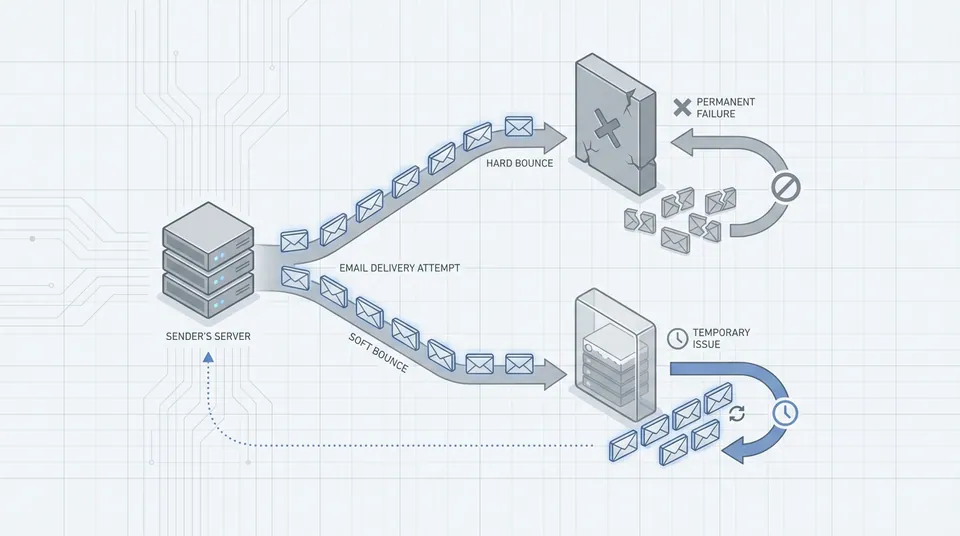
A hard bounce is a permanent, irreversible email delivery failure. It happens when you try to send an email to an address that is invalid, non-existent, or has blocked you. The receiving mail server definitively rejects the email with a “5xx” series error code, signaling that there is no chance of future delivery to this address.
Think of it like sending a letter to a house that was torn down. No matter how many times you try to resend it, the letter will never be delivered. Mailbox providers like Gmail, Yahoo, and Outlook pay close attention to how many hard bounces your campaigns generate. A high hard bounce rate is a major red flag that you might be using old, purchased, or low-quality email lists, which directly harms your sender reputation.
Common Causes of Hard Bounces
- Invalid Email Address: The most common cause. The address was entered incorrectly (e.g.,
jane.doe@gamil.cominstead ofgmail.com) or it’s completely fabricated. - Non-Existent Domain: The domain part of the email address (the part after the
@) doesn’t exist or is misspelled. - Recipient’s Server Has Blocked You: The recipient’s email server has decided to permanently block all emails coming from your domain or IP address.
- Fake or Disposable Addresses: A user signed up with a temporary address from a service like Guerilla Mail to avoid receiving future communication.
Because these failures are permanent, you must remove all hard-bounced addresses from your mailing list immediately. Continuing to send to them is a clear signal to ISPs that you aren’t practicing good list hygiene, which will severely impact your ability to reach the inbox for your valid subscribers.
At Sendgrove, our system automatically identifies and suppresses hard bounces from future sends to protect your account’s reputation. But proactive list hygiene is always the best strategy. Regularly cleaning your list with an email validation service before you send is the most effective way to minimize hard bounces.
What Is a Soft Bounce?
A soft bounce is a temporary email delivery failure. It occurs when the recipient’s email address is valid, but their mail server rejects the email for a temporary reason. The server communicates this with a “4xx” series error code, indicating that you should try sending the email again later.
Unlike a permanent hard bounce, a soft bounce doesn’t automatically mean the email address is bad. It’s more like getting a busy signal on a phone call—the person is there, they just can’t answer right now.
Common Causes of Soft Bounces
- Mailbox is Full: The recipient has too many emails and can’t accept any new ones.
- Server is Down or Offline: The recipient’s email server is temporarily unavailable or overloaded with messages.
- Email Message is Too Large: Your email, including attachments and embedded images, exceeds the size limit set by the recipient’s provider.
- Autoreply/Out of Office: While not technically a bounce, some systems may report auto-replies in a way that gets categorized as a soft bounce.
Most Email Service Providers (ESPs), including Sendgrove, will attempt to resend an email that soft-bounces a few times over a period of 24-72 hours. If the email continues to fail after repeated attempts, it may then be converted to a hard bounce and suppressed.
While a few soft bounces are normal and not an immediate cause for alarm, a high or persistent soft bounce rate for a specific address can signal a problem. For example, an address that consistently soft-bounces for a month could indicate an abandoned mailbox, and it may be wise to remove it.
Hard Bounce vs. Soft Bounce: At a Glance
Here’s a simple breakdown of the key differences.
| Feature | Hard Bounce | Soft Bounce | |---|---|---| | Nature | Permanent Failure | Temporary Failure | | Error Code | 5xx Series | 4xx Series | | Cause | Invalid address, bad domain | Full mailbox, server down | | Impact | High, immediate reputation damage | Low, unless persistent | | Action | Remove immediately | Monitor and retry automatically |
Why Managing Bounces is Crucial for Your Business
Your bounce rate is one of the most important metrics mailbox providers use to determine your sender reputation. A high bounce rate tells them that you are not maintaining a clean, engaged email list.
- Protects Sender Reputation: Internet Service Providers (ISPs) track your bounce rates. A hard bounce rate climbing towards even 1-2% can be a major red flag that gets your future emails sent straight to the spam folder, or blocked entirely.
- Improves Campaign Performance: By removing undeliverable addresses, you get a more accurate picture of your true engagement metrics (open rates, click-through rates). This leads to better decision-making for your email marketing strategy.
- Reduces Costs: Most ESPs charge based on the number of contacts or the volume of emails sent. Cleaning your list of bounced addresses means you stop paying to send emails that have zero chance of being delivered.
How to Manage and Reduce Bounces
Managing your bounce rate isn’t a one-time fix; it’s an ongoing process of list hygiene. Here is a practical workflow to keep your bounces under control.
1. Use a Double Opt-In (DOI) Process
When a new user subscribes, send them a confirmation email with a link they must click to be added to your list. This strongly ensures the email address is valid, accessible, and owned by an engaged user, effectively eliminating most hard bounces from your signup process from the start.
2. Validate Your Email List Before You Send
Before any major campaign, especially to a list that hasn’t been mailed in a while, run it through an email validation service. This is the single most effective way to identify and remove invalid addresses (potential hard bounces) before they can damage your reputation.
Sendgrove’s platform has email validation built-in. You can clean your lists right inside the app, and every account on a free plan gets monthly credits to help you start practicing good hygiene.
3. Monitor Your Bounce Reports
Pay attention to the analytics after every send. Look for trends:
- Sudden spike in hard bounces? You may have imported a bad list segment.
- Consistent soft bounces from one domain? Their server might be having issues.
- An address that soft-bounces for weeks? It’s likely abandoned. Time to remove it.
4. Segment and Sunset Inactive Subscribers
Create a segment of users who haven’t opened or clicked an email in the last 6-12 months. These addresses are more likely to become invalid (e.g., when someone changes jobs). Run a re-engagement campaign to win them back, and be prepared to remove those who don’t respond. This practice, often called “sunsetting,” keeps your list fresh and your engagement rates high.
Frequently Asked Questions (FAQ)
What is a good bounce rate?
Many email programs aim to keep their total bounce rate under 2%. More importantly, your hard bounce rate should be kept as close to 0% as possible, ideally well under 0.5%. A consistent hard bounce rate above 1% is a serious issue that needs immediate attention.
Can a soft bounce become a hard bounce?
Yes. Most ESPs have a policy where if an email address soft-bounces a certain number of times consecutively (e.g., 3-5 times over a few weeks), they will re-categorize it as a hard bounce and suppress it to protect your sender reputation.
Does a high bounce rate mean my emails are going to spam?
Not directly, but they are strongly related. A high bounce rate damages your sender reputation. A poor sender reputation is a key factor that mailbox providers use to decide whether to deliver your email to the inbox or the spam folder.
Should I remove soft bounces from my list?
Not immediately. Soft bounces are temporary. You should only remove an address that soft-bounces consistently over a long period (e.g., several weeks), as this suggests the temporary issue has become permanent (like an abandoned account).
How can I check if an email will bounce before I send?
The only reliable way is to use a real-time email verification service. These tools perform a series of checks (syntax, domain, and even a non-intrusive check on the mailbox server) to determine the validity of an address. Sendgrove offers this as part of its built-in validation toolkit.