Blog
Email Preference Center Best Practices: A 2026 Guide to Reducing Unsubscribes
A complete guide to email preference center best practices. Learn how to give subscribers control, reduce list churn, and improve your overall email marketing
> TL;DR: An email preference center is a dedicated web page where subscribers control how, when, and why they receive emails from your brand. By giving subscribers granular choices—such as selecting email frequency, picking specific content topics, or temporarily pausing sends—brands reduce overall unsubscribe rates by 30% to 40%. Building a high-converting preference center requires friction-free access, clear opt-down pathways, mobile-first design, and immediate synchronization with your email marketing database.
Last updated: July 2026
When a subscriber clicks "Unsubscribe" at the bottom of an email, they rarely hate your brand entirely. In most cases, they are experiencing inbox fatigue, receiving content outside their primary interests, or struggling with poor send timing.
Without an email preference center, subscribers face a binary choice: receive every message you send or cut ties permanently. Forcing subscribers into an all-or-nothing choice inflates global unsubscribe rates, wastes list acquisition investment, and increases spam complaints when frustrated contacts cannot find a mid-ground.
An email preference center converts potential unsubscribes into tailored subscriber relationships. By giving contacts control over content categories, email frequency, and communications channels, you preserve high-intent subscriber segments while maintaining list quality and sender reputation.
What Is an Email Preference Center?
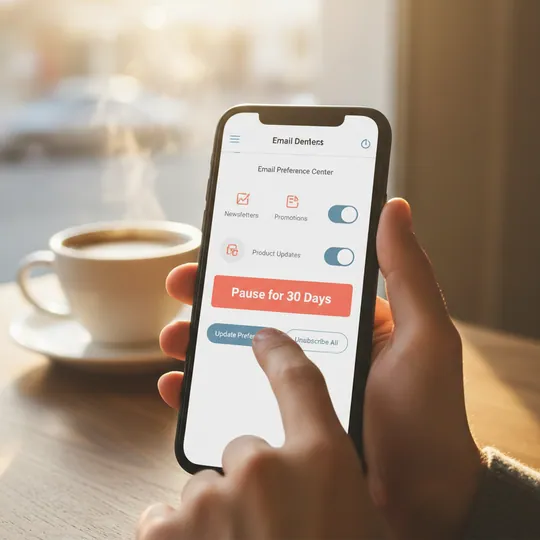
An email preference center is a web portal that allows subscribers to manage their email communication settings, including content topics, message frequency, and communication channels, without performing a full list opt-out. It serves as a self-service dashboard where contacts customize their relationship with your brand.
Unlike a standard one-click unsubscribe page, a preference center provides nuanced choices. Subscribers can modify their settings at any point in their lifecycle—whether responding to a link in an email footer, completing an onboarding sequence, or opting down during a re-engagement campaign.
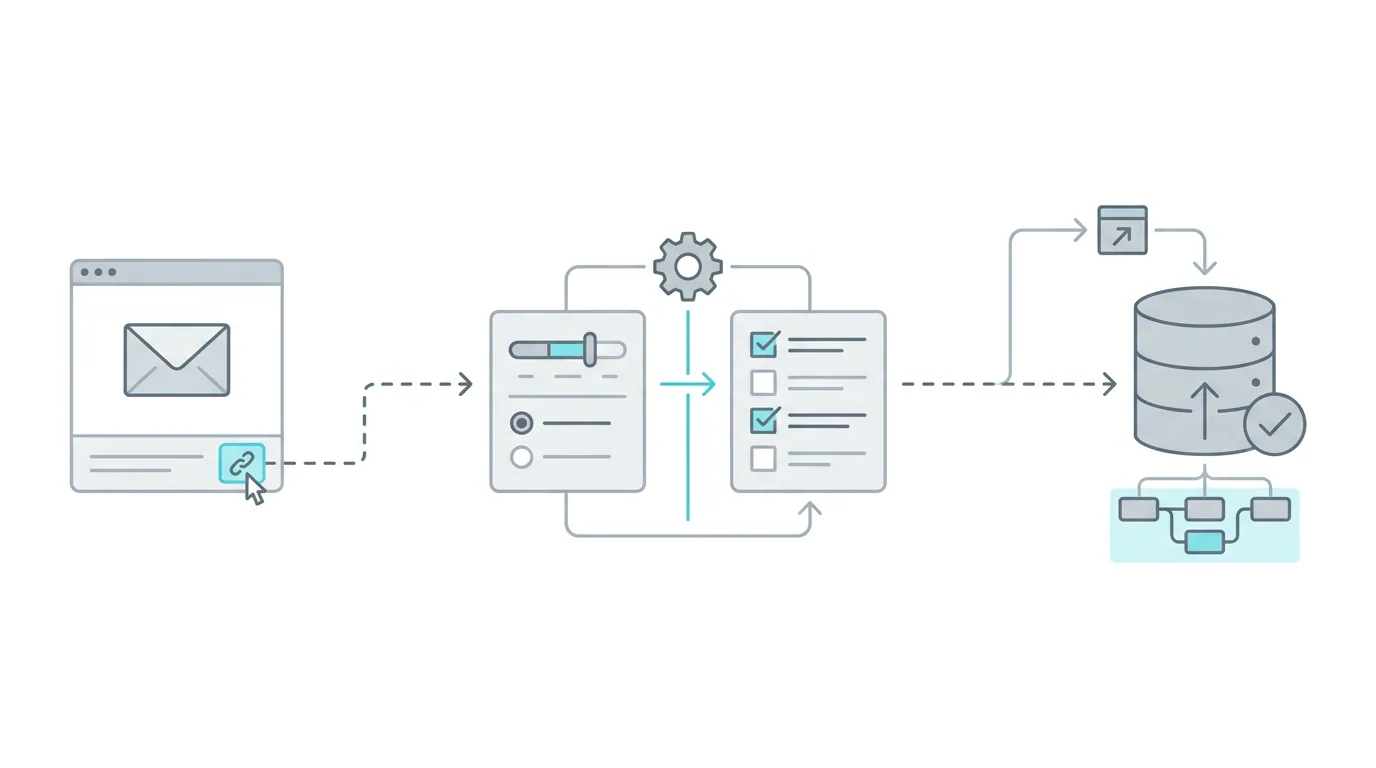
[Diagram showing the flow from a preference link to database sync.]
The Strategic Difference Between Unsubscribe Pages and Preference Centers
A basic unsubscribe page executes a single action: setting a subscriber's global status to suppressed. While one-click unsubscribe functionality remains a legal requirement under regulations like CAN-SPAM, GDPR, and CASL, relying solely on an unsubscribe page forfeits valuable subscriber intelligence.
An email preference center shifts the dynamic from passive list decay to proactive audience management:
- Granular Control over Global Opt-Out: Contacts select which email types to keep (e.g., product updates) while opting out of high-frequency promotional blasts.
- Frequency Throttling (Opt-Down): Rather than leaving the list entirely, subscribers switch from daily sends to a weekly digest or monthly summary.
- Behavioral Data Capture: When subscribers update their preferences, they explicitly declare their current interests, giving your team explicit first-party data to fuel targeting.
- Reduction in Spam Complaints: Subscribers who can easily adjust send frequency are far less likely to hit the "Report Spam" button in Gmail, Yahoo, or Outlook.
By integrating preference options into your email footer, you create a safety valve that catches dissatisfied subscribers before they generate hard list decay or mark your domain as spam.
Why Global Unsubscribes Damage Sender Reputation and List Value
Every subscriber on your list represents an acquisition cost—whether earned through paid campaigns, lead magnets, or organic web traffic. When a subscriber opts out globally, that acquisition investment drops to zero instantly.
However, the financial loss of losing a contact is only part of the damage. Unchecked global unsubscribes and unmanaged list fatigue directly harm your inbox placement and domain reputation across major mailbox providers.
The Hidden Costs of Unmanaged List Fatigue
When subscribers receive irrelevant or overly frequent emails without a preference center to adjust send settings, three negative outcomes occur:
- Increased Spam Complaints: Many users view "Report Spam" as a faster, more permanent way to clear their inbox than hunting for a tiny unsubscribe link. Google and Yahoo enforce a strict 0.3% spam complaint threshold; exceeding this limit causes inbox placement to collapse into the spam folder.
- Depressed Engagement Signals: Subscribers who feel overwhelmed stop opening or clicking your emails. Mailbox providers measure open rates, click-throughs, and scroll time. Passive unsubscription (subscribers ignoring your emails) degrades domain reputation just as severely as active opt-outs.
- Inaccurate Audience Metrics: A bloated list filled with disengaged subscribers distorts open and click-through metrics, making it difficult to evaluate campaign performance accurately.
[Diagram illustrating the decay of subscriber fatigue and reputation.]
Alignment with Modern Deliverability and Compliance Standards
Google and Yahoo's updated sender requirements mandate clear, simple unsubscription mechanisms. Mailbox providers check whether senders respect user intent quickly and transparently.
An email preference center complies with these requirements while offering a positive user experience:
- One-Click Unsubscribe Header Support: A compliant preference center works alongside List-Unsubscribe headers (RFC 8058), ensuring mailbox clients can execute an automated opt-out while the email body offers granular preference links.
- Instant Database Updates: When a contact changes their preferences, changes must sync immediately with your email marketing platform to prevent accidental sends that trigger complaints.
- Consent Record Maintenance: Modern preference portals track opt-in dates, frequency changes, and category selections, creating a verifiable audit trail for GDPR and CASL compliance.
By giving subscribers a clear, easy-to-use preference portal, you satisfy legal mandates while protecting your sending domain from avoidable deliverability penalties.
The 5 Core Components of an Effective Email Preference Center
To build an email preference center that successfully retains subscribers, you must balance simplicity with flexibility. Giving users too many choices creates decision paralysis, while offering too few choices fails to solve their inbox fatigue.
A high-performing preference center integrates five essential functional modules.
1. Frequency Management (Opt-Down Controls)
Send frequency is the number one reason subscribers opt out of email lists. Offering frequency throttling allows subscribers to stay connected on a schedule that fits their daily workflow.
- Daily Digest / Real-Time Sends: Best for active users, breaking news, or core community members.
- Weekly Summary: The most popular opt-down choice. Consolidates multiple promotional or educational messages into a single, high-value weekend update.
- Monthly Newsletter: Ideal for casual readers who only want major product announcements, quarterly reports, or top-level updates.
2. Content and Category Segmentation
Subscribers appreciate relevant content but dislike receiving messages outside their area of interest. Divide your email program into 3 to 5 distinct content categories so users can toggle specific streams on or off.
- Product Updates & Features: Release notes, new integrations, and feature walkthroughs.
- Educational Content & Guides: Blog posts, whitepapers, industry benchmarks, and how-to articles.
- Promotions & Exclusive Discounts: Flash sales, coupon codes, and special seasonal offers.
- Events, Webinars & Community: Live workshop invites, conference announcements, and local meetups.
Using precise categories connects directly with your audience segmentation features, allowing your marketing team to maintain clean, targeted subscriber lists without creating manual suppression filters.
3. Temporary Snooze or Pause Options
Life events, busy work quarters, and holidays often cause temporary email fatigue. Instead of forcing subscribers to unsubscribe completely, offer a temporary "Snooze" or "Pause" button.
- 30-Day Pause: Ideal during vacation or peak project cycles.
- 60-Day or 90-Day Pause: Useful for seasonal buyers or temporary leave.
When a subscriber selects a snooze period, your automated platform automatically suppresses them from regular promotional blasts for the designated timeframe, then seamlessly reactivates them with a friendly "Welcome Back" message once the period ends.
4. Multi-Channel Communication Preferences
If your organization communicates across multiple channels—such as email, SMS, WhatsApp, or browser push notifications—your preference center should allow contacts to select their preferred medium for each update type.
For example, a subscriber might prefer receiving urgent account alerts via SMS, weekly educational content via email, and event reminders via WhatsApp. Centralizing these choices in one portal prevents channel overlap and reduces overall communication friction.
5. Clear, Frictionless Global Unsubscribe Option
While the goal of a preference center is subscriber retention, you must never hide or obscure the global unsubscribe option. Making the "Unsubscribe from All" button hard to find frustrates users, violates anti-spam laws, and drives contacts to mark your emails as spam.
Place a clean, visible "Unsubscribe from All Emails" button at both the top and bottom of your preference center. Position it as a standard option alongside category toggles. Respecting a user's decision to leave builds brand trust and protects your domain from unwanted complaints.
9 Email Preference Center Best Practices to Reduce Unsubscribes
Designing an email preference center requires thoughtful user experience (UX) decisions. If the portal is frustrating or slow, subscribers will bypass your options and hit global unsubscribe or report spam.
Follow these nine field-tested best practices to build a seamless, subscriber-friendly preference portal.
1. Eliminate Password Barriers with Tokenized Magic Links
Never force a subscriber to enter a password or log in to manage their email preferences. Requiring credentials introduces massive friction—most users do not remember their password for an email newsletter or promotional account.
Instead, use secure, tokenized URLs (magic links) embedded in your email footers. When a user clicks "Manage Preferences" in an email, the URL carries an encrypted subscriber token that automatically authenticates them on the preference page.
2. Pre-Populate Known Subscriber Information
When a subscriber arrives at your preference center, their email address and current preference settings should already be visible and pre-selected.
Forcing users to re-type their email address causes friction and introduces typos. If a user accidentally enters a misspelled address while attempting to adjust preferences, their original address remains active in your system, continuing to send unwanted emails and generating spam complaints.
3. Use Clear, Human-Readable Preference Labels
Avoid internal company jargon, database column codes, or obscure list names on your preference page. For example, replacing internal codes like "List_PROMO_CAT_B_v2" with clear labels like "Weekly Product Deals & Discounts" ensures subscribers understand exactly what they are selecting.
Include a brief, one-sentence description below each toggle explaining what content is included and how often it is delivered.
4. Limit Core Options to Five or Fewer Toggles
Presenting a subscriber with 15 different checkboxes creates cognitive overload. When faced with too many choices, overwhelmed users default to checking the single "Unsubscribe from All" box at the bottom.
Keep your primary preference categories between three and five clear options. Group related sub-topics under broader umbrella categories to maintain a clean, scannable interface.
5. Provide Immediate Visual Feedback Upon Update
Subscribers want confidence that their changes have taken effect immediately. When a user toggles a frequency slider or clicks "Save Preferences," display a clear success banner (e.g., "Your preferences have been updated successfully!").
Avoid requiring multi-page confirmation flows or sending unnecessary email confirmation messages that clutter the subscriber's inbox further.
6. Introduce a 30-Day "Snooze" Button as the Primary Alternative
Place a prominent 30-day Pause or Snooze button directly above the global unsubscribe option. Framing a temporary pause as a quick relief option catches subscribers during temporary inbox overwhelm.
Data across B2B and ecommerce programs shows that up to 35% of subscribers who intend to unsubscribe will choose a 30-day pause instead if it is presented as a single-click option.
7. Optimize Layout for Touch Screens and Mobile Readers
Over 60% of email opens occur on mobile devices. If a subscriber clicks "Manage Preferences" on their phone and lands on a desktop-only page with tiny checkboxes and unreadable text, they will give up and mark the message as spam.
Design your preference center with mobile-first principles:
- Use large touch targets (minimum 44x44 pixels) for buttons and toggles.
- Ensure single-column layouts that scale cleanly on mobile viewports.
- Maintain high-contrast text and scannable font sizes (minimum 16px body text).
8. Collect Qualitative Feedback on Unsubscribe (Optional 1-Click Survey)
When a subscriber chooses to opt out completely, present a brief, optional multiple-choice question asking for their reason. Keep it non-intrusive and execute the unsubscribe regardless of whether they answer.
Common feedback choices include:
- "I receive emails too frequently."
- "The content is no longer relevant to me."
- "I never signed up for this email list."
- "I prefer to follow updates on social media."
Reviewing these feedback responses monthly provides critical insights into list acquisition quality, send frequency issues, and content strategy gaps.
9. Synchronize Updates Instantly Across Your ESP Infrastructure
Subscribers expect their preference updates to take effect immediately. If a user opts out of promotional sends and receives another promotional email two hours later due to delayed database sync, they will feel ignored and register a spam complaint.
Ensure your preference portal connects directly to your core automated re-engagement workflows and email database via real-time API webhooks, ensuring suppression lists and tag changes update instantly across all active campaigns.
9 Email Preference Center Best Practices to Reduce Unsubscribes
Designing an email preference center requires thoughtful user experience (UX) decisions. If the portal is frustrating or slow, subscribers will bypass your options and hit global unsubscribe or report spam.
Follow these nine field-tested best practices to build a seamless, subscriber-friendly preference portal.
1. Eliminate Password Barriers with Tokenized Magic Links
Never force a subscriber to enter a password or log in to manage their email preferences. Requiring credentials introduces massive friction—most users do not remember their password for an email newsletter or promotional account.
Instead, use secure, tokenized URLs (magic links) embedded in your email footers. When a user clicks \"Manage Preferences\" in an email, the URL carries an encrypted subscriber token that automatically authenticates them on the preference page.
2. Pre-Populate Known Subscriber Information
When a subscriber arrives at your preference center, their email address and current preference settings should already be visible and pre-selected.
Forcing users to re-type their email address causes friction and introduces typos. If a user accidentally enters a misspelled address while attempting to adjust preferences, their original address remains active in your system, continuing to send unwanted emails and generating spam complaints.
3. Use Clear, Human-Readable Preference Labels
Avoid internal company jargon, database column codes, or obscure list names on your preference page. For example, replacing internal codes like \"List_PROMO_CAT_B_v2\" with clear labels like \"Weekly Product Deals & Discounts\" ensures subscribers understand exactly what they are selecting.
Include a brief, one-sentence description below each toggle explaining what content is included and how often it is delivered.
[Image showing an example of clear labeling in a preference center.]
4. Limit Core Options to Five or Fewer Toggles
Presenting a subscriber with 15 different checkboxes creates cognitive overload. When faced with too many choices, overwhelmed users default to checking the single \"Unsubscribe from All\" box at the bottom.
Keep your primary preference categories between three and five clear options. Group related sub-topics under broader umbrella categories to maintain a clean, scannable interface.
5. Provide Immediate Visual Feedback Upon Update
Subscribers want confidence that their changes have taken effect immediately. When a user toggles a frequency slider or clicks \"Save Preferences,\" display a clear success banner (e.g., \"Your preferences have been updated successfully!\").
Avoid requiring multi-page confirmation flows or sending unnecessary email confirmation messages that clutter the subscriber's inbox further.
6. Introduce a 30-Day \"Snooze\" Button as the Primary Alternative
Place a prominent 30-day "Pause" or "Snooze" button directly above the global unsubscribe option. Framing a temporary pause as a quick relief option catches subscribers during temporary inbox overwhelm.
Data across B2B and ecommerce programs shows that up to 35% of subscribers who intend to unsubscribe will choose a 30-day pause instead if it is presented as a single-click option.
7. Optimize Layout for Touch Screens and Mobile Readers
Over 60% of email opens occur on mobile devices. If a subscriber clicks \"Manage Preferences\" on their phone and lands on a desktop-only page with tiny checkboxes and unreadable text, they will give up and mark the message as spam.
Design your preference center with mobile-first principles:
- Use large touch targets (minimum 44x44 pixels) for buttons and toggles.
- Ensure single-column layouts that scale cleanly on mobile viewports.
- Maintain high-contrast text and scannable font sizes (minimum 16px body text).
8. Collect Qualitative Feedback on Unsubscribe (Optional 1-Click Survey)
When a subscriber chooses to opt out completely, present a brief, optional multiple-choice question asking for their reason. Keep it non-intrusive and execute the unsubscribe regardless of whether they answer.
Common feedback choices include:
- \"I receive emails too frequently.\"
- \"The content is no longer relevant to me.\"
- \"I never signed up for this email list.\"
- \"I prefer to follow updates on social media.\"
Reviewing these feedback responses monthly provides critical insights into list acquisition quality, send frequency issues, and content strategy gaps.
9. Synchronize Updates Instantly Across Your ESP Infrastructure
Subscribers expect their preference updates to take effect immediately. If a user opts out of promotional sends and receives another promotional email two hours later due to delayed database sync, they will feel ignored and register a spam complaint.
Ensure your preference portal connects directly to your core automated re-engagement workflows and email database via real-time API webhooks, ensuring suppression lists and tag changes update instantly across all active campaigns.
Email Preference Center Design & UX Comparison Table
Choosing the right design architecture for your email preference center impacts conversion rates, mobile usability, and maintenance overhead. Different organizations require different implementations based on tech stack maturity and customer touchpoints.
Key Preference Center Architectural Patterns
- Dedicated Web Portal Page: A standalone landing page hosted on your domain or ESP subdomain (e.g.,
preferences.yourbrand.com). Offers maximum layout customization, deep category toggles, and rich multi-channel options. - In-App / Account Settings Integration: Built directly inside your SaaS dashboard or member account portal. Best for logged-in software users, allowing them to manage transactional, security, and promotional preferences in one place.
- Modal / Lightbox Overlay: A lightweight popup that opens directly over your web page when the tokenized link is clicked. Fast to load and ideal for quick single-click adjustments like 30-day snoozing.
Architecture and Capability Comparison
The table below compares traditional single-page unsubscribe pages, standard ESP preference portals, and modern preference architectures like Sendgrove.
| Feature / Capability | Legacy Unsubscribe Page | Traditional ESP Preference Center | Modern Sendgrove Preference Architecture | | :--- | :--- | :--- | :--- | | Primary Function | Global list suppression only | Basic checkbox opt-outs | Granular frequency, category & snooze controls | | Authentication Requirement | None (or manual email input) | Manual login or basic cookie | Secure tokenized magic links (zero login) | | Frequency Throttling | Not available | Limited static lists | Flexible daily, weekly, and monthly digests | | Temporary Pause / Snooze | Not available | Rare / requires manual custom code | Built-in 30, 60, 90-day automated snooze | | Mobile Responsiveness | Basic text page | Variable / often desktop-first | 100% mobile-optimized touch interface | | Real-Time ESP Sync | Batch updates | Periodic sync | Instant real-time webhook & database sync | | List Validation Integration | None | Separate add-on module | Integrated list validation on opt-in & updates | | Impact on Spam Complaints | High (users hit spam if hidden) | Moderate | Up to 40% reduction in spam complaints | | Cost Model | Included in basic plans | Per-contact contact tiers | Transparent credit-based pricing |
Design and Visual Hierarchy Best Practices
When designing the visual layout of your preference page, follow these three structural guidelines:
- Primary Action Prominence: Place the most desirable retention options—such as "Switch to Weekly Digest" or "Pause for 30 Days"—at the top in clear, callout cards.
- Secondary Category Toggles: List topic categories clearly below the primary callouts with toggle switches or checkboxes that default to the user's active settings.
- Clear Save Confirmation: Use a high-visibility primary button labeled "Save My Preferences" or "Update Settings," paired with a low-contrast link at the bottom labeled "Unsubscribe from all marketing emails."
[Image showing an example of a well-structured preference page layout.]
This clean visual hierarchy guides subscribers toward retention options while respecting their right to opt out entirely if desired.
FAQ: Email Preference Center Strategy & Compliance
What's the difference between an email preference center and a regular unsubscribe page?
A regular unsubscribe page only offers a single option: to globally opt out from all future emails. An email preference center provides granular controls, allowing subscribers to choose email frequency, select content topics, and pause communications without fully unsubscribing, which significantly improves list retention.
Is a preference center a replacement for a one-click unsubscribe link?
No. You must always provide a clear and conspicuous one-click unsubscribe option in every email to comply with laws like CAN-SPAM and GDPR. A preference center is an enhancement that you offer alongside the global unsubscribe link, not a replacement for it.
How many preference options should I offer?
The sweet spot is between 3 to 5 main content categories. Offering too many choices can lead to decision fatigue, causing users to abandon the page and just unsubscribe from everything. Group similar topics under broader headings to keep the interface clean and easy to navigate.
Should I require users to log in to access the preference center?
Absolutely not. Requiring a login is a major point of friction that will drive users to mark your email as spam instead. Use secure, tokenized "magic links" in your email footers that automatically and securely identify the subscriber.
How quickly do preference changes need to be processed?
Instantly. Any delay between a subscriber updating their preferences and your database reflecting those changes can lead to accidental sends, which erodes trust and generates spam complaints. Use real-time API webhooks to ensure immediate synchronization with your ESP.
Can a preference center help reduce spam complaints?
Yes, significantly. By giving subscribers an easy way to reduce email frequency or opt out of specific topics, you provide a safety valve that prevents them from using the "report spam" button as an alternative unsubscribe mechanism. Well-designed preference centers can reduce spam complaints by up to 40%.
What is the ROI of building a custom preference center?
The ROI comes from three main areas: reduced list churn (retaining subscribers who would have otherwise opted out), improved sender reputation (higher engagement signals from a more targeted list), and lower spam complaint rates (avoiding deliverability penalties). Retaining just a small percentage of at-risk subscribers provides a measurable return on investment.
Measuring the ROI of Your Preference Center
While building a custom preference center requires an initial investment in design and development, the return on investment (ROI) is significant and measurable. The value is realized through improved subscriber retention, enhanced deliverability, and more accurate audience data.
Key Metrics to Track
- Unsubscribe Rate Reduction: Compare your global unsubscribe rate from the 3-6 months before launching your preference center to the 3-6 months after. A well-implemented center can reduce this rate by 30-40%.
- Opt-Down Rate: Track the percentage of users who choose to reduce frequency (e.g., switch from daily to weekly) instead of globally unsubscribing. This represents directly retained subscribers.
- Snooze/Pause Rate: Measure how many users select a temporary pause. This cohort has a high reactivation rate and represents saved future engagement.
- Spam Complaint Rate: Monitor your spam complaint rate in your ESP dashboard (e.g., Google Postmaster Tools). A successful preference center directly lowers this critical metric, protecting your sender reputation.
- Engagement Lift in Preferred Categories: As subscribers self-segment into topics they care about, you should see a corresponding lift in open and click-through rates for those specific email categories.
Calculating Financial ROI
- Subscriber Lifetime Value (LTV): Assign a value to each subscriber based on your average LTV. Every subscriber retained via an opt-down or snooze action directly preserves that future revenue.
- Cost of Acquisition: Calculate your average cost to acquire a new subscriber. Retaining an existing one is almost always cheaper than acquiring a new one. The cost savings from reduced churn contribute directly to ROI.
4 Common Mistakes to Avoid When Building a Preference Center
- Hiding the Unsubscribe Link: The most critical error is making the global unsubscribe option difficult to find. This practice is illegal in many jurisdictions and is the fastest way to generate spam complaints. Always provide a clear, one-click path to a full opt-out.
- Using Confusing Internal Jargon: Don't label your preferences with internal list names like
MK_List_Q3_Promo_V4. Use clear, benefit-oriented language that subscribers can easily understand, like "Weekly Product Deals." - Forcing a Login: As mentioned, never require a password. The friction is too high. Tokenized magic links are the industry standard for a reason.
- Delayed Updates: If a user opts down to a weekly digest but receives another daily email the next day, you've broken their trust. Preference changes must be synced to your sending database in real-time.
How to Promote Your Preference Center
Simply having a preference center isn't enough; you need to make subscribers aware of it at key moments in their journey.
- Email Footer: This is the most common and essential placement. Position a clear "Manage Preferences" link directly next to your global "Unsubscribe" link.
- Welcome Series: Introduce the preference center in your onboarding or welcome email series. Let new subscribers know from day one that they are in control.
- Re-engagement Campaigns: When targeting inactive subscribers, make the preference center a primary call-to-action. A prompt like "Getting too many emails? Adjust your frequency" can reactivate a disengaged contact.
- Post-Purchase / Confirmation Emails: Transactional emails have very high open rates. Use this opportunity to remind customers they can customize the types of future communications they receive.