Blog
How to A/B Test Email Subject Lines: Step-by-Step Optimization Guide
Discover how to A/B test email subject lines step-by-step. Learn sample size calculations, winning criteria, 7 testing formulas, and deliverability best

> TL;DR: Email subject line A/B testing (or split testing) involves sending two different subject lines to a small sample of your email list (e.g., 10% Variant A and 10% Variant B) and automatically deploying the winning subject line to the remaining 80% based on open rate metrics. To run statistically valid tests, change only one variable at a time, calculate minimum required sample sizes, allow at least 2 to 4 hours for sample engagement, and verify list cleanliness beforehand so deliverability issues do not skew your results.
Last updated: July 2026
What Is Email Subject Line A/B Testing?
Email subject line A/B testing—frequently called split testing—is an empirical method of optimizing email open rates by comparing two variations of a subject line across randomized segments of an audience. Rather than guessing which headline phrasing or incentive will resonate best with subscribers, senders test two distinct hypotheses under identical delivery conditions.
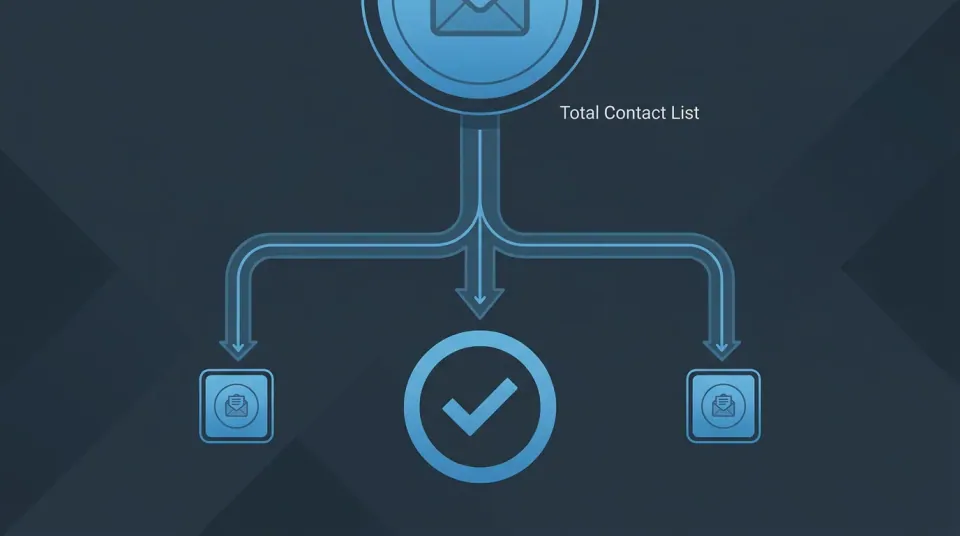
In a standard split test configuration, an email marketing platform selects a representative portion of the total contact list. That test group is split into two equal sub-groups:
- Variant A (Control): Receives the baseline or standard subject line phrasing.
- Variant B (Treatment): Receives an alternative subject line featuring a single controlled modification—such as different length, curiosity-driven framing, personalization, or emoji placement.
| Audience Segment | Percentage of List | Example Contact Count | Action / Assignment | | :--- | :--- | :--- | :--- | | Test Group A | 10% | 5,000 contacts | Receives Subject Line Variant A | | Test Group B | 10% | 5,000 contacts | Receives Subject Line Variant B | | Holdout Audience | 80% | 40,000 contacts | Receives Automatically Winning Subject Line |
During the evaluation window, the email platform tracks recipient interactions—primarily unique opens. Once statistical significance is achieved, the platform automatically routes the winning subject line to the remaining holdout segment (the remaining 80% of the list).
The Role of Preview Text (Preheader) in Subject Line Testing
A subject line never works in total isolation. In modern desktop and mobile email clients (such as Apple Mail, Gmail, and Outlook), the preview text (or preheader) appears immediately alongside or beneath the subject line in the inbox preview pane.
When conducting a subject line A/B test, you must hold the preview text constant between Variant A and Variant B. Changing both the subject line and the preview text simultaneously introduces a secondary confounding variable, making it impossible to determine which text element drove the difference in open rates.
Why Subject Line Testing Matters for Deliverability and Conversions
Subject lines serve as the initial digital gateway to your email campaign. While body copy, offer structure, and call-to-action (CTA) buttons drive clicks and revenue, those downstream conversions are mathematically impossible if subscribers scroll past your email in the inbox.
1. Maximizing Baseline Open Rates and Subscriber Reach
In competitive B2B and B2C markets, average open rates range between 20% and 35% depending on list quality, industry, and sending frequency. A well-executed split test that lifts open rates from 22% to 28% on a 100,000-subscriber list yields an additional 6,000 readers who view your message. Over a 12-month campaign schedule, compound open rate gains dramatically increase total customer touchpoints without increasing audience acquisition costs.
2. Protecting Positive Engagement Signals for Deliverability
Modern inbox providers—including Google, Yahoo, and Microsoft—evaluate subscriber engagement signals when deciding whether to place messages in the primary inbox, promotions tab, or spam folder. Positive signals include:
- High unique open rates relative to industry benchmarks
- Low mark-as-spam rates (many ESPs warn when spam complaints climb toward ~0.1%)
- High read time and reply rates
When an email subject line aligns closely with audience expectations, subscribers open and read the message instead of ignoring or deleting it. Regularly sending optimized subject lines helps maintain healthy sender domain reputation, ensuring that future broadcast campaigns reach the primary inbox rather than filtering into junk folders. Maintain a clean deliverability baseline by applying proven strategies to keep emails out of spam folders.
3. Lowering Unsubscribe and Spam Complaint Velocity
Misleading, overly sensational, or clickbait subject lines may occasionally trigger a brief spike in opens, but they frequently backfire. When recipients discover that the email body copy fails to deliver on the subject line's promise, unsubscribe rates and spam complaint velocity increase rapidly. Controlled A/B testing allows marketers to identify phrasings that generate authentic interest without alienating long-term list members.
Step-by-Step Framework to Run an Email Subject Line A/B Test
Executing a reliable split test requires a structured workflow. Skipping foundational steps—such as list validation or minimum sample calculations—can lead to inconclusive data or misleading winner selection.
Step 1: Formulate a Single Variable Hypothesis
Every effective test begins with a clear hypothesis rather than random variation. Define what specific element you are testing and why you expect it to change subscriber behavior.
- Weak Test Setup:
- Variant A: "March Newsletter Issue #12"
- Variant B: "🚀 5 Secret Marketing Tips Inside!"
- Problem: Changes length, tone, emoji usage, and topic simultaneously. You will not know which factor caused the result.
- Strong Hypothesis Test Setup:
- Hypothesis: Adding specific numerical outcomes to the subject line will increase curiosity and boost open rates by 15%.
- Variant A (Control): "How we reduced list churn this quarter"
- Variant B (Treatment): "How we reduced list churn by 34% this quarter"
Step 2: Determine Your Sample Size and Test Split Ratio
A common testing mistake is selecting a sample size that is too small to yield statistically reliable conclusions. If you test two subject lines on 100 total subscribers (50 per variant), a difference of two opens could be pure statistical noise rather than a meaningful preference.
#### Sample Size Guidelines Based on List Volume
- Lists Under 5,000 Subscribers: For smaller lists, splitting 10% / 10% leaves only 500 contacts in each test group, which is often insufficient for subtle split variations. Instead, run a 50% / 50% split test across the entire list and record the winner to inform future campaign angles.
- Lists of 5,000 to 50,000 Subscribers: A 15% / 15% split (30% total test group) provides enough statistical power while preserving 70% of your audience for the winning deployment.
- Lists Over 50,000 Subscribers: A 10% / 10% split (20% total test group) yields 5,000+ contacts per variant, ensuring rapid statistical significance.
You can organize and segment your subscriber list into precise test tiers using advanced audience segmentation tools.
Step 3: Set Test Duration and Winning Criteria
Give your test sample sufficient time to interact with the email before declaring a winner. Most email opens occur within 2 to 4 hours of deployment, though B2B audiences may require up to 6 hours depending on time zones and work schedules.
#### Key Decision Metrics:
- Unique Open Rate (Primary Metric): The percentage of unique recipients who opened the email. This is the gold standard for subject line A/B tests.
- Open-to-Click Rate (Secondary Verification): Checks whether recipients who opened Variant B also clicked inside the message. If Variant B achieves higher opens but drastically lower click-through rates, the subject line may be perceived as misleading.
Step 4: Validate Your List Hygiene Before Sending
If your contact list contains invalid addresses, soft bounce clusters, or inactive spam traps, deliverability rates will fluctuate unevenly across test groups. Unequal bounce rates skew your sample sizes and distort open percentages.
Before running high-stakes split tests, run your contact list through built-in email validation to clean out invalid addresses and verify deliverability. Combining validation with effective email list segmentation strategies ensures that both Variant A and Variant B are delivered to active, real recipients.
Step 5: Send the Test and Analyze Statistical Significance
Deploy Variant A and Variant B simultaneously to avoid time-of-day bias. Modern sending infrastructure automatically handles parallel delivery.
#### Understanding Statistical Significance (p-Value)
Statistical significance measures the mathematical probability that the difference in open rates between Variant A and Variant B is real rather than random chance. Aim for a confidence level of 95% or higher before declaring a definitive winner.
| Sample Size Per Variant | Baseline Open Rate | Variant A Opens | Variant B Opens | Open Rate Difference | Statistical Confidence | Result | | :--- | :--- | :--- | :--- | :--- | :--- | :--- | | 500 | 20.0% | 100 (20.0%) | 110 (22.0%) | +2.0% | 58% | Inconclusive | | 2,500 | 20.0% | 500 (20.0%) | 575 (23.0%) | +3.0% | 96% | Statistically Significant | | 10,000 | 20.0% | 2,000 (20.0%) | 2,200 (22.0%) | +2.0% | 98% | Statistically Significant |
When a test result is inconclusive (under 95% confidence), revert to your control subject line or select the higher-performing variant while noting that the hypothesis requires further testing on a larger sample.
Step 6: Deploy the Winning Subject Line to the Remaining Audience
Once the designated test window expires (e.g., 3 hours), the automated sending system evaluates the results. The subject line with the higher statistically significant open rate is automatically applied to the holdout audience (the remaining 70% to 80% of subscribers).
After identifying winning subject line formulas, you can apply those proven phrasings to your automated workflows using Sendgrove Email Marketing and scale performance across your automated lead nurturing sequences.
7 High-Converting Subject Line Angles to Split Test
If you are unsure where to begin your testing roadmap, focus on core psychological drivers. Here are seven field-tested subject line angles that consistently produce distinct open rate variations.

1. Curiosity Gap vs. Direct Clarity
Curiosity-driven subject lines withhold key information, encouraging the subscriber to open the email to satisfy their interest. Direct subject lines state the exact benefit or offer upfront.
- Variant A (Direct Clarity): "Save 20% on all email validation credits this week"
- Variant B (Curiosity Gap): "The single metric hurting your inbox placement (and how to fix it)"
- Best Used For: Educational content, webinar invites, and product updates.
2. First-Name Personalization vs. Generic Topic Framing
Adding subscriber tokens (such as {{first_name}} or company name) creates an immediate sense of personal relevance, though overusing personalization can lose its impact over time.
- Variant A (Generic): "Top email marketing strategies for Q3 growth"
- Variant B (Personalized): "Alex, here are 3 email growth strategies for your team"
- Best Used For: Re-engagement campaigns, onboarding sequences, and event invitations.
3. Urgency and Scarcity vs. Value-First Soft Pitch
Urgency leverages time limits or limited availability, while value-first framing emphasizes long-term utility.
- Variant A (Urgency/Scarcity): "Final 4 hours: Workshop registration closes tonight"
- Variant B (Value-First): "Learn how to build automated drip sequences at your own pace"
- Best Used For: Flash sales, seasonal promotions, and registration deadlines.
4. Direct Question Format vs. Declarative Statement
Questions provoke internal cognitive processing, compelling recipients to seek the answer inside the email.
- Variant A (Statement): "How segmenting your list improves deliverability"
- Variant B (Question): "Is unsegmented email traffic lowering your open rates?"
- Best Used For: Problem-solution articles, case studies, and survey requests.
5. Emoji Usage vs. Clean Plain Text
Emojis add visual accent and color in a crowded mobile inbox, but they can occasionally trigger spam filters if overused or misaligned with professional B2B audience expectations.
- Variant A (Plain Text): "New feature announcement: Real-time API validation"
- Variant B (Emoji Accent): "⚡ New feature: Real-time API validation is live"
- Best Used For: B2C ecommerce, weekly newsletters, and community announcements.
6. Short Character Length vs. Long Detailed Phrasing
Mobile email clients often truncate subject lines longer than 35 to 40 characters. Testing short, impactful phrases against longer detailed subject lines reveals your audience's reading habits.
- Variant A (Short - 22 chars): "Quick question for you"
- Variant B (Long - 58 chars): "Can we get your feedback on our new email campaign builder?"
- Best Used For: Cold outreach, customer support follow-ups, and feedback requests.
7. Number / Statistics-Led vs. Narrative Storytelling
Concrete numbers provide tangible expectations, whereas storytelling subject lines appeal to emotion and narrative curiosity.
- Variant A (Number-Led): "5 subject line formulas that boosted opens by 42%"
- Variant B (Storytelling): "The subject line mistake that cost us 10,000 subscribers"
- Best Used For: Case studies, teardowns, and educational blog roundups.
Summary Comparison Matrix of Testing Angles
| Testing Angle | Primary Psychological Mechanism | Typical Open Rate Impact | Recommended Audience Type | | :--- | :--- | :--- | :--- | | Curiosity Gap | Information shortfall / intrigue | High (+15% to +35%) | Newsletters and educational content | | First-Name Personalization | Individual relevance | Moderate (+8% to +20%) | Onboarding and re-engagement | | Question Format | Active cognitive engagement | Moderate (+10% to +22%) | Problem-solution B2B emails | | Urgency / Scarcity | Loss aversion / FOMO | High short-term (+20% to +40%) | E-commerce sales and events | | Number-Led | Specificity and predictable value | Moderate (+12% to +25%) | Guides, case studies, listicles | | Short Subject Lines | Mobile scannability | Variable (+5% to +30%) | B2B outreach and direct updates |
Common A/B Testing Pitfalls That Skew Your Open Rate Data
Even experienced growth teams frequently fall into methodological traps that undermine test validity. Avoiding these five common mistakes ensures your data reflects actual subscriber preferences.
1. Testing Multiple Variables Simultaneously
Changing both the subject line and the preheader text—or changing subject line phrasing while sending Variant A at 9:00 AM and Variant B at 2:00 PM—destroys test isolation. When open rates diverge, you cannot isolate the causal variable. Always enforce strict single-variable isolation.
2. Declaring Winners Too Early (Ignoring Time-of-Day Dynamics)
Evaluating results after only 30 minutes often selects the variant that happened to reach early-rising subscribers first. Allow a minimum evaluation window of 2 to 4 hours so recipients across different schedules have time to check their inboxes.
3. Ignoring Deliverability Baseline Fluctuations
If Variant A contains words or punctuation patterns that trigger content-based spam filters on specific mailbox providers (such as Outlook or Yahoo), Variant A will suffer lower inbox placement. The lower open rate in that scenario reflects poor deliverability rather than audience disinterest.
Ensure your list is verified through built-in email validation before testing to eliminate bounce-related noise.
4. Over-Testing Small Audience Segments Without Statistical Power
Running split tests on lists with fewer than 1,000 active subscribers frequently yields p-values above 0.20 (less than 80% confidence). When sample sizes are small, run 50/50 full-list split tests over consecutive campaigns rather than micro-sample holds.
5. Failing to Document and Re-Test Winner Hypotheses
An A/B test result provides a snapshot of subscriber preferences at a specific point in time. Audience fatigue, seasonal shifts, and cultural trends can alter subject line performance over time. Maintain a central log of hypotheses and winning variations, and re-test core formulas every six to twelve months.
How to Automate Subject Line Testing in Sendgrove
Modern email platforms streamline split testing by removing manual calculations and complex audience splitting workflows.
With Sendgrove Email Marketing, setting up an automated subject line A/B test takes only a few clicks during campaign creation:
- Create a New Broadcast Campaign: In your Sendgrove dashboard, select "New Campaign" and toggle on A/B Split Test.
- Enter Subject Line Variations: Input Variant A and Variant B. You can also test different sender names or preview text if desired.
- Configure Your Test Sample: Choose your sample percentage (e.g., 20% total test group—10% Variant A and 10% Variant B).
- Set Evaluation Duration: Define the test window (e.g., 3 hours).
- Define Winning Logic: Select Unique Open Rate as the automated winner selection metric.
- Launch Campaign: Sendgrove automatically splits the sample audience, tracks real-time engagement via real-time email campaign analytics, determines statistical significance, and deploys the winning subject line to the remaining 80% holdout list once the test duration completes.
Frequently Asked Questions (FAQ)
What is a good sample size for email subject line A/B testing?
A reliable sample size for subject line A/B testing is at least 1,000 to 2,500 subscribers per variant (2,000 to 5,000 total test sample). For lists under 5,000 total subscribers, a 50/50 full-list split is recommended rather than a smaller sample holdout, as micro-samples lack the statistical power needed to detect subtle performance differences.
How long should I wait before selecting the winning subject line?
The standard evaluation window for subject line A/B testing is between 2 and 4 hours. Most email recipients open messages within the first few hours of delivery. Extending the test window beyond 4 to 6 hours yields diminishing returns and delays full campaign deployment unnecessarily.
Should I test subject line and preview text together?
No. You should test only one variable at a time to maintain statistical isolation. If you change both the subject line and the preview text simultaneously, you cannot determine which element was responsible for the change in open rate metrics. Keep the preview text identical across both variants when testing subject line phrasing.
What open rate difference indicates statistical significance in an A/B test?
Statistical significance depends on both sample size and open rate divergence. Generally, achieving a 95% confidence level (p-value < 0.05) indicates that the result is statistically significant. On a sample of 2,500 contacts per variant, an open rate difference of 2.5% or higher typically confirms a statistically valid winner.
Can I A/B test subject lines on automated drip sequences?
Yes. In automated email workflows (such as welcome sequences or lead nurturing drips), split testing operates on an ongoing rolling sample. The email platform sends Variant A to 50% of triggered contacts and Variant B to 50%. Once a predefined sample volume is reached (e.g., 1,000 total opens), the system automatically locks in the winning subject line for all future automation triggers.
Does subject line A/B testing affect email deliverability or sender reputation?
Running subject line A/B tests does not harm deliverability if both subject lines comply with mailbox provider guidelines. In fact, sending optimized subject lines that achieve higher engagement rates generates positive feedback signals for inbox providers (such as Google and Yahoo), which helps protect long-term domain reputation.
How often should I run subject line A/B tests?
You can safely run subject line A/B tests on every major broadcast campaign, provided your list size supports statistical significance. However, avoid over-testing subtle word variations on every email. Focus your testing efforts on distinct psychological angles (such as urgency vs. curiosity, or short vs. long phrasing) to extract meaningful insights.
What metric should I use to select the winning subject line?
Unique open rate is the primary metric for subject line A/B tests because the subject line's sole function is convincing subscribers to open the message. However, you should also monitor downstream click-through rates to ensure the winning subject line does not set misleading expectations that cause subscribers to drop off inside the email body.