Blog
How to Build a Custom Email Preference Center using Webhooks and APIs
Step-by-step guide to building a custom email preference center with webhooks and Sendgrove APIs. Retain subscribers with custom topic preferences.

> TL;DR: Building a custom email preference center with webhooks and APIs offers granular subscriber control, reduces unsubscribes, and ensures real-time data synchronization with your ESP like Sendgrove. This guide details designing the API, securing links, integrating with Sendgrove REST endpoints, and leveraging webhooks for bi-directional sync and automation.
> Building a custom email preference center API allows SaaS teams and email marketers to replace generic one-click unsubscribes with granular subscription controls, custom content topics, and frequency capping. By pairing a custom front-end preference form with secure REST endpoints and real-time email webhooks, engineering teams can synchronize subscriber choices across application databases and Sendgrove lists instantly, preserving list integrity and lowering churn.
A generic "Unsubscribe All" button is often a missed opportunity. When subscribers click the opt-out link in your marketing campaigns or transactional notifications, they rarely hate your entire brand—they are often experiencing inbox overload, receiving irrelevant content streams, or undergoing a temporary role change. Standard one-click unsubscribe links force subscribers into an all-or-nothing choice that destroys customer lifetime value.
Implementing a custom email preference center API gives your engineering team full control over the user experience. By hosting a branded, authentic preference management page on your own domain, you can offer subscribers targeted options: pausing emails for 30 days, adjusting delivery frequency to a weekly digest, or opting out of specific categories like product updates or promotional offers while remaining subscribed to critical security alerts.
Last updated: July 2026
What Is a Custom Email Preference Center API and How Does It Work?
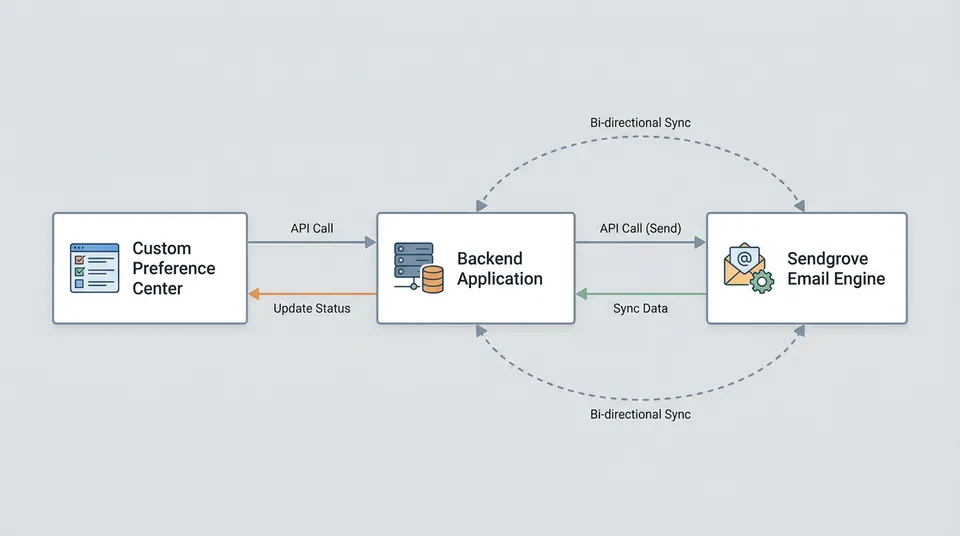
A custom email preference center API is a programmatic interface that connects your custom front-end preference web page with your core user database and your email service provider (ESP) infrastructure. Rather than relying on a default, hosted ESP form with rigid styling and limited fields, a custom preference center API gives you complete architectural flexibility over how subscriber choices are captured, validated, and processed.
The Three Core Components of a Custom Preference Architecture
- The Secure Front-End Interface: A custom web page hosted on your application domain (e.g.,
preferences.yourbrand.comorapp.yourbrand.com/settings/email) where users adjust their subscription categories, notification frequencies, and channel preferences. - The Application Backend & REST Endpoints: Server-side API handlers that receive preference payloads, verify security signatures (such as HMAC tokens or JWTs), update your primary application database, and invoke the Sendgrove REST API to update contact records.
- Bi-Directional Webhooks: Automated event triggers that stream preference changes, suppression updates, and opt-out events between your email engine and internal data warehouses in real time.
When a subscriber opens an email, the footer link contains an encrypted or signed subscriber identifier (such as https://app.yourbrand.com/email-preferences?token=eyJhbG...). When the user submits updated choices, your backend API processes the request, updates your local database, and issues an API call to update the corresponding contact properties and suppression lists in Sendgrove. This bi-directional sync guarantees that your email marketing automation campaigns and transactional workflows always honor the exact preferences recorded in your system.
Why Custom APIs Superior to Default Hosted Unsubscribe Pages
While default ESP-hosted unsubscribe pages require zero code, they introduce significant operational friction for growing SaaS companies and ecommerce brands:
- Brand Disconnect: Generic hosted forms break brand consistency, displaying third-party domain names and basic styling that erode trust during a sensitive user interaction.
- Data Isolation: Standard hosted forms store preference state solely inside the ESP database, requiring manual CSV exports or batch sync jobs to update your internal application database.
- Limited Granularity: Built-in ESP forms rarely support complex business logic, such as frequency-based digest throttling, multi-product subscription matrices, or account-level team notification rules.
- Compliance & Audit Blind Spots: Regal frameworks like GDPR and CCPA require verifiable proof of consent and opt-out history. A custom preference center API logs every change directly into your application audit tables with precise timestamps and IP addresses.
By taking control of your preference architecture, you can implement sophisticated subscriber retention strategies and significantly lower email unsubscribe rates without sacrificing compliance.
Designing a Scalable Preference Schema and REST API Data Model
A robust preference architecture starts with a clean database schema and standardized JSON payloads. To maintain flexibility as your product evolves, separate global system suppressions (hard opt-outs) from granular topic preferences and delivery frequency schedules.
Recommended JSON Payload Structure
When your front-end web application submits updated preferences to your server, your custom API should accept a structured payload containing the subscriber's email address, secure signature token, topic preferences, and frequency settings:
{
  "email": "alex.subscriber@example.com",
  "subscriber_token": "hmac_sha256_e3b0c44298fc1c149afbf4c8996fb92427ae41e4649b934ca495991b7852b855",
  "global_unsubscribe": false,
  "topic_preferences": {
    "product_updates": true,
    "weekly_newsletter": false,
    "promotional_offers": false,
    "security_alerts": true,
    "developer_changelog": true
  },
  "frequency_cap": "weekly_digest",
  "updated_at": "2026-07-15T14:30:00Z",
  "source_ip": "198.51.100.42"
}
Key Data Model Categories
- Global Suppression State (
global_unsubscribe): A boolean flag indicating a complete opt-out from all marketing communications. In Sendgrove, setting this flag maps directly to adding the contact to the global account suppression list, ensuring no marketing campaign can deliver to this address regardless of list memberships. - Topic & Category Preferences (
topic_preferences): Key-value pairs representing specific content streams. In your Sendgrove contact record, these map to custom boolean properties or dedicated interest tags (e.g.,pref_newsletter,pref_product_updates). - Frequency Capping (
frequency_cap): An explicit delivery cadence preference (such asrealtime,daily_digest,weekly_digest, orpaused_30_days). This property feeds into Sendgrove's marketing automation workflows to route contacts into conditional delay branches.
API Endpoint Specification
To support both reading and updating preference state, your backend server should expose two dedicated REST routes:
#### 1. GET /api/v1/email-preferences
- Purpose: Fetches current preference state for rendering the front-end preference form.
- Parameters:
token(Query parameter containing signed HMAC token) oremail(for authenticated logged-in session). - Response: Current topic settings, available categories, and frequency options.
#### 2. POST /api/v1/email-preferences
- Purpose: Validates and saves updated subscriber preferences.
- Request Body: JSON payload containing updated topic choices and security verification.
- Response:
200 OKwith updated status confirmation or400 Bad Request/401 Unauthorizedon signature failure.
Securing Unsubscribe & Preference Links with HMAC Signatures
Exposing an email address directly in a public URL parameter (https://app.yourbrand.com/preferences?email=user@example.com) creates a critical security vulnerability. Malicious actors or automated web crawlers could scan or tamper with preference links, unsubscribing users without consent.
To secure your custom preference links, use HMAC-SHA256 signatures generated on your server when sending outgoing marketing messages:
import hmac
import hashlib

SECRET_KEY = b"your_internal_application_secret_key_32_bytes"

def generate_preference_token(email: str) -> str:
    """Generates a secure HMAC-SHA256 token for a subscriber email."""
    return hmac.new(SECRET_KEY, email.encode('utf-8'), hashlib.sha256).hexdigest()

def verify_preference_token(email: str, token: str) -> bool:
    """Verifies that an incoming preference token matches the subscriber email."""
    expected_token = generate_preference_token(email)
    return hmac.compare_digest(expected_token, token)
In your email campaign templates in Sendgrove, inject the token using dynamic merge tags:
https://app.yourbrand.com/preferences?email={{contact.email}}&token={{contact.preference_token}}
When the user opens the preference page, your API verifies the token before displaying or modifying any account data. This prevents unauthorized access, URL guessing, and accidental opt-outs caused by security scanners inspecting links in incoming emails.
Step-by-Step Guide: Synchronizing Preferences with Sendgrove REST API
Once your backend REST API validates the subscriber token, it must synchronize the updated preference state with Sendgrove's core contacts engine. Sendgrove provides a REST API that allows you to create or update contact properties, manage list memberships, and apply global suppressions programmatically.
The synchronization sequence between your custom backend API and Sendgrove's Contact Engine can be visualized as follows (see the inline diagram):
Your Custom Backend API first verifies the HMAC token. Based on the global unsubscribe flag, it either calls Sendgrove's PUT /v1/contacts/suppressions endpoint to add the contact to the suppression list or PATCH /v1/contacts/{email} to update custom properties. Finally, it updates Sendgrove list memberships (e.g., adding to an Active Segment or removing from an Unsubscribed Segment), which in turn fires a contact.preferences_updated webhook event from the Sendgrove Contact Engine.
Step 1: Updating Custom Contact Properties in Sendgrove
To store category preferences in Sendgrove, define custom contact attributes in your Sendgrove workspace (such as pref_product_updates, pref_newsletter, pref_frequency). Your backend script then sends a PATCH request to the Sendgrove contacts endpoint:
import requests

SENDGROVE_API_KEY = "sg_live_your_api_key_here"
SENDGROVE_BASE_URL = "https://api.sendgrove.com/v1"

def update_sendgrove_contact_preferences(email: str, topic_prefs: dict, frequency: str):
    """Updates custom contact attributes in Sendgrove via REST API."""
    headers = {
        "Authorization": f"Bearer {SENDGROVE_API_KEY}",
        "Content-Type": "application/json"
    }

payload = {
        "email": email,
        "custom_properties": {
            "pref_product_updates": topic_prefs.get("product_updates", True),
            "pref_weekly_newsletter": topic_prefs.get("weekly_newsletter", False),
            "pref_promotional_offers": topic_prefs.get("promotional_offers", False),
            "pref_frequency_cap": frequency,
            "preferences_last_updated": "2026-07-15T14:30:00Z"
        }
    }

response = requests.patch(
        f"{SENDGROVE_BASE_URL}/contacts/upsert",
        json=payload,
        headers=headers
    )

if response.status_code in [200, 201]:
        return response.json()

raise Exception(f"Sendgrove API Error: {response.status_code} - {response.text}")
Step 2: Handling Global Suppressions Programmatically
If the user selects the "Unsubscribe from All Communications" option on your custom preference form, your API should invoke Sendgrove's suppression endpoint rather than simply updating a custom tag. Adding a contact to the global suppression list ensures that Sendgrove's deliverability protection engine automatically blocks future marketing messages to that recipient:
def apply_global_suppression(email: str, reason: str = "User Preference Center Opt-Out"):
    """Adds a contact to Sendgrove global suppression list."""
    headers = {
        "Authorization": f"Bearer {SENDGROVE_API_KEY}",
        "Content-Type": "application/json"
    }

payload = {
        "email": email,
        "suppression_type": "unsubscribe",
        "reason": reason
    }

response = requests.post(
        f"{SENDGROVE_BASE_URL}/suppressions",
        json=payload,
        headers=headers
    )

return response.status_code == 201
By leveraging Sendgrove's email marketing API integration, your custom preference center updates sync in milliseconds, ensuring immediate enforcement across all scheduled campaigns.
Leveraging Real-Time Webhooks to Synchronize External Preference Changes
While user-initiated preference changes flow from your web app into Sendgrove, preference changes can also occur within Sendgrove itself (such as a subscriber clicking a List-Unsubscribe header link in Gmail or Apple Mail).
To maintain bi-directional synchronization and prevent state drift between Sendgrove and your core application database, set up a webhook receiver endpoint in your server infrastructure.
Configuring Sendgrove Preference Webhook Listeners
When an unsubscribe or preference update occurs within Sendgrove, Sendgrove emits an HTTP POST webhook payload to your registered webhook URL:
{
  "event": "contact.unsubscribe",
  "timestamp": 1784125800,
  "contact": {
    "email": "alex.subscriber@example.com",
    "id": "cnt_987654321"
  },
  "metadata": {
    "campaign_id": "cmp_11223344",
    "channel": "one_click_list_unsubscribe",
    "ip_address": "203.0.113.195"
  }
}
Building an Idempotent Webhook Handler in Python / Node.js
When building your webhook receiver, follow web-service best practices: verify Sendgrove HMAC signatures, process events asynchronously using background queues, and ensure idempotency so duplicate network retries do not corrupt user records.
from flask import Flask, request, jsonify
import hmac
import hashlib

app = Flask(__name__)
SENDGROVE_WEBHOOK_SECRET = "whsec_your_webhook_signing_secret"

def verify_webhook_signature(payload_bytes: bytes, signature_header: str) -> bool:
    """Verifies Sendgrove SHA256 HMAC webhook signature."""
    expected_sig = hmac.new(
        SENDGROVE_WEBHOOK_SECRET.encode('utf-8'),
        payload_bytes,
        hashlib.sha256
    ).hexdigest()
    return hmac.compare_digest(expected_sig, signature_header)

@app.route("/webhooks/sendgrove", methods=["POST"])
def sendgrove_webhook_receiver():
    signature = request.headers.get("X-Sendgrove-Signature", "")

if not verify_webhook_signature(request.data, signature):
        return jsonify({"error": "Invalid signature"}), 401

event_data = request.json
    event_type = event_data.get("event")
    email = event_data.get("contact", {}).get("email")

if event_type == "contact.unsubscribe":
        # Synchronize opt-out status with application database
        update_internal_user_preference(email, global_unsubscribe=True)
        log_compliance_event(email, event_type, source="Sendgrove Webhook")

elif event_type == "contact.preferences_updated":
        # Sync updated custom properties
        custom_props = event_data.get("contact", {}).get("custom_properties", {})
        update_internal_user_topics(email, custom_props)

return jsonify({"status": "received"}), 200

def update_internal_user_preference(email: str, global_unsubscribe: bool):
    # Place internal database logic here (e.g., PostgreSQL UPDATE query)
    pass

def update_internal_user_topics(email: str, custom_props: dict):
    pass

def log_compliance_event(email: str, event_type: str, source: str):
    pass
As detailed in our comprehensive guide on using email webhooks for real-time event tracking, real-time webhook listener architecture ensures your customer support, sales, and analytics tools reflect subscription status immediately.
Implementing Automated Frequency Capping and Conditional Journeys
One of the most effective strategies for reducing churn is allowing subscribers to choose a lower email frequency rather than opting out completely. A subscriber who finds daily marketing messages overwhelming will often happily remain subscribed to a weekly digest or monthly round-up.
This frequency-based automation branching in Sendgrove ensures subscribers receive emails at their preferred cadence (see the inline diagram for a visual representation):
When new campaign content is triggered, the Sendgrove Segmentation Engine evaluates the pref_frequency_cap contact attribute. Contacts with realtime preference receive emails immediately. Those with weekly_digest are routed to a Weekly Buffer Segment within the Sendgrove Marketing Automation Queue, which fires consolidated digest campaigns on a schedule (e.g., every Friday at 09:00 AM). Contacts with paused_30_days preference are placed in a Temporary Hold State, delaying execution until the pause date expires.
Setting Up Dynamic Frequency Segments in Sendgrove
To enforce frequency preferences automatically:
- Store Frequency Custom Properties: Ensure your custom API saves the subscriber's frequency selection (
realtime,weekly_digest,monthly_summary,paused_30_days) into the contact propertypref_frequency_cap. - Build Dynamic Segments: In your Sendgrove dashboard, build audience segments using Sendgrove's audience segmentation engine:
- Segment A (Realtime Subscribers):
pref_frequency_cap EQUALS realtime AND global_unsubscribe EQUALS false - Segment B (Weekly Digest Subscribers):
pref_frequency_cap EQUALS weekly_digest AND global_unsubscribe EQUALS false - Segment C (Paused Subscribers):
pref_frequency_cap EQUALS paused_30_days
- Connect Segments to Automation Workflows: Use Sendgrove marketing automation workflows to route contacts into delayed execution queues or recurring digest builders based on segment membership. When sending time-sensitive announcements, target Segment A immediately while enqueuing campaign highlights for Segment B's scheduled Friday newsletter digest.
Managing Temporary Sabbaticals (Pause Subscription for 30 Days)
A "Pause Emails for 30 Days" feature is a proven unsubscribe alternative that rescues up to 18% of at-risk subscribers.
To implement a pause feature:
- When a subscriber selects "Pause for 30 Days" on your preference page, your backend sets
pref_frequency_cap = "paused_30_days"and calculates a resume date:pause_until = current_date + 30 days. - Write these properties to Sendgrove via REST API.
- In Sendgrove, create an automated workflow triggered when
pref_frequency_capchanges topaused_30_days. The workflow includes a 30-day delay node, after which Sendgrove automatically updatespref_frequency_capback toweekly_digestand sends a welcome-back confirmation email.
Compliance, Security, and UX Best Practices for Custom Preference Centers
Building a custom email preference center API involves regulatory responsibilities under global data privacy laws, including the GDPR (Europe), CCPA/CPRA (California), CAN-SPAM (United States), and CASL (Canada). Adhering to technical compliance guidelines protects your brand reputation while maintaining subscriber trust.
Essential Compliance Guidelines
- Honor Opt-Outs Promptly: While CAN-SPAM permits up to 10 business days to process unsubscribes, modern consumer expectations and Sendgrove deliverability standards demand immediate or near-instant processing. Your API should write suppressions to Sendgrove synchronously.
- Maintain Clear Unsubscribe Links: Do not obscure the universal opt-out option. Even if your preference center highlights category choices or frequency pauses, a clear "Unsubscribe from All" button must remain easily accessible on the page.
- Support RFC 8058 List-Unsubscribe Headers: Modern mailbox providers like Gmail and Yahoo require high-volume senders to include
List-UnsubscribeandList-Unsubscribe-Postheaders in email messages. Sendgrove handles list-unsubscribe headers automatically, triggering thecontact.unsubscribewebhook event whenever a recipient clicks the native inbox unsubscribe button. - Audit Logging and Proof of Consent: Store every preference change in a secure database audit table recording the subscriber ID, modified fields, timestamp, IP address, and authorization method. This log provides necessary documentation during compliance audits.
UX Tradeoffs Comparison: Custom API Preference Center vs. Default Hosted Pages
When evaluating your technical roadmap, consider the operational tradeoffs between building a custom preference center API and relying on default ESP forms:
| Architectural Metric | Custom Preference Center API | Default Hosted ESP Form | | :--- | :--- | :--- | | Branding & UI Control | Complete control; fully native CSS, subdomains, and embedded app components | Limited styling; hosted on third-party ESP domains | | Data Synchronization | Real-time bi-directional REST and webhook integration with application DB | Manual CSV exports or periodic batch API polling | | Frequency Controls | Custom digest logic, conditional delays, and temporary pause support | Basic on/off list toggles only | | Development Effort | Requires backend API endpoints and front-end engineering (~10-20 hours) | Zero development time required | | Compliance Audit Trail | Full internal logging in PostgreSQL / application databases | Logs maintained primarily within ESP dashboard | | Subscriber Retention Impact | Up to 30% reduction in global unsubscribes via granular topic controls | Higher global opt-out rates due to binary choices |
Combining custom preference endpoints with Sendgrove's email marketing campaigns gives your organization enterprise-grade flexibility while maintaining optimal inbox deliverability. To explore detailed UX strategies and layout designs, review our companion guide on email preference center best practices.
Building a Responsive Front-End Preference Form in React / Next.js
To complement your backend REST API, your engineering team can construct a lightweight, accessible front-end interface using modern web frameworks like React, Next.js, or Vue. Key requirements for a high-converting preference form include instant visual feedback, clear category descriptions, and effortless opt-out toggles.
Example React Component for Custom Preferences
Below is a production-grade React functional component that loads existing preferences via API, manages local form state, and submits updates securely using signed subscriber tokens:
import React, { useState, useEffect } from 'react';

interface TopicPreferences {
  product_updates: boolean;
  weekly_newsletter: boolean;
  promotional_offers: boolean;
  developer_changelog: boolean;
}

interface PreferenceState {
  email: string;
  global_unsubscribe: boolean;
  topic_preferences: TopicPreferences;
  frequency_cap: string;
}

export const EmailPreferenceCenter: React.FC<{ email: string; token: string }> = ({ email, token }) => {
  const [loading, setLoading] = useState<boolean>(true);
  const [saving, setSaving] = useState<boolean>(false);
  const [message, setMessage] = useState<string>('');
  const [preferences, setPreferences] = useState<PreferenceState>({
    email,
    global_unsubscribe: false,
    topic_preferences: {
      product_updates: true,
      weekly_newsletter: true,
      promotional_offers: false,
      developer_changelog: true,
    },
    frequency_cap: 'realtime',
  });

useEffect(() => {
    // Fetch initial preference state from custom API
    fetch(`/api/v1/email-preferences?email={encodeURIComponent(email)}&token={token}`)
      .then((res) => res.json())
      .then((data) => {
        if (data.preferences) setPreferences(data.preferences);
        setLoading(false);
      })
      .catch(() => {
        setMessage('Failed to load preferences. Please try again.');
        setLoading(false);
      });
  }, [email, token]);

const handleToggleTopic = (topic: keyof TopicPreferences) => {
    setPreferences((prev) => ({
      ...prev,
      topic_preferences: {
        ...prev.topic_preferences,
        [topic]: !prev.topic_preferences[topic],
      },
    }));
  };

const handleSave = async (e: React.FormEvent) => {
    e.preventDefault();
    setSaving(true);
    setMessage('');

try {
      const response = await fetch('/api/v1/email-preferences', {
        method: 'POST',
        headers: { 'Content-Type': 'application/json' },
        body: JSON.stringify({ ...preferences, subscriber_token: token }),
      });

if (response.ok) {
        setMessage('Your email preferences have been successfully updated.');
      } else {
        setMessage('An error occurred while saving your choices.');
      }
    } catch {
      setMessage('Network error. Unable to reach preference server.');
    } finally {
      setSaving(false);
    }
  };

if (loading) return <div className="p-6 text-center">Loading preference portal...</div>;

return (
    <div className="max-w-xl mx-auto p-8 bg-white border border-gray-200 rounded-lg shadow-sm">
      <h1 className="text-2xl font-bold mb-2">Manage Your Email Preferences</h1>
      <p className="text-gray-600 mb-6">Updating subscriptions for <span className="font-semibold">{email}</span></p>

{message && <div className="mb-4 p-3 bg-blue-50 text-blue-800 rounded">{message}</div>}

<form onSubmit={handleSave} className="space-y-6">
        <div className="space-y-4">
          <h2 className="text-lg font-semibold">Content Topics</h2>
          {Object.entries(preferences.topic_preferences).map(([key, enabled]) => (
            <label key={key} className="flex items-center justify-between p-3 bg-gray-50 rounded hover:bg-gray-100 cursor-pointer">
              <span className="capitalize">{key.replace('_', ' ')}</span>
              <input
                type="checkbox"
                checked={enabled && !preferences.global_unsubscribe}
                disabled={preferences.global_unsubscribe}
                onChange={() => handleToggleTopic(key as keyof TopicPreferences)}
                className="h-5 w-5 text-indigo-600 rounded"
              />
            </label>
          ))}
        </div>

<div className="pt-4 border-t border-gray-200">
          <label className="flex items-center space-x-3 text-red-600 font-medium">
            <input
              type="checkbox"
              checked={preferences.global_unsubscribe}
              onChange={(e) => setPreferences({ ...preferences, global_unsubscribe: e.target.checked })}
              className="h-5 w-5 text-red-600 rounded"
            />
            <span>Unsubscribe from all marketing and promotional emails</span>
          </label>
        </div>

<button
          type="submit"
          disabled={saving}
          className="w-full py-3 px-4 bg-indigo-600 hover:bg-indigo-700 text-white font-semibold rounded transition"
        >
          {saving ? 'Saving...' : 'Save Preferences'}
        </button>
      </form>
    </div>
  );
};
Resilience, Edge Cases, and End-to-End Testing Strategy
Building production-ready API integrations requires anticipating edge cases, handling transient network errors gracefully, and establishing rigorous testing procedures before deploying preference links to live subscribers.
Handling Failure Modes and Network Retries
- Token Expiration & Malformed Hashes: If an incoming request presents an invalid HMAC token, return HTTP
401 Unauthorizedwithout rendering subscriber details. Display a user-friendly error page allowing the subscriber to request a fresh magic link via email. - API Rate Limiting: Sendgrove's REST API enforces fair-use rate limits. Implement exponential backoff retries in your server-side API client using library middleware (such as
tenacityin Python oraxios-retryin Node.js) to buffer spike traffic during large campaign launches. - Asynchronous Task Queueing: Rather than blocking the user's HTTP response while waiting for external API calls, write preference updates to a local transactional queue (such as Redis Celery or BullMQ). The queue worker syncs state with Sendgrove in the background, ensuring sub-second response times for end users.
# Example background task queue processing with Celery
from celery import Celery
import time

celery_app = Celery("preference_tasks", broker="redis://localhost:6379/0")

@celery_app.task(autoretry_for=(Exception,), retry_backoff=True, max_retries=5)
def sync_preferences_to_sendgrove_async(email: str, topic_prefs: dict, frequency: str, is_global_optout: bool):
    """Background worker task ensuring reliable deliverability and retries."""
    if is_global_optout:
        apply_global_suppression(email, reason="Web Preference Center Opt-Out")
    else:
        update_sendgrove_contact_preferences(email, topic_prefs, frequency)
End-to-End Validation and Webhook Tunneling
Before launching your custom preference center, conduct three essential verification tests:
- Token Signature Verification Test: Submit requests with valid, altered, and empty tokens to confirm your API rejects forged URLs.
- Bi-Directional State Synchronization Test: Update preferences on your front-end page, then verify in your Sendgrove contact dashboard that custom properties (
pref_product_updates,pref_frequency_cap) reflect the exact payload within 2 seconds. - Webhook Receiver Test: Use local tunneling tools like ngrok (
ngrok http 5000) to expose your local Flask or Node.js server. In your Sendgrove developer settings, register the ngrok webhook URL and trigger a manual test event to verify your local database processes the payload correctly.
By systematically addressing edge cases, implementing background queues, and verifying webhook payloads, your engineering team can deliver a resilient, enterprise-grade preference management system that scales seamlessly alongside your email volume.
Summary Checklist for Custom Email Preference Center Deployment
Before marking your preference center integration as complete in your deployment pipeline, review this final launch checklist:
- Cryptographic Security: Verify that all unsubscribe links generated in email footers contain HMAC-SHA256 signature tokens rather than raw, unencrypted email query parameters.
- Synchronous Suppression Writes: Confirm that global unsubscribe requests immediately invoke Sendgrove's suppression endpoint to prevent accidental campaign sends.
- Robust Failure Fallbacks: Ensure your front-end preference form displays informative status messages when network connectivity drops or third-party APIs return non-200 HTTP responses.
- GDPR Audit Trails: Verify that every preference modification logs timestamped entries containing subscriber ID, modified fields, IP address, and authorization method in your application audit table.
- Webhook Idempotency: Test your webhook receiver against duplicate event payloads to ensure database updates execute cleanly without creating orphan records or infinite loops.
Following this architectural blueprint gives your business full control over the subscriber experience, aligns email marketing operations with global privacy regulations, and delivers measurable reductions in unsubscribe rates.
FAQ
What is a custom email preference center API?
A custom email preference center API is a programmatic backend interface that allows users to manage their subscription categories, frequency settings, and opt-out preferences directly on a self-hosted web application. It securely processes user selections, updates internal databases, and synchronizes subscriber states with an email service provider like Sendgrove in real time.
How do email preference center webhooks work to manage preferences?
Email preference center webhooks transmit real-time HTTP POST notifications between your email service provider and your application server whenever a subscriber's status changes. For instance, if a recipient clicks the native "Unsubscribe" header in Gmail, Sendgrove fires a webhook event that automatically updates your internal application database to reflect the opt-out.
Why build a custom email preference center or custom unsubscribe page API instead of a default unsubscribe page?
Building a custom preference center prevents binary "all-or-nothing" unsubscribes by giving subscribers granular control over email frequency, topic selection, or temporary pauses. It also maintains consistent brand styling, ensures real-time bi-directional database synchronization, and records detailed audit logs required for data privacy compliance.
How do you synchronize custom email preferences with Sendgrove contact properties?
You synchronize preferences by sending authenticated REST API requests to Sendgrove's contact endpoints. When a user submits updated preferences, your backend API issues a PATCH request to update custom contact properties (such as boolean category flags or frequency preferences) or calls the suppression endpoint to enforce a global opt-out.
What is an email frequency preferences API?
An email frequency preferences API allows subscribers to programmatically define how often they wish to receive communications. This API endpoint enables them to choose daily, weekly, or monthly digests, or to temporarily pause subscriptions, directly influencing their email volume and reducing unsubscribe rates. It integrates with automation platforms like Sendgrove to manage contact attributes and segment assignments dynamically.
What compliance requirements apply to custom email preference centers?
Custom preference centers must comply with regulations like GDPR, CCPA, and CAN-SPAM by offering an easily accessible global unsubscribe option, processing opt-out requests promptly, maintaining detailed consent audit logs, and supporting RFC 8058 automated list-unsubscribe headers.