Blog
Subscriber Retention Email Playbook: How to Stop List Churn and Boost LTV
Master email subscriber retention with our playbook. Learn strategies for welcome sequences, preference centers, engagement-based segmentation, automated

> TL;DR: Implementing a comprehensive subscriber retention email strategy is crucial for maintaining active engagement, reducing unsubscribe rates, and extending the customer lifetime value (LTV) of your email list. By leveraging automated preference centers, engagement-based segmentation, and automated win-back workflows, email marketers can effectively reduce list churn by 30% to 50% while preserving inbox deliverability.
Acquiring a new email subscriber costs anywhere from 5 to 10 times more than retaining an existing subscriber. Yet most email marketing programs invest 80% of their resources into growth forms, lead magnets, and acquisition campaigns, while treating subscriber churn as an inevitable cost of doing business.
List churn—driven by unsubscribes, spam complaints, and silent disengagement—erodes subscriber databases by an average of 25% to 30% every year. When subscribers stop opening or clicking your emails, mailbox providers like Gmail, Yahoo, and Outlook take notice. High disengagement signals to ISP filters that your messages are uninhibited or unwanted, driving even your most active subscribers' messages into the spam folder.
To build a sustainable email engine, email marketers need a structured subscriber retention playbook. This guide outlines the diagnostic tools, behavioral workflows, preference controls, and automated re-engagement systems required to stop list decay, boost subscriber lifetime value, and maintain healthy inbox placement.
Last updated: March 2026
The Economics of Subscriber Retention in Modern Email Marketing
Subscriber retention is directly tied to total campaign return on investment (ROI). In digital marketing, list retention is often discussed in qualitative terms—keeping readers "happy" or "entertained." However, the financial impact of email churn is quantifiable across three distinct levers: acquisition replacement costs, revenue per subscriber, and deliverability reputation.
1. Acquisition Replacement Costs
When a subscriber unsubscribes or bounces, replacing that lost contact requires fresh ad spend, organic content production, or co-marketing partnerships. If your average cost per lead (CPL) is $4.50 and your monthly list churn is 3%, a database of 50,000 subscribers loses 1,500 contacts per month. Replacing those contacts requires $6,750 in monthly acquisition spend simply to maintain a flat list size.
2. Subscriber Lifetime Value (LTV) Growth
Subscribers who remain on your list for 12 months or longer generate significantly higher cumulative revenue than short-term contacts. Long-term subscribers exhibit higher brand trust, leading to repeat purchases, higher average order value (AOV), and higher response rates to automated promotional campaigns. Extending average subscriber retention from 6 months to 18 months more than doubles the net LTV per contact.
3. Deliverability Protection and ISP Filtering
Modern inbox algorithms rely heavily on negative engagement signals. High unsubscribe rates (exceeding 0.2% per send) and elevated spam complaint rates (above 0.1%) directly harm sender domain reputation. By proactively identifying disengaged contacts and giving them control over content frequency, you eliminate the friction that drives readers to click "Report Spam."
| Retention Lever | Short-Term Focus (Acquisition-Only) | Long-Term Focus (Retention Playbook) | | :--- | :--- | :--- | | List Growth Rate | High top-of-funnel intake, high churn | Steady net growth with low churn | | Average LTV | $2.50 – $5.00 per contact | $12.00 – $28.00 per contact | | Spam Complaint Rate | 0.15% – 0.30% (High risk zone) | < 0.03% (Safe sender zone) | | Inbox Placement | Variable / Frequent primary tab drops | Consistent 98%+ primary inbox placement | | Resource Allocation | 85% paid acquisition, 15% retention | 50% acquisition, 50% lifecycle retention |
Building an effective retention strategy requires viewing your email list not as a broadcast channel, but as a dynamic lifecycle relationship where content relevance and send frequency adapt dynamically to subscriber behavior.
Root Causes of Email List Churn: Diagnostic Framework
Before implementing technical retention fixes, email strategists must diagnose why subscribers leave. List churn falls into two distinct categories: explicit churn (unsubscribes and spam complaints) and implicit churn (silent disengagement and unopens). Diagnosing the root causes requires examining subscriber behavior across four primary friction points.
1. Content-Audience Mismatch (Relevance Decay)
When subscribers sign up for a specific incentive—such as a 15% discount code or a downloadable whitepaper—they expect follow-up emails that match their initial intent. If a brand immediately pivots into generic daily product blasts or irrelevant newsletter topics, subscribers lose interest. Relevance decay occurs when content fails to align with the subscriber's job-to-be-done or purchase lifecycle stage.
2. Cadence Fatigue and Send Volume Spikes
Email frequency is one of the most delicate balances in digital marketing. Sending too infrequently (less than once per month) leads to brand forgetfulness and unexpected inbox arrivals. Conversely, over-mailing subscribers without segmented targeting causes immediate fatigue. A sudden jump from weekly updates to daily promotional sends during peak sales periods frequently triggers massive spike waves in unsubscribes and spam reports.
3. Missing Preference Controls
When a subscriber feels overwhelmed by daily emails, their only default option in standard email templates is the global "Unsubscribe" link in the footer. Without a granular preference center where users can reduce email frequency (e.g., switching from daily to weekly summaries) or opt out of specific content categories (e.g., promotional announcements vs. product updates), users are forced to sever the entire subscription relationship.
4. Technical Deliverability and Inbox Placement Issues
Implicit churn often stems from technical delivery failures. If your messages consistently land in the Promotions tab, Spam folder, or get throttled by receiving mail servers, subscribers won't see your content. Over time, unread emails accumulate, leading subscribers to clear their inboxes via bulk delete or mark-as-spam actions.
To isolate the specific driver of churn in your program, monitor subscriber metrics across cohorts. For deeper strategies on addressing audience fatigue, review our detailed guide on what is email list fatigue and how to fix it.
Identifying which friction point dominates your email program allows you to deploy targeted interventions rather than relying on blanket broadcast adjustments.
Phase 1: Onboarding & Preference Centers – Setting Expectations Early
Subscriber retention begins during the first 14 days of the email relationship. The welcome experience establishes expectations for content frequency, topic relevance, and inbox value. A structured onboarding sequence prevents early drop-off and trains subscribers to open your messages consistently.
1. The 4-Part Retention-Focused Welcome Sequence
Rather than sending a single confirmation message, deploy a dedicated welcome series designed to onboard subscribers into your brand ecosystem. Modern marketing tools like Sendgrove Email Marketing allow teams to build automated onboarding journeys that adapt based on initial click behavior.
- Email 1 (Immediate Send): Delivery & Expectation Setting. Deliver the promised lead magnet, coupon, or welcome resource immediately. Explicitly tell subscribers how often you will email them and what topics you will cover. Ask them to add your sender address to their primary inbox contact list.
- Email 2 (Day 2): Origin Story & Brand Core Value. Share the core mission of your organization. Focus on educating the reader rather than pitching products. Provide links to your top 3 most valuable blog posts or resources.
- Email 3 (Day 5): Preference Alignment & Topic Selection. Invite subscribers to customize their email profile. Present clear choices for topics of interest and preferred mailing frequency.
- Email 4 (Day 8): Social Proof & Community Engagement. Highlight customer success stories, case studies, or community discussions. Show subscribers how others derive value from your newsletter and products.
For complete sequence blueprints and messaging templates, explore our comprehensive guide to customer retention email sequences.
2. Implementing a Self-Service Preference Center
A self-service preference center is your primary defense against global unsubscribes. When subscribers click the manage preferences link in your email footer, present them with flexible options rather than an all-or-nothing opt-out button.
Key preference options to include:
- Frequency Options: Allow subscribers to switch from daily blasts to a weekly digest or monthly roundup.
- Content Category Toggles: Give users granular control over specific campaign types (e.g., Product Updates, Educational Guides, Promotional Offers, Industry News).
- The "Pause" Option: Provide a temporary 30-day or 60-day subscription pause for users who are travelling, busy, or experiencing temporary inbox overload.
Providing a temporary pause feature retains the contact record and consent history, enabling automated reactivation once the pause window expires without requiring fresh acquisition effort.
Phase 2: Behavioral Segmentation & Dynamic Cadence Management
Treating all subscribers equally regardless of engagement level is a leading driver of list fatigue. High-volume email programs must implement behavioral segmentation to adjust message frequency automatically based on subscriber activity.
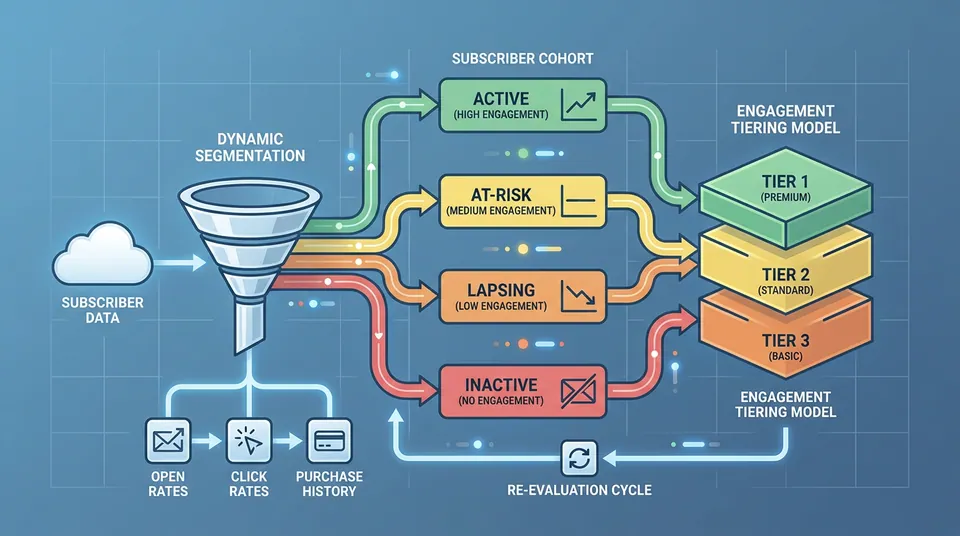
1. The Engagement Tiering Model
Group your subscriber base into distinct engagement cohorts based on recent email opens, link clicks, and web sessions. By utilizing Sendgrove Audience Segmentation, marketers can build dynamic rules that update subscriber tiers in real time.
- Tier 1: Highly Active (Engaged in 0–30 Days). These subscribers actively read and click your emails. They should receive full promotional messaging, product announcements, and regular newsletter editions (3–4 emails per week).
- Tier 2: Moderately Engaged (Engaged in 31–60 Days). Showing signs of waning interest. Throttle send frequency to 1–2 emails per week, focusing on high-value educational content and top-performing offers.
- Tier 3: At-Risk / Lapsing (Engaged in 61–90 Days). Subscriber activity has dropped significantly. Remove them from standard promotional broadcasts and suppress daily sends. Shift them into soft re-engagement workflows.
- Tier 4: Inactive / Dormant (No Engagement in 90+ Days). High risk of technical deliverability harm. Suppress completely from main marketing lists and isolate into dedicated win-back campaigns.
To master cohort setup, read our step-by-step framework for email engagement segmentation.
2. Dynamic Cadence Throttling via Automation
Automated dynamic throttling ensures that disengaged contacts receive fewer emails without requiring manual list list filtering before every send. Using workflow platforms like Sendgrove Marketing Automation, you can build rules that automatically suppress users from broadcast lists if they haven't opened the last 5 consecutive emails.
By matching message frequency to interest levels, you protect subscriber satisfaction while maintaining strong sender reputation metrics with major mailbox providers.
Phase 3: Automated Re-Engagement & Win-Back Triggers
When a subscriber enters the At-Risk tier (61–90 days without an open or click), automated win-back triggers must fire immediately. A well-designed re-engagement campaign wakes up dormant subscribers and provides explicit feedback on why they disengaged.
1. The 3-Step Win-Back Email Sequence Architecture
Automated win-back campaigns should consist of 3 distinct, highly targeted messages deployed over a 14-day window.
#### Email 1 (Day 60 of Inactivity): The Value Reminder & Best Content Roundup
- Goal: Remind the subscriber of why they originally joined without making demands.
- Subject Line Examples: "Did you miss these top guides?" | "Our most popular resources this month"
- Body Strategy: Feature your top 3 highest-rated articles, tools, or resources. Keep the tone helpful, light, and non-confrontational.
#### Email 2 (Day 67 of Inactivity): The Incentive & Feedback Survey
- Goal: Drive explicit click activity through an exclusive offer or feedback request.
- Subject Line Examples: "A quick question about your inbox..." | "We'd love your feedback (plus 20% off)"
- Body Strategy: Offer a compelling incentive (discount, free credit, exclusive guide) or ask a simple 1-click survey: "How can we make our emails better for you?" Include prominent buttons for preference adjustments.
#### Email 3 (Day 74 of Inactivity): The Breakup Email (Permission Confirmation)
- Goal: Force a definitive engagement decision to clean your list safely.
- Subject Line Examples: "Should we unsubscribe you?" | "Final check: Are you still interested?"
- Body Strategy: Be direct and polite. Inform the subscriber that because you value their inbox peace and want to maintain high delivery standards, you will remove them from the active list in 48 hours unless they click a single confirmation button: "Keep Me Subscribed."
2. Evaluating Re-Engagement Success Rates
A successful win-back workflow typically yields a 10% to 20% reactivation rate among lapsed subscribers. While this may sound modest, reactivating 15% of a 10,000-subscriber dormant segment restores 1,500 qualified leads to your marketing funnel at zero added acquisition cost.
Subscribers who fail to engage after Email 3 must be transitioned directly to your sunset workflow. For a detailed comparison between win-back tactics and permanent removal rules, reference our deep dive on email list reactivation vs sunset policy.
Phase 4: List Hygiene & Sunset Automation to Protect Deliverability
Subscriber retention is not merely about keeping contacts on your list—it is equally about knowing when to remove them. Retaining non-responsive or invalid email addresses degrades domain reputation, increases spam complaints, and damages overall sender authority.
1. Real-Time API Validation vs. Periodic List Cleaning
List hygiene operates at two levels: real-time point-of-entry verification and periodic list verification. Implementing real-time API verification via Sendgrove Email Validation prevents invalid addresses, mistyped domains, disposable emails, and spam traps from ever entering your subscriber database.
Key validation checks to run:
- Syntax and MX Records: Instantly flag malformed syntax or domains without active mail servers.
- Disposable Email Detection: Block temporary 10-minute inbox domains commonly used to scrape lead magnets.
- Spam Trap and Toxicity Identification: Filter known spam traps and honeypot addresses before they damage your sending IP or domain score.
- Role-Based Address Filtering: Quarantine admin@, info@, and sales@ addresses that yield low individual engagement and high abuse report risks.
| Validation Channel | Deployment Point | Primary Benefit | | :--- | :--- | :--- | | Real-Time API | Sign-up forms & checkout pages | Prevents fake/invalid leads at registration | | Bulk CSV Verification | Pre-campaign / quarterly cleaning | Cleans legacy lists prior to major promotional pushes | | Automated Sunset Rule | Daily background automation | Automatically purges long-term inactive contacts |
2. Executing an Automated Sunset Policy
A sunset policy is an automated rule that permanently suppresses subscribers who have not opened or clicked an email in 90 to 180 days (and who ignored the 3-step win-back sequence).
While suppressing unengaged subscribers reduces total subscriber count, it dramatically improves relative open and click rates. A list of 40,000 highly engaged subscribers yields significantly better inbox placement and total revenue than a list of 100,000 contacts where 60,000 emails go unopened every send.
#### Sunset Policy Execution Rules:
- Rule Trigger: Contact has zero opens/clicks in 90 days AND completed win-back sequence without action.
- System Action: Move contact to "Suppressed / Inactive" status automatically.
- Delivery Rule: Do NOT include suppressed contacts in standard marketing broadcasts, newsletters, or seasonal promotions.
- Data Retention: Retain historical opt-in records for compliance, but cease active sending immediately.
Rigorous list hygiene ensures that your deliverability metrics remain clean, keeping your messages in the Primary tab where engaged subscribers can see them.
Key Retention Metrics, Dashboards, and Benchmarks to Track
To evaluate the health of your retention playbook, build a dedicated marketing dashboard that tracks list stability, negative engagement signals, and revenue impact across monthly cohorts.
1. Core Retention Formulas and Target Benchmarks
#### Monthly List Churn Rate Monthly Churn Rate (%) = (Unsubscribes + Hard Bounces + Spam Reports + Sunsetted Contacts) / Total Starting List Size * 100
- Target Benchmark: < 2.0% per month (Healthy)
- Warning Zone: 2.0% – 4.0% per month
- Critical Risk Zone: > 4.0% per month
#### Unsubscribe Rate Per Campaign
- Target Benchmark: < 0.20% per send
- Industry Average: 0.10% – 0.25%
#### Spam Complaint Rate
- Target Benchmark: < 0.03% (3 complaints per 10,000 sends)
- Google / Yahoo Hard Ceiling: 0.10% (Exceeding this threshold triggers immediate domain throttling)
#### Net List Growth Rate Net Growth Rate (%) = (New Opt-Ins - Total Churn) / Starting List Size * 100
- Target Benchmark: > 3.0% positive net growth per month
2. Subscriber Cohort Retention Tracking
Track subscriber retention by signup cohort (e.g., Q1 Signups) over 3, 6, 9, and 12 months. Analyzing cohort retention reveals whether onboarding improvements actually extend subscriber lifespan.
| Cohort Window | Baseline (No Retention Playbook) | Optimized Retention Playbook | Performance Impact | | :--- | :--- | :--- | :--- | | Month 1 Active Rate | 68% | 88% | +20% Retention | | Month 3 Active Rate | 45% | 72% | +27% Retention | | Month 6 Active Rate | 32% | 58% | +26% Retention | | Month 12 Active Rate| 18% | 44% | +26% Retention | | Average Subscriber Lifespan | 5.2 Months | 14.8 Months | 2.8x Lifespan Increase |
Monitoring these metrics continuously allows your email deliverability and growth teams to catch disengagement trends before they manifest as severe list decay.
Welcome Series Copywriting Frameworks & Subject Line Vault
The messaging structure of your onboarding emails directly influences whether subscribers remain active over 6 months or churn within 30 days. Applying proven copywriting frameworks ensures that each welcome email delivers clear value and reinforces subscriber intent.
#### The PAS Framework for Welcome Emails (Problem - Agitate - Solve)
- Problem: Acknowledge the core challenge that drove the subscriber to opt in (e.g., struggling with low open rates, email list decay, or complex deliverability setups).
- Agitate: Briefly highlight the risks of ignoring the issue—such as wasting acquisition budget on dead leads or suffering domain reputation damage.
- Solve: Present your newsletter, educational content, or platform resources as the continuous solution.
#### Retention-Focused Subject Line Vault
- Immediate Welcome: "Welcome to [Brand]! Here is your download + what to expect"
- Setting Expectations: "How to get the most out of our weekly deliverability insights"
- Preference Invitation: "Quick question: Which email topics interest you most?"
- Community Proof: "How 2,500+ growth marketers solved email list churn"
- Resource Roundup: "Our top 5 guides on list hygiene, segmentation, and deliverability"
Testing these subject line structures across onboarding cohorts helps identify which positioning drives the highest 30-day retention rates.
Advanced RFM Matrix Scoring Strategy for Email Retention
To move beyond simple 30/60/90-day activity windows, sophisticated email programs implement Recency, Frequency, and Monetary (RFM) scoring. RFM scoring assigns numerical values to subscriber interactions to produce an aggregate engagement score.
- Recency Score (R: 1–5): How recently did the subscriber open an email, click a link, or visit your web domain? (5 = Within 7 days, 1 = Over 90 days ago).
- Frequency Score (F: 1–5): How often does the subscriber interact with campaign sends over a rolling 60-day window? (5 = Opens 80%+ of sends, 1 = Opens < 10%).
- Monetary/Value Score (M: 1–5): What is the cumulative purchase or subscription value associated with this email contact? (5 = VIP/Paying customer, 1 = Free subscriber).
#### RFM Segment Action Matrix
- Score 555 (Champions): High engagement, high frequency, high customer value. Action: Invite to VIP beta programs, early product access, referral campaigns.
- Score 511 (Recent Opt-Ins): High recency, low historical frequency. Action: Nurture through structured onboarding and content discovery workflows.
- Score 155 (Lapsing VIPs): High historical purchase value, low recent email activity. Action: High-priority personal outreach, customer success check-in, exclusive reactivation incentive.
- Score 111 (Hibernating): Low recency, low frequency, zero historical monetary value. Action: Suppress immediately and trigger automated win-back sequence.
B2B vs. B2C Subscriber Retention Playbooks
While the foundational principles of list hygiene and preference management apply universally, B2B and B2C email programs require distinct operational strategies.
| Playbook Dimension | B2B Subscriber Retention | B2C Subscriber Retention | | :--- | :--- | :--- | | Primary Churn Driver | Job changes, corporate email address decay | Inbox overload, discount hunting, impulse opt-outs | | Optimal Send Frequency | 1 to 2 emails per week | 2 to 4 emails per week | | Core Content Vehicle | In-depth guides, webinars, product updates | Flash sales, curated visual showcases, lifestyle content | | Win-Back Incentive | Free whitepaper/audit, 1-on-1 strategy call | Discount coupon, free shipping, bonus loyalty points | | List Decay Rate | ~30% per year (driven by employment turnover) | ~22% per year (driven by personal email changes) |
Addressing the unique drivers of churn in your specific market model ensures that retention messaging resonates effectively with your audience.
Bounce-Log Triage & Technical Deliverability Troubleshooting
When subscriber retention degrades unexpectedly, deliverability engineers and email marketers must inspect raw SMTP bounce logs to differentiate between content disengagement and technical delivery blocks.
#### Step-by-Step Bounce Triage Workflow:
- Filter Hard Bounces Immediately: Isolate 5xx permanent failure status codes (e.g.,
550 5.1.1 Address Rejected). Automatically remove these contacts from active sending lists to avoid triggering ISP security flags. - Monitor Soft Bounce Clusters: Soft bounces (4xx status codes like
452 4.2.2 Mailbox Full) indicate temporary delivery issues. If a subscriber soft-bounces across 4 consecutive campaigns over 14 days, reclassify the address as a hard bounce and suppress it. - Inspect Spam Complaint Webhooks: Ensure your ESP is registered with all major Feedback Loops (FBLs). When a subscriber clicks "Report Spam," processing the webhook within seconds prevents future sends to that user and maintains sender trust.
ESP Suppression Policy & Retry Window Comparison Table
Understanding how major email service providers and mailbox platforms handle suppression rules and bounce retries helps marketers configure custom rules in their infrastructure.
| ESP / Mailbox Infrastructure | Hard Bounce Action | Soft Bounce Threshold | Inactivity Sunset Default | | :--- | :--- | :--- | :--- | | Sendgrove Email Infrastructure | Automatic instant suppression | 4 retries over 5 days before suppression | Custom 60/90/180-day automated sunset rules | | Gmail / Google Workspace | Immediate rejection | Throttles send rate on 4xx codes | Suppresses low-engagement bulk senders | | Yahoo / AOL Mail | Immediate rejection | Temp-blocks IP on high 4xx rates | Enforces strict < 0.3% complaint limits | | Microsoft Outlook / Hotmail | Immediate rejection | Greylists unauthenticated IPs | Places unengaged sender mail in Junk folder |
Configuring proper bounce suppression rules guarantees that technical delivery errors do not contaminate your subscriber retention metrics.
3 Practical Case Scenarios: Subscriber Retention in Action
To understand how these retention principles operate in real-world marketing environments, examine three scenario walkthroughs across different industry models.
Scenario 1: E-Commerce Brand Overcomes Holiday Unsubscribe Spikes
- The Challenge: A multi-brand fashion retailer experienced a massive 3.8% monthly list churn rate following Black Friday / Cyber Monday promotional blitzes. Unsubscribes soared as subscribers felt bombarded by twice-daily discount blasts.
- The Intervention: The marketing team implemented a 3-part retention fix. First, they introduced a "Snooze Promotional Emails for 30 Days" button directly in campaign footers during peak sales weeks. Second, they built an automated engagement suppression rule that excluded subscribers who hadn't opened an email in 30 days from general promotional sends. Third, they launched a dynamic post-purchase welcome sequence introducing brand styling tips.
- The Result: Monthly unsubscribe rates dropped from 3.8% to 0.8%, net list growth turned positive within 45 days, and domain open rates increased by 28%.
Scenario 2: B2B SaaS Reduces Free Trial Drop-off & Subscriber Churn
- The Challenge: A project management software company noticed that 65% of trial signups became inactive email subscribers within 14 days of account creation, leading to low trial-to-paid conversion rates.
- The Intervention: The company replaced generic daily feature announcements with a behavior-triggered onboarding sequence. Instead of sending Email 3 on Day 3 automatically, the system checked whether the user had created their first project board. If the feature was unused, Email 3 offered a 2-minute video walkthrough showing board setup. If the feature was used, Email 3 introduced advanced team collaboration workflows.
- The Result: Onboarding email click-through rates increased by 42%, 14-day trial retention improved by 31%, and trial-to-paid conversions grew by 18%.
Scenario 3: Media Publisher Reclaims Primary Tab & Restores Active List
- The Challenge: A daily tech newsletter with 80,000 subscribers saw open rates decline from 32% to 14% over 9 months. Their emails were consistently landing in the Gmail Promotions tab and Spam folder due to accumulating dormant contacts.
- The Intervention: The publisher executed a rigorous list hygiene overhaul using Sendgrove Email Validation to verify the entire database. They identified and removed 12,000 invalid and spam-trap addresses. Next, they launched a 3-step re-engagement sequence targeting 22,000 inactive contacts, reactivating 3,400 subscribers and sunsetting the remaining 18,600 dormant accounts.
- The Result: List size decreased from 80,000 to 49,400, but average open rates jumped to 41%. Gmail restored the newsletter to the Primary Inbox, increasing total sponsorship ad clicks by 54%.
Reviewing these real-world interventions demonstrates that proactive list hygiene and tailored messaging consistently outperform passive broadcast sending.
Common Myths & Misconceptions About Email List Churn
Navigating subscriber retention effectively requires dispelling widespread email marketing myths that lead teams to adopt counterproductive strategies.
Myth 1: "All Unsubscribes Are Bad for Your Business"
The Reality: Unsubscribes are a natural self-cleaning mechanism. When an unengaged reader unsubscribes voluntarily, they save you the operational cost of sending messages to an uninterested prospect and protect you from spam complaints or soft bounces. A healthy unsubscribe rate (under 0.2% per send) indicates that your list self-filters without friction.
Myth 2: "More List Volume Always Equals More Sales"
The Reality: Total subscriber count is a vanity metric. A list of 100,000 subscribers with a 10% open rate produces 10,000 opened emails. A cleaned list of 30,000 subscribers with a 45% open rate yields 13,500 opened emails—generating significantly more clicks, conversions, and revenue while costing less in ESP sending fees and preserving inbox deliverability.
Myth 3: "Re-Engagement Campaigns Can Save Every Inactive Subscriber"
The Reality: Win-back campaigns typically reactivate 10% to 20% of lapsed contacts. Expecting a 50%+ reactivation rate among contacts who have ignored your messages for six months is unrealistic. The primary goal of a win-back sequence is to give subscribers a final opportunity to stay before executing an automated sunset purge.
Myth 4: "Purchased or Co-Registration Lists Can Be Safely Cleaned Later"
The Reality: Purchased, rented, or scraped contact lists violate permission-based marketing standards and contain high concentrations of spam traps, honeypots, and invalid addresses. Running a purchased list through validation tools removes invalid addresses, but it does NOT create opt-in consent. Sending to non-consented lists results in immediate spam complaints, domain blacklisting, and potential legal penalties under CAN-SPAM, GDPR, and CASL regulations.
Myth 5: "Sending Less Frequently Prevents Unsubscribes"
The Reality: Cutting overall sending frequency to once every two months often increases churn rather than reducing it. Subscribers forget why they signed up, lose brand recognition, and mark subsequent emails as spam when they unexpectedly arrive. Consistency, predictable scheduling, and behavioral segmentation are far more effective at preventing churn than artificial sending droughts.
Recognizing these realities ensures that your retention strategy remains grounded in deliverability best practices and sound unit economics.
10-Point Step-by-Step Implementation Checklist for Email Teams
To implement this subscriber retention playbook systematically across your marketing operations, execute the following 10-point checklist over a 30-day rollout window.
- Step 1: Audit Current Churn Baseline. Calculate your monthly unsubscribe rate, hard bounce rate, spam complaint rate, and net list growth over the past 6 months.
- Step 2: Deploy Real-Time Form Validation. Integrate real-time API verification on all signup forms, checkout pages, and lead capture widgets to block invalid emails at point of entry.
- Step 3: Build a Dedicated 4-Part Welcome Series. Create an automated onboarding workflow that sets content expectations, shares brand value, invites preference selection, and highlights top resources.
- Step 4: Launch a Granular Preference Center. Replace single global unsubscribe links with a self-service preference page offering topic toggles, frequency options, and a 30-day subscription pause.
- Step 5: Define 4 Engagement Tiers. Establish dynamic segments for Active (0–30 days), Moderately Engaged (31–60 days), At-Risk (61–90 days), and Inactive (90+ days) contacts.
- Step 6: Configure Dynamic Cadence Throttling. Implement automated workflow rules that automatically reduce send frequency for subscribers entering the At-Risk cohort.
- Step 7: Automate the 3-Step Win-Back Sequence. Build a 14-day automated re-engagement trigger for contacts reaching 60 days of inactivity, incorporating value roundups, feedback surveys, and a clear breakup email.
- Step 8: Set Up Automated Sunset Purge Rules. Configure background automation to permanently suppress contacts who complete the win-back sequence without opening or clicking.
- Step 9: Monitor SMTP Bounce Logs & FBL Webhooks. Ensure immediate automated suppression for 5xx hard bounces and instant processing for spam complaint webhooks.
- Step 10: Review Monthly Cohort Dashboards. Track 30-day, 90-day, and 180-day cohort retention rates regularly to measure ROI improvements and adjust content strategies continuously.
By completing these 10 operational steps, email teams transform list retention from a reactive guessing game into a predictable growth system that maximizes subscriber LTV while safeguarding deliverability.
Common Pitfalls and Mistakes to Avoid in Subscriber Retention
Even with a robust playbook, marketers often encounter traps that undermine their subscriber retention efforts. Avoiding these common mistakes is as crucial as implementing the right strategies.
Mistake 1: Ignoring Mobile Experience for Preference Centers
Many preference centers are an afterthought, built for desktop and unresponsive on mobile. With over 60% of emails opened on mobile devices, a clunky, non-responsive preference center creates frustration, driving mobile users directly to the global unsubscribe link rather than giving them control. Ensure your preference center is fully responsive and intuitive on all screen sizes.
Mistake 2: One-Size-Fits-All Re-Engagement Timelines
While generic 60-day inactivity triggers are a starting point, they rarely account for product lifecycles or customer segments. A B2B SaaS product with a 90-day sales cycle needs different re-engagement windows than an e-commerce brand with weekly flash sales. Customize win-back trigger points based on average customer purchase cycles and product usage patterns.
Mistake 3: Over-Reliance on Promotional Incentives for Reactivation
Offering a discount code is a quick way to reactivate some lapsed subscribers, but it doesn't address the underlying reason for disengagement. If content relevance or excessive frequency was the issue, a temporary discount will only bring them back until the next promotional email. Prioritize re-engagement messages that offer value (exclusive content, early access) or seek feedback before resorting to discounts.
Mistake 4: Failing to Update Historical Consent Records
After a subscriber reactivates or adjusts preferences, it's critical that your email platform updates their consent and communication settings immediately. Failure to honor preference changes (e.g., continuing to send daily emails after they selected weekly) erodes trust and guarantees a quick return to disengagement or a spam complaint. Verify that your automation rules dynamically update subscriber profiles.
Mistake 5: Neglecting the Small List Segments
It's easy to focus retention efforts on the largest segments, but often the most valuable insights come from smaller, niche groups. For example, customers who bought Product A but not Product B. These micro-segments often have unique churn triggers and can yield disproportionately high LTV with tailored retention efforts. Leverage advanced segmentation tools to analyze and target these smaller cohorts effectively.
FAQ
How do I reduce email unsubscribes without stopping promotions?
You can reduce email unsubscribes while maintaining promotional sends by implementing behavioral segmentation and preference centers. Allow subscribers to select their preferred email frequency or opt out of specific campaign types rather than forcing a global unsubscribe. Suppress promotional emails from contacts who haven't opened an email in 60 days to prevent fatigue.
What is a good email subscriber retention rate?
A healthy annual email subscriber retention rate is between 70% and 80%, corresponding to an annual churn rate of 20% to 30%. On a monthly basis, maintaining a total churn rate (unsubscribes, bounces, and complaints combined) under 2.0% indicates strong subscriber alignment and effective list hygiene.
How often should I clean my email list for optimal deliverability?
You should clean your email list continuously using real-time API validation at sign-up and automated sunset workflows for disengaged contacts. Perform a comprehensive bulk list verification every 3 to 6 months to catch decaying domains, spam traps, and role-based email addresses before executing major seasonal promotional campaigns.
Does double opt-in improve subscriber retention?
Yes, double opt-in (DOI) significantly improves long-term subscriber retention by confirming explicit intent before adding contacts to your primary broadcast list. While single opt-in yields higher initial signup volume, double opt-in filters out mistyped email addresses, bot signups, and unengaged contacts, resulting in higher open rates and lower future unsubscribes.
How do preference centers reduce unsubscribe rates?
Preference centers reduce unsubscribe rates by giving readers flexible control over email frequency and content topics. When subscribers feel overwhelmed by daily emails, a preference center allows them to switch to a weekly digest or pause emails for 30 days, retaining the contact record instead of driving a permanent global opt-out.
What should I do when a subscriber stops opening my emails?
When a subscriber stops opening emails for 60 days, automatically move them into a 3-step re-engagement workflow. Send a value-focused content roundup, followed by a feedback survey or special incentive, and finish with a direct breakup confirmation message. If they remain inactive after 75 days, automatically sunset and suppress the contact record to protect sender deliverability.